Model Type
The ‘Model type’ editor provides an ‘at a glance’ view of which MIKE+ features and modules are active. Active features and modules control the menus being accessible from the Setup tree view.
Rivers Collection System and Overland Flows
Rivers, Collection System and Overland Flows
Within the ‘Rivers, collection system and overland flows’ working mode, you can choose to have the following features activated:
- Catchments
- Collection system network
- River network
- 2D overland
Catchments can be connected to both Collection system and River networks. Collection system and River networks can also be connected together. When 2D overland is enabled with Collection system network and/or river network, couplings between the various features are enabled automatically.
You can then activate the following modules, which will apply to all selected features whenever relevant:
- Rainfall Runoff (RR): The RR module simulates hydrological processes on catchments. Enabling the Catchments feature but without including the RR module allows applying catchment discharge to the collection system and river networks.
- Hydrodynamic (HD): The HD module simulates the flows in collection system networks, river networks and/or 2D overland, depending on the selected features. The HD module includes the two sub-modules Control Rules (only apply applicable to Collection system and River networks) and Long Term Statistics (LTS), only applicable to the Collection system network.
- Transport (AD, SWQ): The transport module simulates the Advection-Dispersion processes (for e.g. pollution transport) in collection system networks, river networks and/or 2D overland, depending on the selected features. The transport option also enables stormwater quality (SWQ) simulations on catchments, when Catchment feature and Rainfall-Runoff module are active.
- Water quality (MIKE ECO Lab): The MIKE ECO Lab module simulates the advanced water quality processes (e.g. biological processes) in collection system networks, river networks and/or 2D overland, depending on the selected features.
- Sediment transport (ST): The ST module simulates transport of sediments in collection system and river networks. It is not available for 2D overland.
- Data assimilation (DA): The DA module includes an updating feature for continuous processing and updating of model states during simulations. Data assimilation is used for many types of applications, but in particular for real-time forecasting where the forecasted values of network state conditions (water levels, flows, etc.) are much more accurate and reliable when update and error estimation are included. It is designed for river networks.
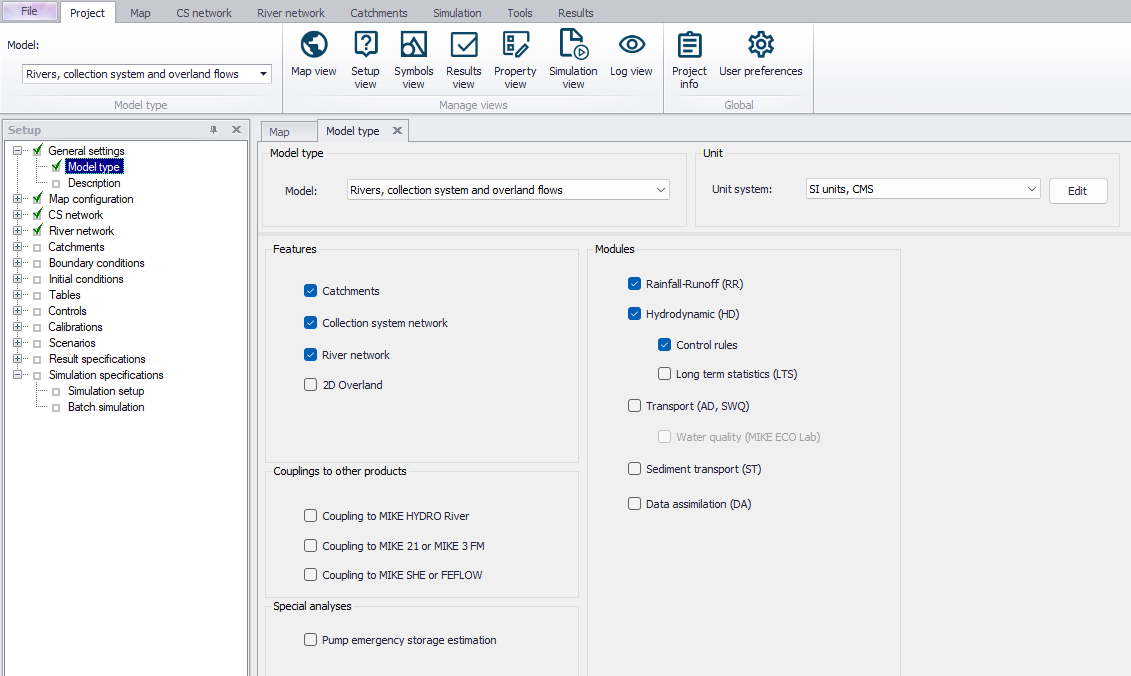
Figure: Model Type editor for ‘Rivers, collection system and overland flows’ models
The following couplings to other MIKE products are also available:
- Coupling to MIKE HYDRO River: When this is active, the desired MIKE HYDRO model setup file must be selected in the 'River model' page. Note that coupling AD module with MIKE HYDRO is allowed and automatically enabled when the 'Transport (AD, SWQ)' module is also included in the simulation setup. AD components' names in MIKE HYDRO must, however, be identical to the components' names in MIKE+.
- Coupling to MIKE 21 or MIKE 3 Flow Model FM: When this is active, the desired MIKE 21 FM or MIKE 3 FM model setup file must be selected in the 2D / 3D overland model' page. Note that this coupling cannot be enabled at the same time as the 2D overland feature, since only one source of overland model can be used at a time.
- Coupling to MIKE SHE or FEFLOW: When this is active, it is possible to define parts of the river network to be coupled to a MIKE SHE or FEFLOW model. The network simulation file (*.m1dx file) must then be exported from MIKE+ for use in MIKE SHE or FEFLOW. This also allows coupling the collection system network to MIKE SHE: in that case, the corresponding coupling file (*.couple) must also be exported from MIKE+ for use in MIKE SHE.
When the different features and modules are activated, the corresponding menus will be added in the Setup view. Note that the features and modules are actually included in a simulation only if they are also included in the simulation definition, from the 'Simulation setup' editor.
The 'Pump emergency storage estimation' option enables a special type of analysis for collection system networks, enabling extra simulation options under the 'Special analyses' group in the Setup tree view. It estimates the time and volume available prior to an overflow at the wastewater pump station assets in the event of system failure.
SWMM5 Collection System and Overland Flows
Under the ‘SWMM5 collection system and overland flows’ working mode, you can choose to have the following features activated:
- Catchment
- Collection system network
- 2D overland
Activation of relevant features allows the following modelling capabilities:
- Catchment: Various hydrological processes that produce runoff from urban areas can be modelled with SWMM.
- Collection System Network: This allows for the hydrodynamic simulation of flows and water levels in the urban storm drainage and wastewater collection networks, thus providing an accurate information about the network functionality under a variety of boundary conditions. The model can be enhanced by the variety of real-time control functions.
- 2D Overland: Allows for the simulation of flows and water levels over 2D overland surfaces, as well as hydrodynamic coupling with a SWMM5 collections system network for integrated flood modelling.
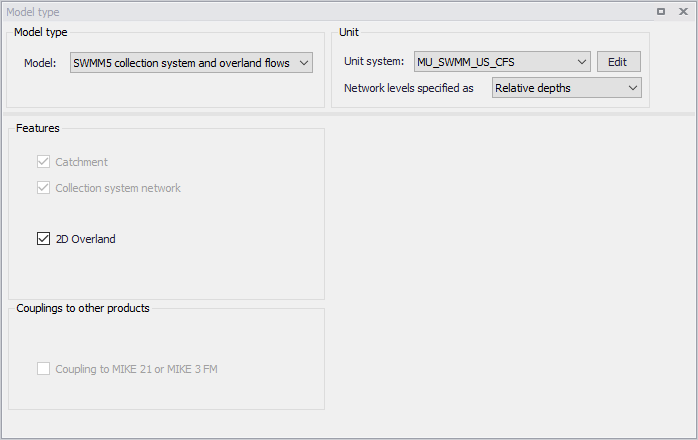
Figure: Model Type editor for ‘SWMM5 collection system and overland flows’ models
The following couplings to other MIKE products are also available:
- Coupling to MIKE 21 or MIKE 3 Flow Model FM: When this is active, the desired MIKE 21 FM or MIKE 3 FM model setup file must be selected in the 2D / 3D overland model' page. Note that this coupling cannot be enabled at the same time as the 2D overland feature since only one source of overland model can be used at a time.
The corresponding menus are added in the Setup view when relevant features are active. Note that features and modules are included in a simulation only if they are also activated in the simulation definition from the 'Simulation Setup' editor.