SWQ Methods
Similarly as hydrological processes and runoff from urban catchments can be simulated by various runoff models, SWQ supports several methods for simulating processes related to stormwater quality. The available methods are:
- Simple concentration
- Table concentration
- Build-up/Wash-off
- Event mean concentration (EMC)
Method 1 (Simple concentration) applies a pollutant concentration directly to the runoff from a catchment. The applied concentration can be specified as constant or based on an arbitrary time series.
Method 2 (Table concentration) applies a tabulated concentration of pollutant specified as a tabulated function, based on the runoff intensity (i.e. specific runoff).
Note
Method 1 and Method 2 do not consider availability of pollutants. In other words, these methods assume unlimited supply of pollutants on the catchment surface. As such, they should be applied with care and only in appropriate cases.
Method 3. (Build-up/Wash-off) simulates the build-up of pollutants or sediments on the catchment surface and wash-off of this pollution by mechanical action of rainfall events. This method is mass-conservative, i.e. the amount of pollutant washed-off from the catchment surface is limited by the build-up process. This method is appropriate for simulating first flush.
Method 4. (EMC) assumes that the concentration of pollutant in runoff is constant throughout rainfall event. The method simulates the build-up of pollutants or sediments on the catchment surface in the same way as Method 3, but the rain-dependent wash-off process is replaced by a calculated event-mean concentration. This method is mass-conservative, i.e. EMC or amount of pollutant washed-off from the catchment surface is limited by the build-up process.
Both Method 3 and Method 4 are appropriate for simulating multiple, consecutive rainfalls, e.g. in connection with LTS. These methods are also referenced as SWQ advanced methods.
SWQ Advanced Methods
SWQ advanced methods include Build-up/Wash-off and Event-mean Concentration (EMC) methods.
In addition to SWQ global data, computations in these methods are driven by user-specified sets of parameters (SWQ local data), which may be associated with each SWQ boundary property separately. This means that different behaviour of each pollutant and each catchment surface type, in terms of pollutant quantities and build-up/wash-off mechanisms, can be simulated.
Parameter set for modelling SWQ using advanced methods are specified through the SWQ Advanced Methods editor.
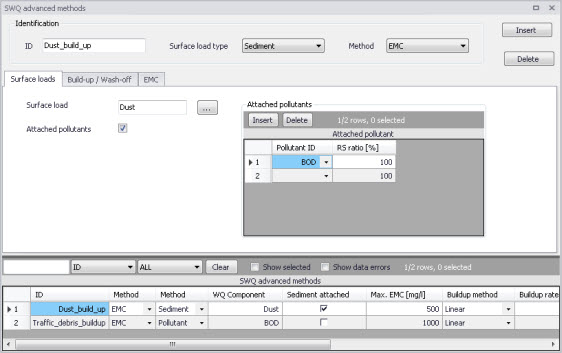
Figure: The SWQ Advanced Methods editor
The different tabs of the editor are described in succeeding sections below.
Identification
The main properties of the SWQ parameter set are defined in the Identification box. Any SWQ parameter set may refer either to a pollutant component or to a sediment fraction (with or without pollutants attached). Also, the set will apply for one of the two SWQ advanced methods only (Build-up/Wash-off or EMC).

Figure: Identification box in the SWQ Advanced Methods editor
An overview of database attributes and their usage is found in the table below.
| Edit Field | Description | Usage | Attribute Table Field |
|---|---|---|---|
| ID | Unique name (identifier) for SWQ local parameter set | Build-up/Wash-off and EMC methods | MUID |
| Surface load type | 1 = Pollutant component 2 = Sediment fraction | Build-up/Wash-off and EMC methods | TypeNo |
| Method | Choice of SWQ computation method 1 = EMC 2 = Build-Up/Wash-Off | Build-up/Wash-off and EMC methods | MethodNo |
Table: SWQ Advanced Methods Identification box attributes (Table msm_SWQPollutant)
Surface Loads
The Surface Loads tab specifies the pollutant component (or sediment fraction) associated with actual SWQ parameter set.
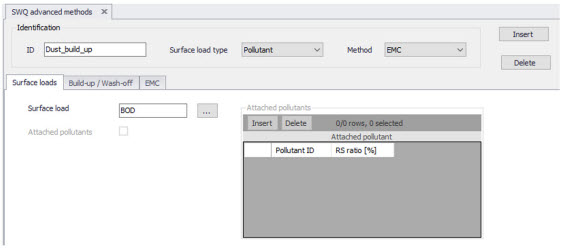
Figure: Surface Loads tab in the SWQ Advanced Methods editor
A description of attributes in the Surface loads tab and their usage is found in the table below.
| Edit Field | Description | Usage | Attribute Table Field |
|---|---|---|---|
| Surface Load | Choice of pollutant component (or sediment fraction) | Build-up/Wash-off and EMC methods | ComponentID |
| Attached pollutants | 0 = No pollutants attached (default) 1 = Pollutants attached to sediments | Build-up/Wash-off and EMC methods, TypeNo = 2 (sediment fraction) | SedimentAttachNo |
Table: SWQ Advanced Methods editor Surface Loads tab attributes (Table msm_SWQPollutant)
If the actual parameter set relates to a sediment fraction, pollutants may (optionally) be attached to the sediments though inputs in the editor's secondary grid (database table msm_SWQAttachedPollutant).
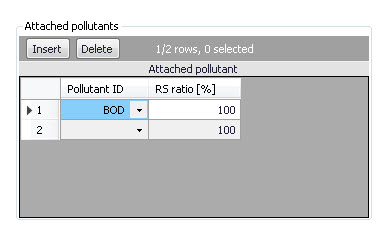
Figure: The Attached Pollutants secondary grid in the Surface Loads tab
The amount of the sediment-attached pollutants is specified as a fraction (percentage) of the sediment mass. The total of the attached pollutants shall not exceed 100%.
When surface load is specified as a pollutant component, the model output is directed into the SWQ pollutants output, which may be used as input into the network advection-dispersion simulation (directly in case of simultaneous catchment and network simulation, or as a WQ boundary property to the runoff load into the network model).
When surface load is specified as a sediment fraction, the model output is directed into the SWQ sediments output, which may be used as input into the network sediment transport simulation (directly in case of simultaneous catchment and network simulation, or as an ST boundary property to the runoff load into the network model).
Attached pollutants (if any) are directed into the SWQ pollutants output, similarly as in case of a pollutant surface load. The mass of pollutants is calculated as a specified fraction of sediment mass.
A description of attributes in the Attached Pollutants secondary grid (table msm_SWQAttachedPollutant) and their usage is found in the table below.
| Edit Field | Description | Usage | Attribute Table Field |
|---|---|---|---|
| PollutantID | Duration of antecedent dry weather period before the start of the simulation [hours] | Build-up/Wash-off and EMC methods, SedimentAttachNo =1 | PollutantID |
| RSRatio | Peak rainfall intensity in a rainfall event, used as a minimum threshold to include the rainfall event in the SQW computation | Build-up/Wash-off and EMC methods, SedimentAttachNo =1 | PSRatio |
Table: Overview of the Attached Pollutants secondary grid attributes (Table msm_SWQAttachedPollutant)
Build-Up/Wash-Off
The Build-up/Wash-off tab provides the local parameters for the Build-up/Wash-off method.
Build-up parameters are:
Method: Linear or Exponential. During dry weather periods pollution or sediments accumulate on the surface of urban catchments. The most common formulations for this process are to assume that the build-up is a linear or an exponential function of time. The choice between the two formulations is not straightforward due to insufficient experimental results.
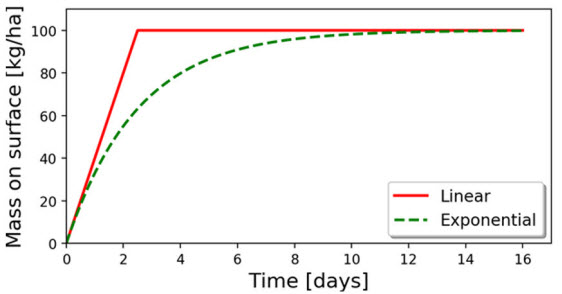
Figure: Illustration of the linear and the exponential build-up function. For details of mathematical formulation, see MIKE 1D Reference Manual.
Rate: Linear build-up rate of the pollutant component (or sediment fraction) on the catchment surface, given as mass per unit area per unit of time.
Max: Maximum possible amount of pollution (or sediment) on the catchment surface. This represents an equilibrium situation, when removal rate is equal to build-up rate.
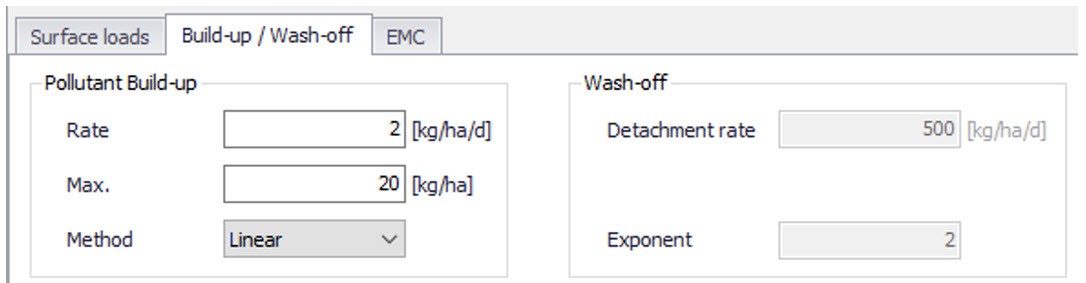
Figure: The Build-Up/Wash-Off tab in the SWQ Advanced Methods editor
Wash-off parameters are related to the applied wash-off formula, which is based on the assumption that the wash-off is exponentially related to the rain intensity.
Detachment rate: Wash-off (detachment) rate at rainfall intensity 25.4 mm/hour (1 inch/hour). This is a calibration factor for the wash-off process: smaller values apply for pollutants firmly attached the catchment surface, higher values apply for loose particles.
Note
The "Detachment rate" operates with sediment mass uniformly spread over entire contributing catchment area. The default value of 10000 kg/ha/day, assuming the sediment density of 2650 \(\text{kg}/\text{m}^{3}\) and zero porosity, is equivalent to the velocity of rain penetration into the sediment layer of 16 mm/h. The recommended values are up to max. 30 mm/h.
Exponent: Default value is 2, which implies that the wash-off is proportional to the kinetic energy of the rain drops.
A description of attributes in the Build-up/Wash-off tab and their usage is found in the table below.
| Edit Field | Description | Usage | Attribute Table Field |
|---|---|---|---|
| Pollutant Build-Up/ Rate | Linear build-up rate of pollutant (sediment) on the catchment surface (ML -2 T -1 ) | Build-up /Wash-off and EMC methods | BuildUpRate |
| Pollutant Build-Up/ Max. | Maximum amount of pollutant (sediment) on the catchment surface per unit area (ML -2 ) | Build-up /Wash-off and EMC methods | MaxBuildUp |
| Pollutant Build-Up/ Method | 1 = Linear 2 = Exponential | Build-up /Wash-off and EMC methods | BuildUpTypeNo |
| Wash-Off/ Detachment Rate | Pollutant (sediment) detachment rate at rainfall intensity 25.4 mm/hour (1 inch/ hour) | Build-up /Wash-off method | DetachRate |
| Wash-Off/ Exponent | Default value is 2. Larger values increase the wash off non-linear dependency on the rainfall intensity. Value 1 implies a linear dependency | Build-up /Wash-off method | WashOffExp |
Table: Overview of the SWQ Advanced Methods Build-up/Wash-off tab attributes (Table msm_SWQPollutant)
EMC
The EMC tab provides a single local parameter for the EMC (Event Mean Concentration) method.
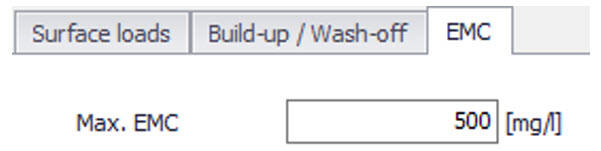
Figure: The EMC tab in the SWQ Advanced Methods editor
Max. EMC: Is the maximum possible concentration of the pollutant component (or sediment fraction) in the runoff leaving the catchment.
The primary role of this parameter is to prevent unrealistic results i.e. very high values of pollutant EMC in case of long ADWP and/or high build-up rates during small rain events. In such cases, Max. EMC will prevent the full removal of pollutants by a small rain.
| Edit Field | Description | Usage | Attribute Table Field |
|---|---|---|---|
| Max. EMC | Maximum event mean concentration; used to prevent unrealistically high concentrations and full wash-off by a minor rainfall | EMC method | MaxEMC |
Table: Overview of the SWQ Advanced Methods EMC tab attributes (Table msm_SWQPollutant)