Set Pumps Critical Levels Tool
Introduction
This tool is used to assign a critical level at pumping stations' wet well nodes ('From node' of the pumps). This value is applied to the 'Critical level' field in the 'Description' tab from the Nodes editor.
The tool uses network tracing to trace backwards from each pumping station to find nodes, weirs and orifices where water can potentially leave the network; and stops when it reaches the user-specified trace distance, or earlier if it meets another pump.
For each pump, the tool will assess the critical level for each node found on the backward-traced path. For each of these nodes, the critical level is the lowest level amongst:
- The nodes' ground level minus the specified freeboard
- The weir crest level minus the freeboard, if any weir is connected to the node and doesn't have any 'To node' (i.e. if the weir discharges out of the modelled network)
- The orifice invert level minus the freeboard, if any orifice is connected to the node and doesn't have any 'To node' (i.e. if the orifice discharges out of the modelled network).
Finally, the actual 'Critical level' assigned to the pump's wet well node is the lowest of all critical levels from all these nodes on the backward-traced path.
The tool is accessed through the MIKE+ ribbon, CS network tab, from the 'Special tools' button.
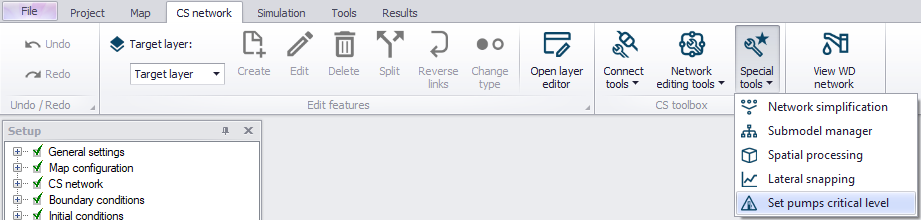
Figure: Accessing the Set pumps critical level tool
The tool works per default with all pumping stations in the model or, if some wet well nodes are selected, only with the pumping stations connected to the selected wet well nodes.
Settings
The 'Critical level identification' group contains option controlling the selection of upstream nodes and the estimation of the critical level. The following controls are available:
- Backward tracing distance: The distance, starting from the pump's wet well node, along which the nodes will be selected during the backward tracing.
- Freeboard: The depth at which the critical level is defined below the ground level, for a node. For a weir or an orifice discharging out of the modelled network, the critical level is defined at the weir crest level or the orifice invert level, minus the freeboard. The freeboard is defined with a positive value.
- Ignore sealed nodes and junction nodes: When a node is a 'Junction'-type of node or when it's sealed, no overflow can occur and no critical level is assessed using this node's ground level, when this option is selected. It is however possible to force including the ground level for these types of nodes in the analysis, by unselecting this option.
- Update existing critical levels: When this option is not selected, any critical level already defined for the pumps wet well nodes will be kept when running the tool. When it is selected, existing critical levels will be replaced by a new value computed by the tool.
The 'Reporting' group contains options to control how many nodes and their critical levels are reported along the backward-tracing distance from each pump. This does not affect the critical level assigned to the pumps' wet well nodes. Per default, all nodes included in the analysis for a pump are reported. By unticking the check box, it is possible to select a maximum number of nodes to report.
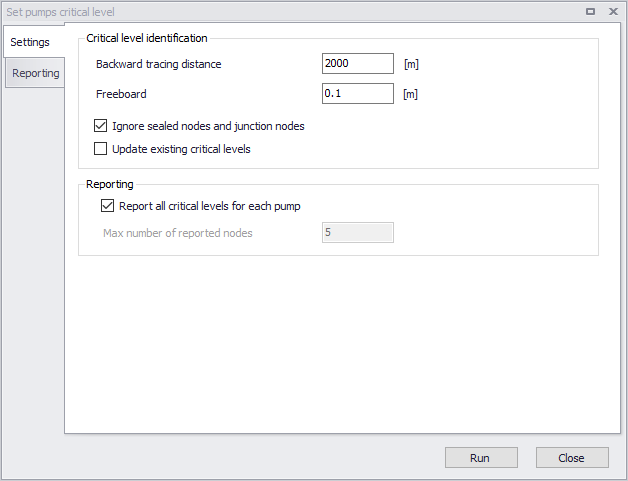
Figure: Configuring the Set pumps critical level tool
Running the tool
To assign critical levels to the pumps' wet well nodes, click on "Run". The 'Reporting' tab shows a formatted "report" describing the settings applied in the analysis, and detailed information for each pump. For each pump, the report gives the critical level for each of the nodes found on the backward-traced path, sorted by increasing 'Critical level' value. If 'Report all critical levels for each pump' was unticked, then only the user-defined number of nodes is reported for each pump.
The 'Source type' indicates, for each node, where the lowest level is found between the ground level and any connected weir or orifice discharging out of the modelled network. The 'Source level' reports the corresponding minimum level in the node, and the 'Critical level' is the source level minus the freeboard.
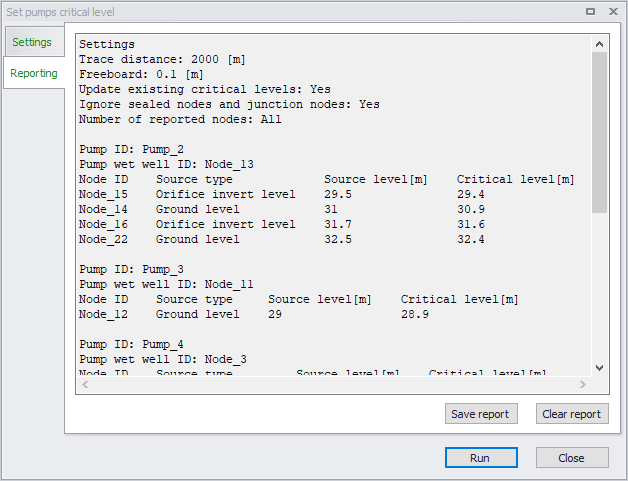
Figure: Report from the Set pumps critical level tool
The 'Save report' button will save the content to a text file, and the 'Clear report' button with clear the text box.