Catchment Slope and Length Tool
As part of the hydrological modelling, the catchment slope and/or length may need to be estimated for some rainfall-runoff models. The tool performs automatic estimation of hydrological parameters for each catchment in a consistent, documented and reproducible way.
Based on delineated catchments, a DEM, and lines for the flow path inside a catchment, the slope and length can be automatically estimated for each catchment using the Catchment Slope and Length tool. Note that the length is not computed for the catchments with 'SWMM hydrology' model.
The tool is initiated from the Catchment Toolbox.
To calculate the slope and length, the typical flow path within the catchment must be digitized (i.e. the slope lines). These can be drawn from the load point or towards the load point but a consistent methodology should be used in a project. A multiple number of slope lines can be defined for each catchment. The slope lines must be a line feature in MIKE+ either from a background layer or an existing (unused) layer in the database.
The slope and length are calculated as an average slope and length of the lines that are completely contained within the catchment.
An example of slope lines are shown in the figure below.
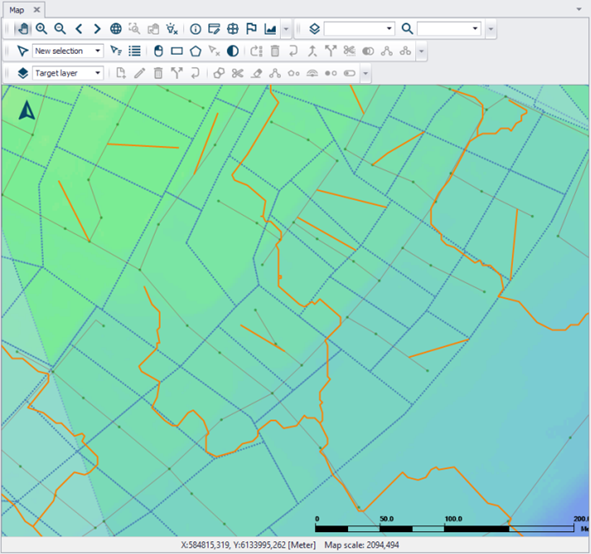
Figure: Example of slope lines (solid yellow lines) following surface flow paths overlaying catchments (broken blue lines) and the DEM (coloured surface), which are used in catchment length and slope derivation.
When the tool is opened, the slope line layer must be specified together with the direction the lines were digitized to obtain the correct sign for the slope. A minimum slope is also specified that will be assigned to all catchments with smaller slopes. The DEM and slope line layer must be added as a background layers in the MIKE+ project to be available in the tool, see Figure 9.33.
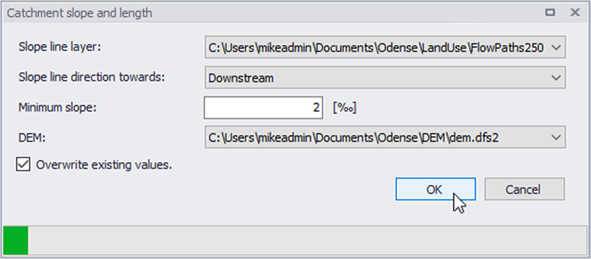
Figure: Catchment Slope and Length Tool
Click the OK button to run the tool.
The tool will calculate the length and/or slope for all selected catchments. If no catchments are selected, the length and slope will be calculated for all catchments containing slope lines. The results are saved under the ‘Kinematic Wave’ tab in the Catchments Editor.
Activate the 'Overwrite Existing Values' option if the computed catchment slopes and lengths shall replace existing values, if any.