LTS Computations
Starting an LTS computation
LTS computations are started from the Simulation Setup editor with the Long-Term Statistics (LTS) module activated in the General tab.
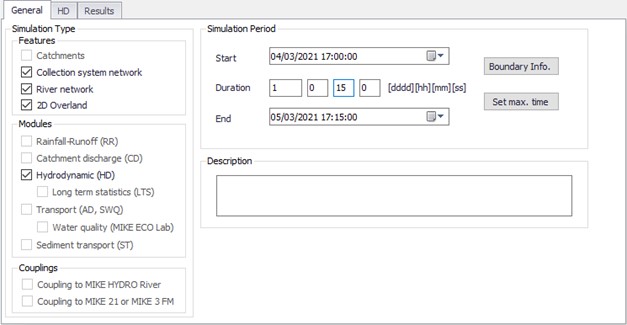
Figure: LTS computation activation in the Simulation Setup dialog General tab
Generating job list files
Activating the LTS module activates the Generate Job List functionality in the LTS tab for generating a Job List file.
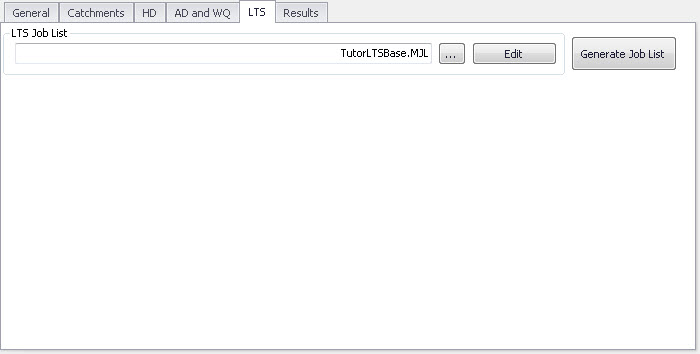
Figure: LTS tab in the Simulation Setup dialog
Automatic recovery of a failed LTS simulation
An LTS simulation includes many - possibly thousands - simulation events. Depending on the size of the model, complexity and the number of the requested statistical outputs, such a simulation may represent a significant computational job. With usually available hardware, a single LTS run may take hours, days or even weeks. This sets the requirements for a stable a safe completion of such simulations very high, to avoid repetitions and delays.
Likeliness for a successful completion of a simulation improves with the application of a conservatively short time steps, at the expense of the overall longer simulation time.
Anyway, it happens occasionally that one of the simulation jobs in the LTS simulation fails. In such a case, LTS will recover automatically by repeating the failed simulation with a reduced time step.
Time step for a repeated simulation is calculated as a fraction of the time step applied in the just failed simulation. This is controlled by the parameter 'Failed job time step reduction factor', found in the 'MIKE 1D engine configuration' dialog, from the 'Simulation' tab in the ribbon.
The system will reduce the time step and repeat the simulation as many times as specified in 'Failed job maximum redo count', also found in the 'MIKE 1D engine configuration' dialog.
Any repetition due to a failed simulation will be reported in the simulation log.
If the repeated simulation was successful, the LTS computation will continue regularly.
If the simulation still fails after the maximum number of redo attempts was tried, this event will be excluded from any specified output and the LTS computation will continue regularly.
Any exclusion of a simulation event due to the simulation failure will be reported in the simulation log.