General Settings
Access the Model type and Description editors for Water Distribution modelling under the General Settings section.
The ‘Model type’ dialogue provides an ‘at a glance’ view of which MIKE+ elements are available, and if they are activated or not. The list of available modules is:
- Water quality
- Fire flow analysis
- Network vulnerability
- Cost analysis
- Shutdown planning
- Flushing analysis
- Water hammer analysis
- Online analysis
- Optimization
- Multi-species analysis
- Autocalibration.
These modules indicate which type of analysis will be modelled within the current project setup. For example, if fire flow analysis is required, hence it needs to be ‘checked’. When the module is checked, it becomes visible on the Setup tree in the left panel and can be applied to the modelled applications.
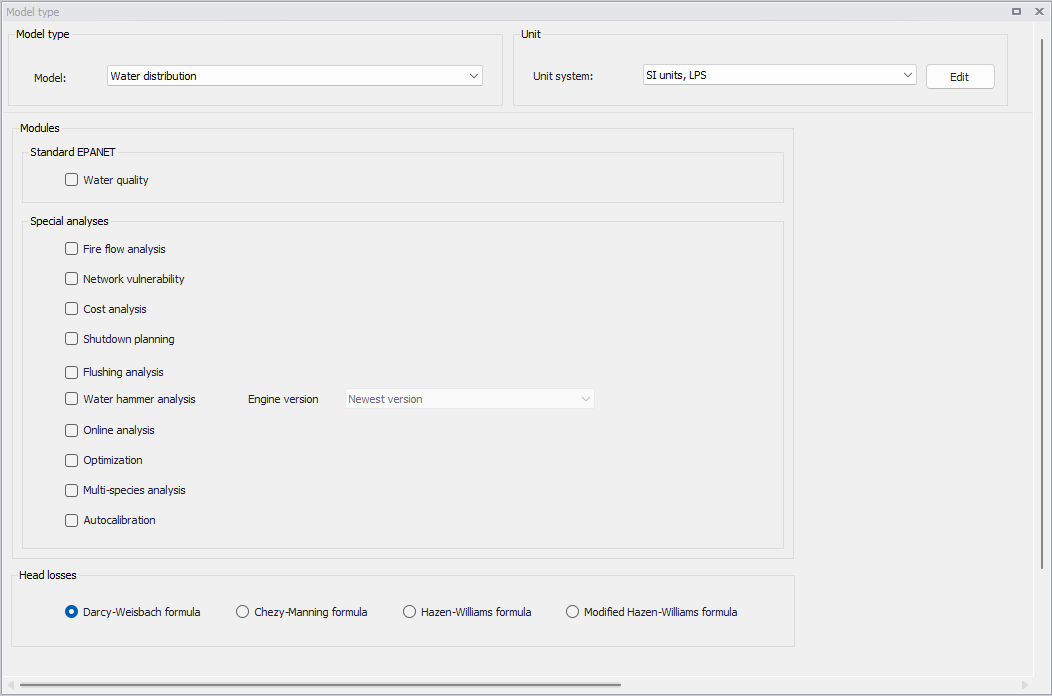
Figure: General settings
Note
Two versions of the simulation engine are available for water hammer analyses. The appropriate version must be selected in the selection list next to the 'Water hammer analysis' check box. The preferred choice should be to use the newest engine version, which offers various improvements. The former version remains available for special cases where e.g. slight differences are observed in the results from the two engines and in case it is important to maintain the same results as in former simulations.
The 'Head losses' selection controls which method is used to calculate the head losses as a function of flow rate in a pipe. It is related to the roughness coefficients in the pipe editor, where each formula has its corresponding roughness coefficient.
It has four choices:
- Darcy-Weisbach formula
- Chezy-Manning formula
- Hazen-Williams formula
- Modified Hazen-Williams formula.
Please refer to the section Selecting an Appropriate Unit Environment in the Model Manager User guide to select units used in the project.
In addition to the ‘Model type’ dialogue, ‘General Settings’ contains a ‘Description’ editor. This editor allows addition of information about the project and a free text description for the model. It may also be used as a model build log to make notes on updates and model amendments.