Catchments
Catchments are essential for any hydrological model. MIKE+ catchments are geographical polygon features which represent hydrological urban catchments or wastewater drainage areas. As such, catchments may be used for hydrological modeling or as wastewater sources.
In the context of hydrological modelling, MIKE+ catchments are treated as hydrological units where storm runoff and infiltration are generated based on a single set of model parameters and input data. Catchments represent the level of spatial discretization of the hydrological model.
Catchments are featured as a single data layer in MIKE+. After the definition of the catchments' connections to a model network, the catchments become a source of loads for a network model.
Catchments can be managed both graphically on the map and through the Catchments Editor. The two modes complement each other, and efficient management of catchment data can be achieved through joint application of both modes.
The graphical mode (i.e. Edit Features functionality) allows digitisation of catchment extent by tools like Create, Edit, Delete, and Split. Descriptions of graphical catchment tools are found in the Model Manager User Guide.
The Catchments editor is used for:
- Editing catchment attributes. It is possible to insert catchments through the Editor; these are given a schematised quadratic shape.
- Editing connections to model networks and hydrological data for Rainfall-Runoff models.
- Editing catchment hydrological model attributes. It is possible to edit catchment attributes in relation to various hydrological runoff models available in MIKE+.
The Catchments Editor can be accessed via Catchments|Catchments.
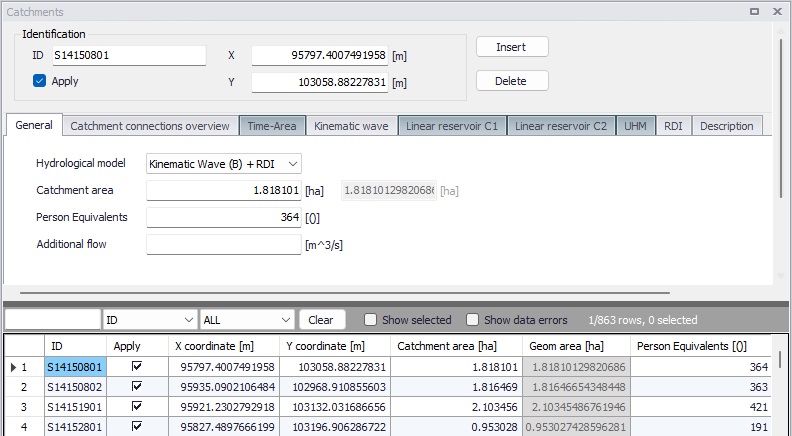
Figure: The Catchments editor
The Catchments Editor has a general Identification Group containing information on catchment identifier and geographic location. The 'Apply' check box allows the user to toggle the Active status of the catchment on and off. The simulations will omit all catchments that are not active.

Figure: The Catchments editor Identification group
| Edit field | Description | Usage | Attribute Table Field |
|---|---|---|---|
| ID | Unique catchment identifier | Yes | MUID |
| X | X coordinate of the catchment geometry centroid | Calculated (read-only) | -Derived- |
| Y | Y coordinate of the catchment geometry centroid | Calculated (read-only) | -Derived- |
| Apply | This check box allows to toggle the Active status of the catchment on and off. The simulations will omit all catchments that are not active. | Yes | Enabled |
Table: Overview of the Catchments editor Identification group attributes (table msm_Catchment)
Other catchment attributes related to hydrological modelling and connections to model networks are organized in tabs within the Catchments Editor and are described in succeeding sections.
General
General catchment attributes related to geometry and Person Equivalents are specified in the ‘General’ tab of the Catchments Editor. Optionally, land use of the catchment's surface can also be specified in this tab.
In MIKE+, the geographical extent of a catchment is determined by the catchment polygon perimeter. MIKE+ provides information on the total catchment area based on polygon geometry.
In some cases, the geographical boundaries of a catchment do not coincide with the actual drainage area. A catchment extent may be defined based on some administrative division, while the drainage network is present only in some parts of the catchment. In such cases, the User may specify the Catchment Area value, which overwrites the actual geometric area in all hydrological computations.
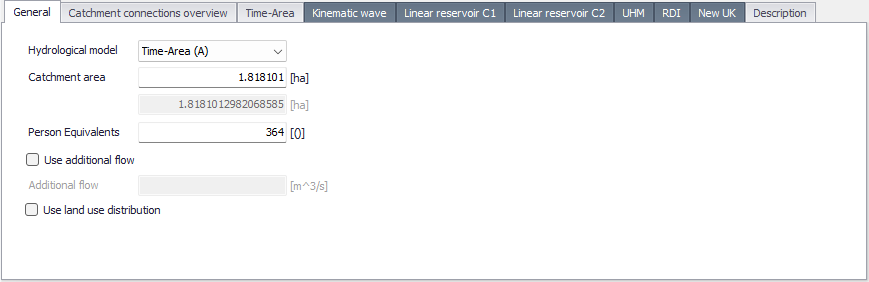
Figure: The General tab of the Catchments editor
A number of person equivalents may also be specified for the catchment, which will be used to compute the wastewater load on the catchment.
An optional additional flow can also be applied. It acts as a constant flow added to the computed catchment runoff during the simulation, if ‘Use additional flow’ is active.
Finally, the definition of land uses over the catchment may be activated from the 'Use land use distribution' option, or when using the 'New UK / Wallingford' hydrological model for which it is mandatory. This option allows defining local parameters within the catchment as a function of e.g. the surface coverage type. When this option is inactive, all parameters for the catchment simulation are defined in the tab corresponding to the selected hydrological model. When this option is active, an extra table must be filled with information about the description of each land use on the catchment. Land use definitions may be of three types:
- For hydrological models Time-Area (A), Kinematic wave (B), Linear Reservoir (C1) or Linear Reservoir (C2), the specification of the land use controls the local loss and infiltration settings, and is defined in the Land uses editor. The computation of the runoff dynamics is instead performed at the catchment level, using the sum of runoffs from all land uses on the catchment, using the selected hydrological model's method.
- For the RDI hydrological model, a land use is specified using a RDI parameter set (see Parameters RDI). Each RDI land use is simulated independently from other land uses: its resulting flow time series are simply summed up with flows from other land uses
- For the 'New UK / Wallingford' hydrological model, the specification of the land use controls the local loss and routing, and is defined in the Land uses editor.
The buttons next to the table are used to add or remove new land use types to the catchment. For each land use type, a contributing area (expressed as a percentage of the catchment area) must be specified. The fields on the right of the table present the land use settings, for information (except for RDI land use type).
For 'New UK / Wallingford' hydrological models, the table of land uses lists the land uses using the 'Fixed coefficient' runoff type, whereas the remainder of the catchment is associated with a land use with 'New UK' runoff type which is specified below the table. For other hydrological model types, the percentage of the catchment area not contributing to the runoff is presented below the table. It represents the remainder of the catchment, not covered by the land uses, and therefore not generating runoff.
The approach based on land use is not available for the UHM hydrological model.
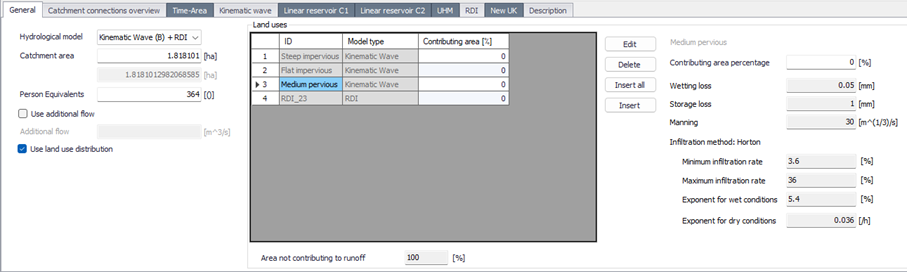
Figure: Definition of the land use on the catchment
| Edit field | Description | Usage | Attribute Table Field |
|---|---|---|---|
| Hydrological Model | Dropdown menu for selecting the hydrological runoff model to use for a catchment | Yes | HydrologicalModelNo |
| Catchment Area | The catchment area of relevance for the project | Optional | Area |
| (Geom. Area) | Program-calculated geometric area of the catchment polygon | Calculated (read-only) | -Derived- |
| Person Equivalents | Unit per capita loading for the catchment | Yes, Used as a method for wastewater load definition | Persons |
| Use additional flow | Option to include or exclude constant additional flow on the catchment | Optional | AddFlowNo |
| Additional Flow | Amount of constant additional flow | Optional | AddFlow |
| Use land use definition | Selection between uniform description of the catchment, or paramaters distributed depending on the land use. | Yes | LossDefinition |
| Land use ID | Reference to a land use ID, as defined in the 'Land uses' editor, or to a RDI parameters ID, depending on the selected type of hydrological model. | Yes, If applying land use definition | LandUseID |
| Land use contributing area | Percentage of the catchment area covered by the corresponding land use. | Yes, If applying land use based loss definition | LandUseContrib |
Table: Overview of the Catchments editor Geometry attributes (table msm_Catchment)
Description
The Catchments editor’s ‘Description’ tab allows the user to provide additional information for a catchment record.
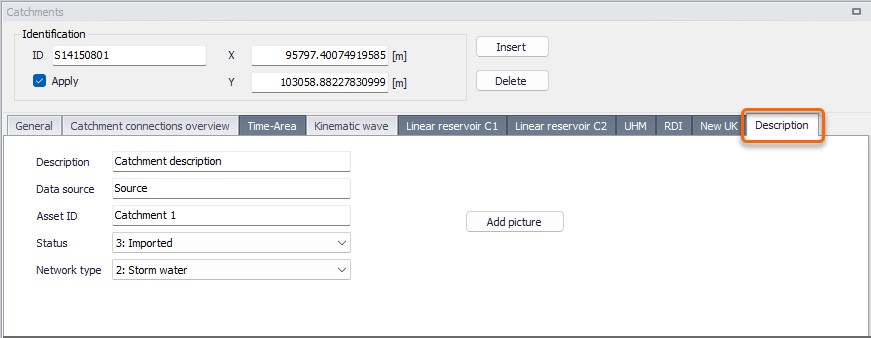
Figure: The Catchments editor Description tab
| Edit field | Description | Usage | Attribute Table Field |
|---|---|---|---|
| Description | Free text description related to the catchment | Optional | Description |
| Data source | Reference to an external data source (e.g. table ID) from where the record was taken | Optional | DataSource |
| Asset ID | Reference to an ID used in external data sources | Optional | AssetName |
| Status | Data status for the record for keeping track of information source | Optional | Element_S |
| Network Type | Attributes the catchment to a certain type of network. Used in cases where different network types are in the same project. | Optional | NetTypeNo |
| Add picture button | Facility for defining an image file for the catchment record. Accepts .PNG, .JPG, and .BMP image files. | Optional | - |
Table: The Catchments editor Description tab attributes (table msm_Catchment)