RDI
Continuous runoff from MIKE+ catchments can be modelled using an RDI computation, a continuous hydrological model Rainfall Dependent Infiltration (RDI). RDI provides detailed, continuous modelling of the complete land phase of the hydrologic cycle, providing support for urban, rural, and mixed catchments analyses. Precipitation is routed through four different types of storage: snow, surface, unsaturated zone (root-zone) and groundwater. This enables continuous modelling of the runoff processes, which is particularly useful when long-term hydraulic and pollution load effects are analyzed.
Instead of only performing hydrological load analysis of the sewer system for short periods of high intensity rainstorms, a continuous, long-term analysis is applied to look at periods of both wet and dry weather, as well as inflows and infiltration to the sewer network. This provides a more accurate picture of actual loads on treatment plants and combined sewer overflows.
When studying the real flow conditions in sewer systems, flow peaks during rain events are often found to exceed the values that can be attributed to the contribution from participating impervious areas. This is a consequence of the phenomenon, usually named Rainfall Induced Infiltration. This differs from the Rainfall Induced Inflow by the fact that it does not only depend on the actual precipitation, but is heavily affected by the actual hydrological situation, i.e. the memory from earlier hydrological events. For a certain rainfall event, the increase in flow will therefore differ, depending on hydrological events during the previous period. The Rainfall Induced Infiltration is also distinguished by a slow flow response, which takes place during several days after the rainfall event.
From a hydrological point of view, parts of the infiltration behave in the same way as the inflow. Therefore, classification of total hydrological loads to infiltration and inflow is not suitable for modelling approach. Rather, to describe appropriately the constitutive components of flow hydrographs distinguished by their hydrological behaviour, the following concept is used instead:
- FRC - Fast Response Component: comprises the rain induced inflow and fast infiltration component;
- SRC - Slow Response Component: comprises slow infiltration component.
Distinctive for the FRC component is that it is not influenced by the previous hydrological situation, i.e. high or low soil moisture content. It occurs as a direct consequence of a rainfall. The FRC component consists of the inflow to the sewer system and the fast flow component of the infiltration, not dependent on previous hydrological conditions.
On the other hand, characteristic of the SRC component is that it is highly dependent on previous hydrological conditions and usually responds slowly to a rainfall. The SRC component consists of the rest of the precipitation-induced infiltration and dry weather infiltration/inflow.
When combined with any of the surface runoff models, RDI provides a platform for accurate and reliable computation of runoff free from the limitations inherent to standard urban runoff modelling.
The figure below shows an example illustrating the influence of previous hydrological conditions for the two components and their response to a rainfall.
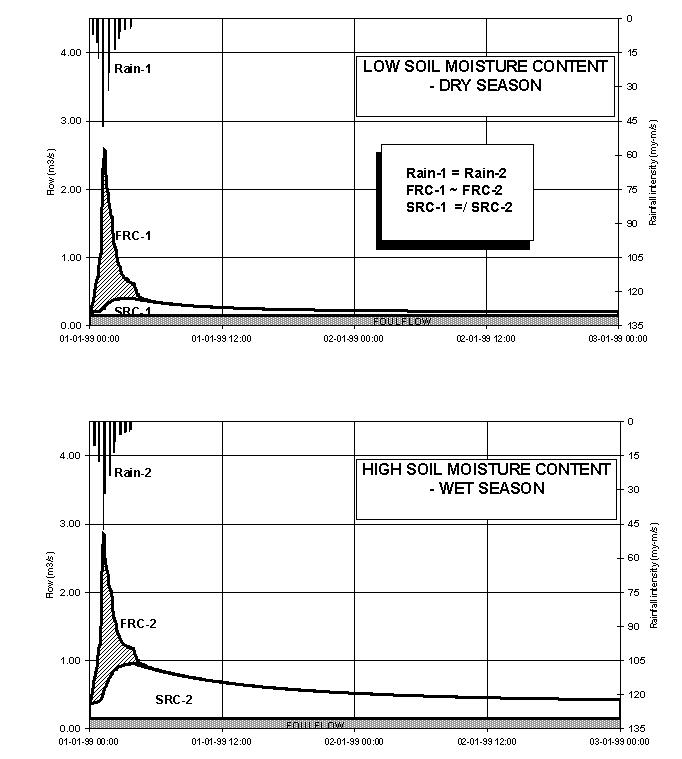
Figure: Different catchment response under the same rainfall due to different soil moisture conditions at the beginning of the rainfall
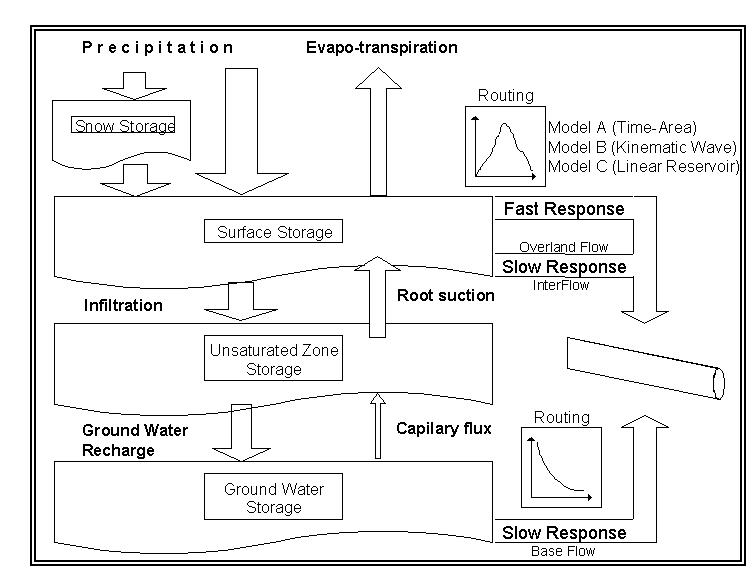
Figure: Schematics of the RDI Model
Model Data
The model data for additional catchment flow and RDI are in the database table msm_Catchment.
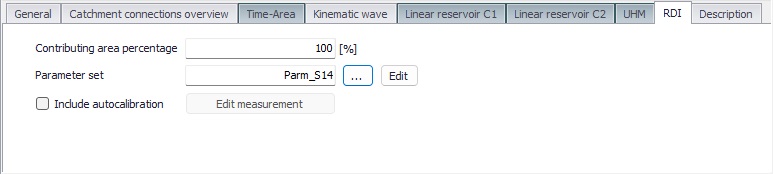
Figure: The RDI tab in the Catchments editor
The contributing area percentage is the fraction of the catchment area to which the RDI model is applied. The parameter set is selected from the list of sets, defined in the 'Parameters RDI' editor.
When 'Include autocalibration' is selected, the simulation will initially run iterations to calibrate the RDI parameters in the selected parameter set against a discharge measurement time series, in .dfs0 file format. This discharge measurement time series must be specified in a measurement station connected to the same catchment (in 'Calibrations | Measurement stations').
A full overview of the editor fields and corresponding database attributes is provided in the table below.
| Edit field | Description | Used or required by simulations | Field name in datastructure |
|---|---|---|---|
| Contributing area percentage | Fraction of catchment area to which the RDI model is applied | Yes, if RDI activated | RdiiArea |
| Parameter Set | Reference to a set of RDI model parameters to be used for the current catchment | Yes, if RDI activated | ParRDiiID |
| Include autocalibration | Enables automatic calibration of the RDI parameters against measurement time series | Optional | IncludeAutoCalNo |
Table: Overview of the RDI attributes (Table msm_Catchment)
Parameters RDI
The RDI Model uses a large number of parameters. For practical reasons, these parameters have been grouped in parameter sets, which can be associated with certain catchments. This means the entire model setup can be established with a very small amount of information.
New parameter sets can be inserted and values of individual parameters can be edited in the Parameters RDI Editor. This can be activated via Catchments|Parameters RDI.
MIKE+ comes with a Default RDI parameter set (-DEFAULT-). The User can insert any number of parameter sets and edit them as needed.
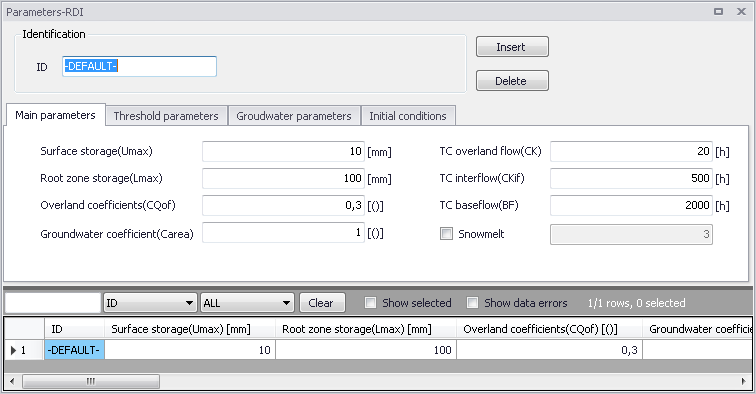
Figure: The Main Parameters tab
The RDI parameters are grouped into Tabs in the editor by:
- Main parameters
- Threshold parameters
- Groundwater parameters
- Snow melt
- Elevation zones
- Irrigation
- Initial conditions
- AutoCalibration
- Seasonal variation
A full overview of the editor fields and corresponding database attributes is provided in the talbles below.
| Edit field | Description | Used or required by simulations | Field name in datastructure |
|---|---|---|---|
| ID | Parameter set identifier | Yes | MUID |
| Max. content in surface storage (Umax) | Capacity of surface storage. It represents the cumulative total water content of the interception storage (on vegetation), surface depression storage and storage in the uppermost layers (a few cm) of the soil. Typical values are between 10-20 mm. | Yes | Umax |
| Max. content in root zone storage (Lmax) | Capacity of root zone (lower) storage. It represents the maximum soil moisture content in the root zone, which is available for transpiration by vegetation. Typical values are between 50-300 mm. | Yes | Lmax |
| Overland runoff coefficient (CQOF) | Fraction of runoff going to overland flow. It determines the division of excess rainfall between overland flow and infiltration. | Yes | Cqof |
| Groundwater(catchment area ratio (Carea) | This parameter describes the ratio of the groundwater catchment area to the topographical surface water catchment area. Local geological condition may cause part of the infiltrating water to drain to another catchment. This loss of water is described by a Carea less than one. Usual value: 1.0. | Yes | GwCarea |
| TC for routing overland flow (CK1,2) | Time constant for overland runoff component. It determines the shape of hydrograph peaks. The routing takes place through two linear reservoirs (serially connected) with different time constants, expressed in [hours]. High, sharp peaks are simulated with small time constants, whereas low peaks, at a later time, are simulated with large values of these parameters. Values in the range of 3-48 hours are common. | Yes | Ck |
| TC2 for routing overland flow (CK2) | Enables specification of a second time constant for the second linear reservoir. | Optional | Ck2TypeNo |
| CK2 value | The time constant for the second linear reservoir, when 'TC2 overland flow (CK2)' is selected | Yes, if 'TC2 overland flow (CK2)' is selected | Ck2 |
| TC for interflow (CKIF) | Time constant for interflow runoff component. It determines the amount of interflow, which decreases with larger time constants. Values in the range of 500-1000 hours are common. | Yes | Ckif |
| TC for baseflow (CKBF) | Time constant for baseflow runoff component. It can be determined from the hydrograph recession in dry periods. In rare cases, the shape of the measured recession changes to a slower recession after some time. To simulate this, a second groundwater reservoir may be included, in the 'Groundwater parameters' tab. | Yes | Ckbf |
Table: Overview of Parameters RDI Main Parameters tab attributes (Table ‘msm_HParRDII’)
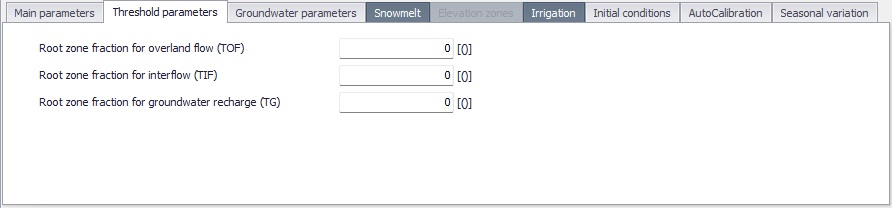
Figure: The Threshold Parameters tab
| Edit field | Description | Used or required by simulations | Field name in datastructure |
|---|---|---|---|
| Root zone fraction for overland flow (TOF) | Fraction of root zone capacity above which overland flow starts. The main impact of TOF is seen at the beginning of a wet season, where an increase of the parameter value will delay the start of runoff as overland flow. Threshold value range between 0 and 70% of Lmax, and the maximum value allowed is 0.99. | Yes | Tof |
| Root zone fraction for interflow (TIF) | Fraction of root zone capacity above which interflow starts. | Yes | Tif |
| Root zone fraction for groundwater recharge (TG) | Fraction of root zone capacity above which ground water recharge starts. The main impact of increasing TG is less recharge to the groundwater storage. Threshold values range between 0 and 70% of Lmax and the maximum value allowed is 0.99. | Yes | Tg |
Table: Overview of Parameters RDI Threshold Parameters Tab attributes (Table ‘msm_HParRDII’)
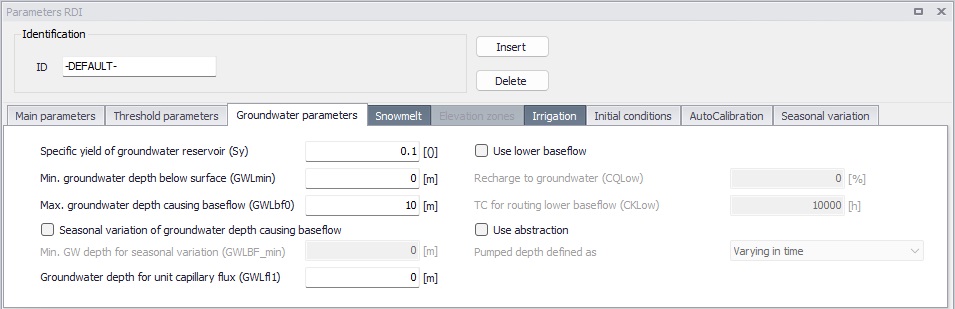
Figure: The Groundwater Parameters tab
| Edit field | Description | Used or required by simulations | Field name in datastructure |
|---|---|---|---|
| Specific yield of groundwater reservoir (Sy) | Specific yield of the groundwater reservoir (porosity). This parameter should be kept at the default value except for the special cases in which the groundwater level is used for calibration. This may be required in riparian areas, for example, where the outflow of groundwater strongly influences the seasonal variation of the levels in the surrounding rivers. Simulation of groundwater level variation requires values of the specific yield Sy and of the groundwater outflow level GWLbf0, which may vary in time. The value of Sy depends on the soil type and may often be assessed from hydro-geological data, e.g. test pumping. Typically values of 0.01-0.10 for clay and 0.10-0.30 for sand are used. | Yes | GwSy |
| Min. groundwater depth below surface (GWLmin) | Top of the groundwater storage (depth from surface) | Yes | GwLmin |
| Max. groundwater depth causing baseflow (GWLbf0) | Bottom of the groundwater storage (depth from surface)). This parameter should be kept at the default value except for the special cases in which the groundwater level is used for calibration, cf. Sy above. | Yes | GWLbf0 |
| Seasonal variation of groundwater depth causing baseflow | In low-lying catchments the annual variation of the maximum groundwater depth may be of importance. This variation relative to the difference between the maximum and minimum groundwater depth can be entered if the option is ticked. The monthly values are given relative to the difference between GWLbf0 and GWLBF_min [0-1]. This is done in the 'Seasonal variation' tab, in the column 'Variation of groundwater maximum water depth'. | Optional | GWSeasonTypeNo |
| Min. GW depth for seasonal variation (GWLBF_min) | If the Seasonal variation of groundwater depth causing baseflow is selected, the minimum groundwater depth [m] has also to be entered for the calculations. | Optional | GWLBFMin |
| Groundwater depth for unit capillary flux (GWLfl1) | Groundwater depth causing an upward capillary flux of 1 mm/day when the upper soil layers are dry corresponding to wilting point. The effect of capillary flux is negligible for most applications. Keep the default value of 0.0 to disregard capillary flux. | Yes | Gwlfl1 |
| Use lower baseflow | Activates the use of a second linear reservoir, which can have a larger time constant to better represent the groundwater recession. | Optional | LowerBFTypeNo |
| Recharge to groundwater (CQLow) | The recharge to the lower (second) groundwater reservoir is specified here as a percentage of the total recharge. | Yes, if 'Use lower baseflow' is selected | CQLow |
| TC for routing lower baseflow (CKLow) | A baseflow time constant, which is usually larger than the CKBF. | Yes, if 'Use lower baseflow' is selected | CKLow |
| Use abstraction | If this option is selected, it is possible to specify the groundwater abstraction depth from the catchment. | Optional | AbstractionTypeNo |
| Pumped depth defined as | When abstraction is used, the pumped depth can be defined either as 'Varying in time' (in which case the time series is provided as a catchment boundary condition), or using 'Seasonal variation' (in which case monthly values of abstraction depth are defined in the 'Seasonal variation' tab). | Optional | AbstractionSourceTypeNo |
Table: Overview of Parameters RDI Groundwater Parameters tab attributes (Table ‘msm_HParRDII’)
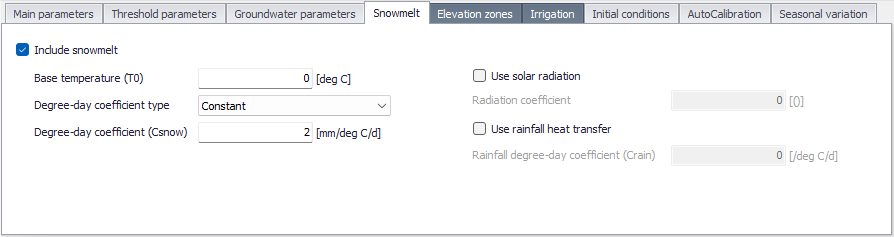
Figure: The ‘Snowmelt’ tab
The snow module simulates the accumulation and melting of snow in a RDI catchment. It is included in the model when the 'Include snowmelt' checkbox is ticked.
The snow melt module uses a temperature input time series, usually mean daily temperature. This has to be specified as a boundary condition for the catchments.
| Edit field | Description | Used or required by simulations | Field name in datastructure |
|---|---|---|---|
| Include snowmelt | Switch for activation of the snow storage / snowmelt processes | Yes | SnowmeltNo |
| Base temperature (T0) | The precipitation is retained in the snow storage only if the temperature is below the base temperature, whereas it is by-passed to the surface storage (U) in situations with higher temperatures. The base temperature is usually at or near zero degree C. | Optional | T0 |
| Degree-day coefficient type | The content of the snow storage melts at a rate defined by the degree-day coefficient multiplied by the temperature difference above the 'Base temperature'. This degree-day coefficient can either be constant during the simulation, or varying in time (in which case a time series of degree-day coefficient has to be provided as boundary condition to the catchment), or using seasonal variation (in which case the monthly values of the coefficient have to be specified in the 'Seasonal variation' tab). | Optional | SnowmeltCTypeNo |
| Degree-day coefficient (Csnow) | The constant value of the degree-day coefficient. Typical values for Csnow are 2-4 mm/day/C. | Optional | SnowmeltC |
| Use solar radiation | This option may be enabled when time series data for incoming radiation are available. The radiation time series must be specified as a boundary condition to the catchment. The total snow melt is calculated as a contribution from the traditional snow melt approach based on Csnow (representing the convective term) plus a term based on the radiation. | Optional | RadiationTypeNo |
| Radiation coefficient | The radiation coefficient value, when the effect of solar radiation is included. | Optional | RadiationCoef |
| Use rainfall heat transfer | This option may be enabled when the melting effect from the advective heat transferred to the snow pack by rainfall is significant. | Optional | RainfallCoefTypeNo |
| Rainfall degree-day coefficient (Crain) | This heat transfer from the rainfall is represented in the snow module as a linear function of the precipitation multiplied by the rainfall degree-day coefficient and the temperature deviation above the base temperature. | Optional | RainfallCoef |
Table: Overview of the 'Snowmelt' tab attributes (Table 'msm_HParRDII')
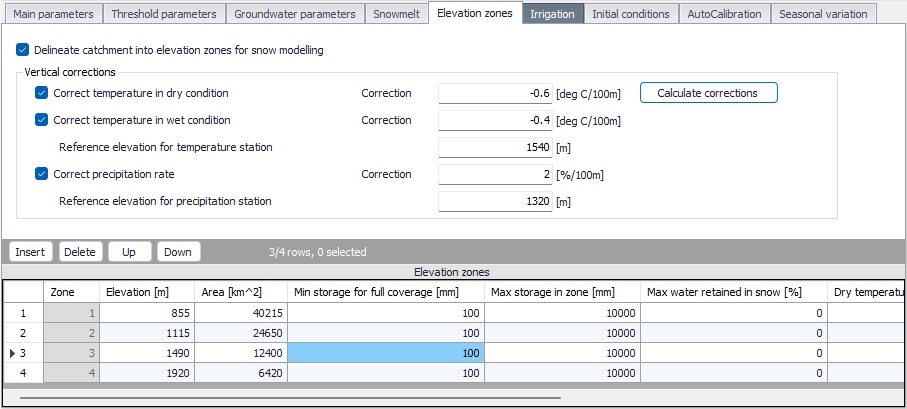
Figure: The ‘Elevation zones’ tab
The 'Elevation zones' tab becomes available when snowmelt is included in the model. When the 'Delineate catchment into elevation zones for snow modelling' option is selected, the snowmelt distributed approach is applied. Following this approach, the catchment is divided into a certain number of elevation zones, each with specific snow melt parameters, temperature and precipitation inputs.
Global parameters used with elevation zones are described in the table below.
| Edit field | Description | Used or required by simulations | Field name in datastructure |
|---|---|---|---|
| Delineate catchment into elevation zones for snow modelling | Switch to enable or disable the distributed approach for snowmelt modelling | Yes | ElevZonesNo |
| Correct temperature in dry condition | When this option is ticked, the temperature correction will be recomputed in the table of zones when pressing the 'Calculate corrections' button. The correction value specifies the vertical gradient [C/100 m] for adjustment of temperature under dry conditions. The temperature in the actual elevation zone is calculated based on a linear transformation of the temperature from the reference station to the actual zone, the correction being defined as the dry temperature lapse rate multiplied by the difference in elevations between the reference station and the zone. | Optional | CorrectDryTempNo and CorrectDryTempCorrection |
| Correct temperature in wet condition | When this option is ticked, the temperature correction will be recomputed in the table of zones when pressing the 'Calculate corrections' button. The correction value specifies the vertical gradient [C/100 m] for adjustment of temperature under wet conditions, defined as days with precipitation higher than 10 [mm]. The temperature in the actual elevation zone is calculated based on a linear transformation of the temperature from the reference station to the actual zone, the correction being defined as the wet temperature lapse rate multiplied by the difference in elevations between the reference station and the actual zone. | Optional | CorrectWetTempNo and CorrectWetTempCorrection |
| Reference elevation for temperature station | This parameter defines the elevation of the reference temperature station. This station is used as a reference for calculating the temperature correction within each elevation zone. | Optional | TempStationElev |
| Correct precipitation rate | When this option is ticked, the precipitation correction will be recomputed in the table of zones when pressing the 'Calculate corrections' button. The correction value specifies the vertical gradient for adjustment of precipitation and is expressed in [percent/100 m]. The precipitation in the actual elevation zone is calculated based on a linear transformation of the precipitation from the reference station to the actual zone, the correction being defined as correction of precipitation rate [percent/100 m] multiplied by the difference in elevation between the reference station and the actual zone. | Optional | CorrectPrecNo and CorrectPrecCorrection |
| Reference elevation for precipitation station | This parameter defines the elevation of the reference precipitation station. This station is used as a reference for calculating the precipitation correction within each elevation zone. | Optional | PrecStationElev |
Table: Overview of the global attributes in the 'Elevation zones' tab (Table 'msm_HParRDII')
Elevation zones are defined in the secondary table at the bottom of the tab. The number of zones is defined by the number of records in this table. Parameters used for each elevation zone are described in the table below.
| Edit field | Description | Used or required by simulations | Field name in datastructure |
|---|---|---|---|
| Elevation | The elevation of each zone is specified in the table as the average elevation of the zone. The elevation must increase from zone (i) to zone (i+1). | Yes | Elevation |
| Area | The area of the zone. The total area of the elevation zones must equal the area of the catchment. | Yes | Area |
| Min storage for full coverage | This parameter defines the required amount of snow to ensure that the zone area is fully covered with snow. When the water equivalent of the snow pack falls under this value, the area coverage (and the snow melt) will be reduced linearly with the snow storage in the zone. | Yes | MinStorage |
| Max storage in zone | This value defines the upper limit for snow storage in a zone. Snow above this value will be automatically redistributed to the neighbouring lower zone. | Yes | MaxStorage |
| Max water retained in snow | It defines the maximum water content in the snow pack of the zone. Generated snow melt is retained in the snow storage as liquid water until the total amount of liquid water exceeds this water retention capacity. When the air temperature is below the base temperature T0, the liquid water of the snow re-freezes with rate Csnow. | Yes | MaxWaterRetain |
| Dry temperature correction | The temperature correction for dry conditions to estimate actual temperature for the specific zone. | Yes | DryTempCorrection |
| Wet temperature correction | The temperature correction for wet conditions to estimate actual temperature for the specific zone. | Yes | WetTempCorrection |
| Precipitation correction | The relative correction for precipitation, expressed in percent, to estimate the precipitation for the specific zone. | Yes | PrecipTempCorrection |
Table: Overview of the zones’ attributes in the 'Elevation zones' tab (Table 'msm_HParRDII')
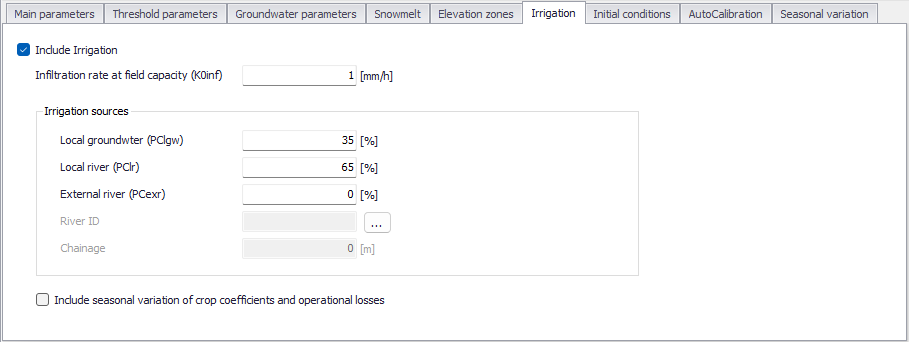
Figure: The ‘Irrigation’ tab
An irrigation module is included in the rainfall-runoff model when the 'Include irrigation' box is ticked. The irrigation module is used for adjusting the water balance in the RDI model. The purpose of the irrigation module is that of simulating the runoff and groundwater recharge/baseflow from the irrigated areas, so that RDI can be calibrated for the non-irrigated part of the catchment.
Minor irrigation schemes within a catchment will normally have negligible influence on the catchment hydrology, unless transfer of water over catchment boundaries is involved. Large schemes, however, may significantly affect the runoff and the groundwater recharge through local increases in evapotranspiration and infiltration as well as through operational and field losses.
The irrigation module of RDI may be applied to describe the effect of irrigation on the following aspects:
- The overall water balance of the catchment. This will be affected mainly by the increased evapotranspiration and by possible external water sources for irrigation.
- Local infiltration and groundwater recharge in irrigated areas.
- The distribution of catchment runoff amongst different runoff components (overland flow, interflow, baseflow). This may be influenced by the increased infiltration in irrigated areas as well as by local abstraction of irrigation water from groundwater or streams.
| Edit field | Description | Used or required by simulations | Field name in datastructure |
|---|---|---|---|
| Include irrigation | A switch to enable or disable the irrigation module. | Yes | IncludeIrrigationNo |
| Infiltration rate at field capacity (K0inf) | This parameter defines the rate of infiltration at field capacity | Optional | K0inf |
| Local groundwater (PClgw) | Percentage of water for irrigation supplied by groundwater sources. | Optional | PClgw |
| Local river (PClr) | Percentage of water used for irrigation supplied by a local river. | Optional | PClr |
| External river (PCexr) | Percentage of water for irrigation supplied by a river external from the catchment. | Optional | PCexr |
| River ID | When part of the irrigation source comes from an external river (PCexr > 0), the River ID field is used to specify the location on the river network where the water is taken from. | Optional | RiverID |
| Chainage | When part of the irrigation source comes from an external river, the Chainage field is used to specify the location on the river where the water is taken from. | Optional | Chainage |
| Include seasonal variation of crop coefficients and operational losses | If this checkbox is ticked, 'Irrigation crop coefficient' and 'Irrigation operational and conveyance losses' can be specified as monthly values in the 'Seasonal variation' tab. The 'Irrigation crop coefficient', also defined as Kc, allows to quantify the amount of water required and transpired by the crop. Different crops have different crop coefficient. Kc is multiplied by the reference ET of a standard crop (grass) to calculate the water demand of the crop of interest. 'Irrigation operational and conveyance losses' represent the system losses of irrigation water for the different components / processes (Groundwater, Overland flow, Evaporation). | Optional | IncludeSeasonalVarNo |
Table: Overview of the 'Irrigation' tab attributes (Table 'msm_HParRDII')
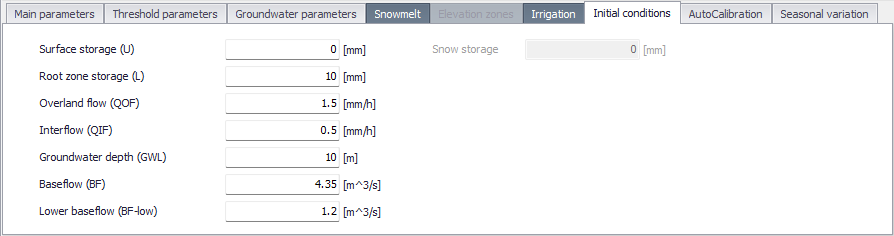
Figure: The ‘Initial Conditions’ tab
| Edit field | Description | Used or required by simulations | Field name in datastructure |
|---|---|---|---|
| Surface Storage (U) | Water depth in the surface storage at the simulation start | Yes | InitU |
| Root zone storage (L) | Moisture contents in the root zone at the simulation start | Yes | InitL |
| Overland flow (QOF) | Overland flow intensity at the simulation start | Yes | InitOf |
| Interflow (QIF) | Interflow intensity at the simulation start | Yes | InitIf |
| Groundwater depth (GWL) | Groundwater depth at the simulation start | Yes | InitGwl |
| Baseflow (BF) | The baseflow at the beginning of the simulation, which is normally estimated from the hydrograph. | Yes | InitBF |
| Lower baseflow (BF-low) | The lower baseflow at the beginning of the simulation, which is normally estimated from the hydrograph. | Yes | InitBFLow |
| Snow storage | If elevation zones are not used for snow melt modelling, a unique snow storage value describes the initial amount of snow over the entire catchment. If elevation zones are used, a snow storage value is specified in the table for each zone. | Optional | SnowStorage |
| Water in snow | If elevation zones are used, a value representing the water content in the snow pack is specified in the table for each zone. | Optional | WaterInSnow |
Table: Overview of Parameters RDI Initial Conditions tab attributes (Table 'msm_HParRDII')
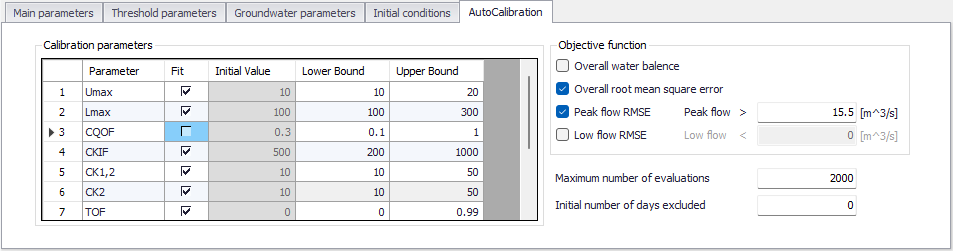
Figure: The AutoCalibration tab
It is possible to use an automatic optimisation procedure to calibrate the 12 most important parameters in the RDI model. The calibration routine used in RDI is based on a multi-objective optimisation strategy, the SCE algorithm. The procedure implemented in RDI allows to simultaneously optimise four different calibration objectives or a combination of them. This automatic calibration is activated or deactivated from the 'RDI' tab in the Catchments editor.
In automatic calibration, the calibration objectives have to be formulated as numerical goodness-of-fit measures that are optimised. Four calibration objectives are defined as numerical performance measures in the autocalibration routine. These are selected and used by ticking the available check boxes:
- Overall water balance: this defines the agreement between the average simulated and observed catchment runoff overall volume error.
- Overall root mean squared error: this measure defines the overall agreement of the shape of the simulated hydrograph with the observed one.
- Peak flow RMSE: this optimisation measure defines the agreement of simulated and observed peak flows events. If this measure is selected, the minimum river discharge value above which the flow is defined as peak flow has to be specified in the Peak flow field.
- Low flow RMSE: this optimisation measure defines the agreement of simulated and observed low flows events. If this measure is selected, the maximum river discharge value below which the flow is defined as low flow has to be specified in the Low flow field.
| Edit field | Description | Used or required by simulations | Field name in datastructure |
|---|---|---|---|
| Fit | If the 'Fit' checkbox is ticked, the parameter is included in the autocalibration | Yes | FitNo |
| Initial value | It is the initial value for the parameter. It always corresponds to the value specified in the corresponding tab. | Yes | Read-only |
| Lower bound | Minimum value that the parameter can get | Yes | LowerBound |
| Upper bound | Maximum value that the parameter can get | Yes | UpperBound |
| Objective function | Selection of objective function for the calibration target. | Yes | ObjFuncWaterBalanceNo ObjFuncRmsErrorNo ObjFuncPeakflowNo ObjFuncLowflowNo |
| Maximum number of evaluations | The automatic calibration will stop either when the optimisation algorithm ceases to give an improvement in the calibration objective or when the maximum number of model evaluations is reached. Yes | Yes | ObjFuncMaxEvaluation |
| Initial number of days excluded | A warm up period that will be disregarded when calculating the objecting function. | ObjFuncInitDaysExcluded |
Table: Overview of Parameters RDI, AutoCalibration tab, attributes (Table 'msm_HParRDII')
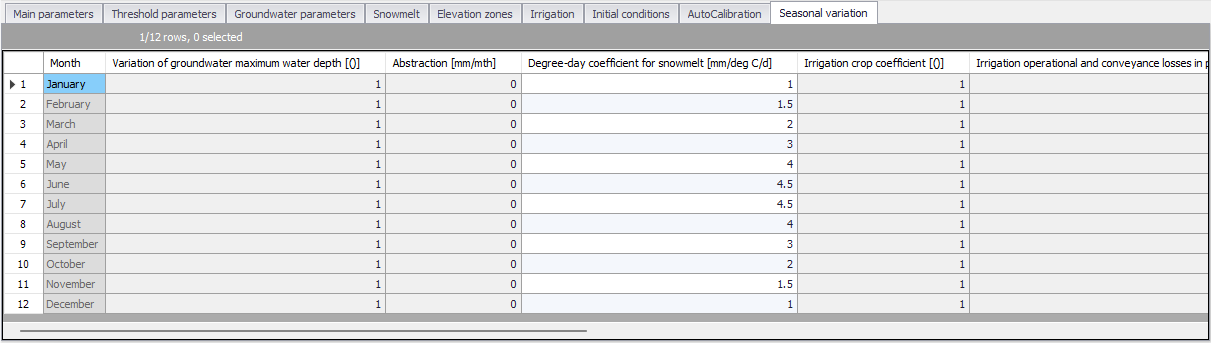
Figure: The ‘Seasonal variation’ tab
In this tab, it is possible to enter the monthly values of some selected parameters. Whether a parameter uses a constant or a seasonal varying value is determined in the different tabs of the RDI parameters editor.
It is possible to specify a seasonal variation for the following parameters:
- Variation of groundwater maximum water depth: used for the seasonal variation of groundwater depth causing baseflow, when this option is active in the 'Groundwater parameters' tab.
- Abstraction: used for the seasonal variation of groundwater abstraction depth, when 'Use abstraction' is active in the 'Groundwater parameters' tab.
- Degree day coefficient for snow melt: used for the seasonal variation of the melting coefficient, when the 'Degree-day coefficient type' is defined with seasonal variation in the 'Snowmelt' tab.
- Irrigation crop coefficient: used for the seasonal variation of the parameter quantifying the amount of water required (and transpired) by the crop, when 'Include seasonal variation of crop coefficients and operational losses' is ticked in the 'Irrigation' tab.
- Irrigation operational and conveyance losses in percent of abstracted water: used for the seasonal variation of the system losses of irrigation water for the different components/processes (Groundwater, Overland flow and Evaporation), when 'Include seasonal variation of crop coefficients and operational losses' is ticked in the 'Irrigation' tab.