Settings
A list of the Settings attributes follows with a short description given for each one. This editor has a free-form i.e. it allows you to enter any number of entries, each consisting of a keyword and a section. The complete list and description of these entries is provided in the WD Online User's Guide. This editor contains a predefined set of commonly used configuration entries that can be used as a template or default settings.
Insert
This button is used to insert a new row into the list.
Delete
This button is used to delete the selected row from the list.
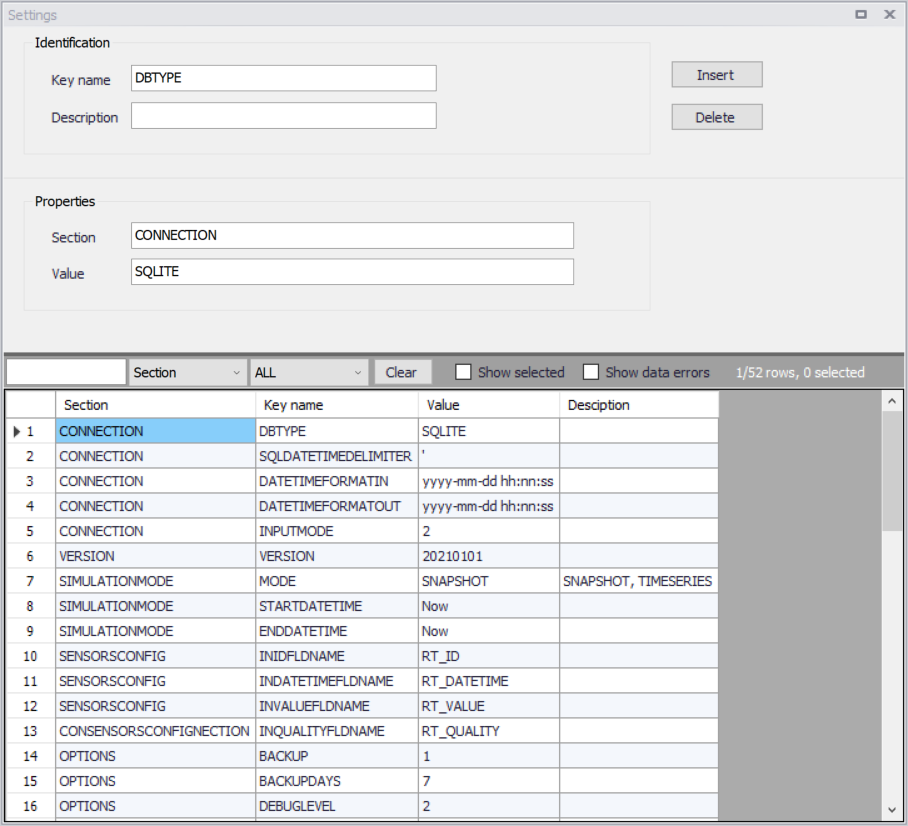
Figure: The Settings editor for the Online analysis
The attributes from this editor are described below.
Keyname
Entry with the keyword name, see "Water Distribution Online User's Guide" for detailed descriptions.
Section
Entry with the section name, see "Water Distribution Online User's Guide" for detailed descriptions.
Value
Entry with the value, see "Water Distribution Online User's Guide" for detailed descriptions.
Description
User-defined description of the entry.