Aggregation Tool
Demand aggregation allows to use customer connections to model junctions and to develop node demands. Node demands can be developed from consumption points in two essential methods:
- Assigning: this will create 1:1 relation, i.e. 1 allocation point = 1 node demand
- Aggregation: this will create 1: N relation, i.e. multiple allocation points = 1 node demand.
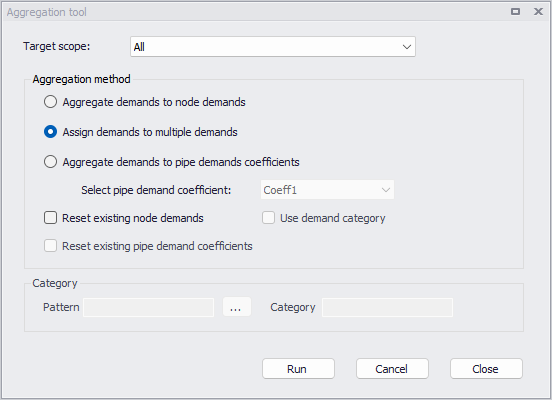
Figure: The demand aggregation tool
Target scope
It is possible to use all demands (all consumers) or only the selected ones (e.g. new consumers), using this list.
Aggregation method
The following methods can be applied:
- Aggregate demands to node demands: the program will aggregate data from multiple consumer points (assigned to the same node) and create a new node demand
- Assign demands to multiple demands: the program will create a new multiple node demands for each consumer point
- Aggregate demands to pipe demand coefficients: the program will aggregate data from multiple consumer points (assigned to the same pipe) and enter the total value into a pipe demand coefficient.
- Select pipe demand coefficient: selected pipe demand coefficient
The following options can additionally be applied:
- Reset existing node demands: the program will remove all existing multiple demands, which are marked as created by the 'Demand allocation' tool. Multiple demands with a mark set to 'Manual' or 'Distributed demand' will be kept unchanged.
- Reset existing pipe demand coefficients: the program will remove data from the selected pipe demand coefficient in all pipes.
- Use demand category: the program will aggregate demand based on the category. For example, if there are 5 consumer points to be aggregated to the same node and 3 are residential and 2 are commercial, the program will create 2 new node demands, one for residential (where 3 residential consumer points are aggregated into one) and one for commercial (where 2 residential consumer points are aggregated into one).
Category
The 'Category' group box holds the following attributes:
- Pattern: when a pattern is selected, the program will use the pattern name for multiple demands that will be created in this process.
- Category: when a category name is provided, the program will use this category name for multiple demands that will be created in this process.