Time Series
Time Series may be user specified or taken from external measured data of e.g. rainfall, evaporation, inflows to nodes of the drainage system, and water stage at outfall boundary nodes.
The following types of SWMM Time Series items may be defined in MIKE+:
- Rainfall
- Temperature
- Inflow hydrograph
- Evaporation
- Outfall stage
- Inflow pollutograph.
Define Time Series items via the SWMM Time Series editor. The editor organizes time series data into the following groups:
- Identification: General identification and time series type information.
- Time Series Format: Set source of time series values.
- Time Series Data Values: Secondary table where values for internal time series are defined.
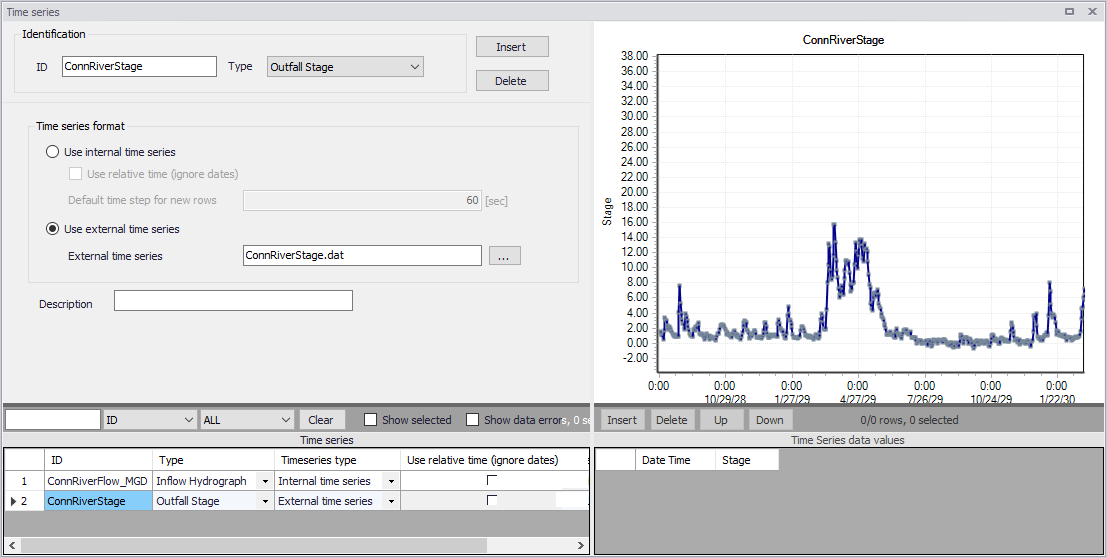
Figure: The SWMM Time Series editor
The time component of time series data may be defined as:
- Calendar date/time of day
- As elapsed hours since the start of the simulation (i.e. relative time)
For rainfall time series, it is only necessary to enter periods with non-zero rainfall amounts. SWMM interprets the rainfall value as a constant value lasting over the recording interval specified for the rain gage which utilizes the time series. For all other types of time series, SWMM uses interpolation to estimate values at times that fall in between the recorded values.
The SWMM engine supports the following external time series data formats:
- Date / time / value format Dates are entered as month/day/year (e.g., 7/21/2004) and times in 24-hour military time format (e.g. 8:30 pm is 20:30). After the first date, additional dates need only be entered whenever a new day occurs.
- Time / value format Times are entered as hours since simulation start. Time can either be decimal hours or military time since the start of a simulation (e.g., 2 days, 4 hours and 20 minutes can be entered as either 52.333 or 52:20).
Each entry is separated by one or more spaces or tab characters.
| Edit field | Description | Used or required by simulations | Field name in datastructure |
|---|---|---|---|
| ID | ID of Time Series | Yes | MUID |
| Type | Type of Time Series: Rainfall (TypeNo = 1) Temperature (TypeNo = 2) Inflow Hydrograph (TypeNo = 3) Evaporation (TypeNo = 4) Outfall Stage (TypeNo = 5) Inflow Pollutograph (TypeNo = 6) | Yes | TypeNo |
| Use Internal Time Series radio button | Option to define time series values directly on the interface | Yes | TimeSeriesTypeNo = 1 |
| Use Relative Time (Ignore Dates) | Option to define time series values with time axis relative to simulation start | Yes If TimeSeriesTypeNo = 1 | UseRelativeTime |
| Default Time Step for new Rows | Time step between records when inserting time series values in the secondary table | Yes If TimeSeriesTypeNo = 1 | m_GlobalParameter.SWMM.TimeSeries_DeltaT.ValueDouble |
| Use External Time Series radio button | Option to define time series values from an external file | Yes | TimeSeriesTypeNo = 2 |
| External Time Series | Name and location of external time series file | Yes TimeSeriesTypeNo = 2 | ExternalTimeSeriesFile |
| Description | Optional description for the time series item | No | Description |
Table: Edit fields in the Time Series editor (mss_Timeseries)