Create Time Patterns Tool
When flow measurement stations are associated with a network zone, in the 'Water balance' tab from the 'Zones' editor, the 'Create time patterns' tool can compute the pattern of the water demand within the zone. The computed pattern is then saved in the 'Patterns' editor.
This tool is accessed from the 'WD toolbox' group in the 'WD network' tab of the ribbon, from the list of demand tools.
Note
The tool cannot work with zones defined with a 'Selection' definition type.
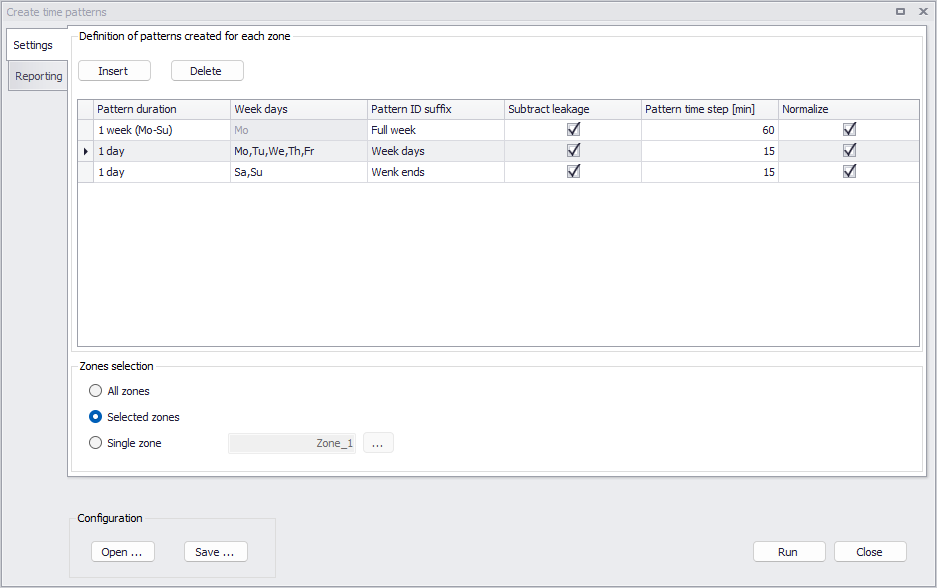
Figure: The 'Create time patterns' tool's settings
Patterns are derived from the demand in the zone. The total demand in a zone is derived from the flow measurement time series associated with the zone. This total demand is defined as the sum of all time series measuring flows entering into the zone minus the sum of all time series measuring flows out of the zone. Optionally, a leakage can be subtracted from this total demand before computing the pattern, so that the resulting pattern reflects the actual demand only.
Definition of patterns
The upper table in the 'Settings' tab controls the number and the types of patterns to be created for each processed zone. It is therefore possible to create several patterns per zone, typically for different parts of the week.
Click the 'Insert' button to add a new pattern to the list, or 'Delete' to remove the selected one.
For each pattern in the list, the following properties must be specified:
- Pattern duration: this is the duration of the created pattern, which is either one day or one week. In the latter case, several definitions of the week's start/end are offered (Monday-Sunday, Sunday-Saturday, Saturday-Friday).
- Week days: when the pattern duration is set to one day, this list controls which days of the week are taken into account for the analysis. Multiple days can be selected. During the analysis, only the flow measurements from the selected days are used to compute the pattern.
- Pattern ID suffix: created patterns are saved in the 'Patterns' editor. Each pattern is named with the zone ID it refers to, supplemented by the specified suffix.
- Subtract leakage: when this option is inactive, the pattern is computed from the total demand in the zone. When this option is active, the leakage in the zone is subtracted from the total demand time series, before computing the pattern. This subtracted leakage value is the constant 'Leakage estimate' value, specified in the 'Zones' editor. This leakage value must therefore be specified prior to computing patterns. It can be estimated with the Compute zone demand and leakage tool.
- Pattern time step: this is the time step length of the created pattern.
- Normalize: when this option is active, the created pattern provides multiplier values, varying as a function of time. These multipliers represent the demand value at a specific time step divided by the average demand throughout the duration of the pattern. When this option is inactive, the computed values are not divided by the average demand, and therefore represent actual flow values instead of multipliers.
The period of time used for the analysis is the period specified in the 'Water balance' tab of the 'Zones' editor, which may vary for each of the processed zones. This analysis period is the longest period covered by all measurement time series associated to the zone, unless a custom period has been specified.
The different steps performed by the tool to compute a pattern are as follows:
1. Derive the total demand time series from flow measurements associated with the zone, for the period of analysis defined in the 'Zones' editor. This demand time series is defined as the sum of all time series measuring flows entering into the zone minus the sum of all time series measuring flows out of the zone. Measured time series values are interpolated as necessary to provide values at the specified pattern time steps.
2. Split this demand time series into multiple daily or weekly time series. For 1-week patterns, each weekly time series starts at the specified start day of the week (Monday, Sunday or Saturday), for a duration of seven days. For 1-day patterns, each daily time series covers one of the selected week days. Daily or weekly time series starting before the start of the analysis, or ending after the end of the analysis, are discarded (i.e. partial daily or weekly time series are ignored).
3. Transform all the daily or weekly time series with a relative time axis (i.e. ignore dates) and compute the average time series.
4. If 'Subtract leakage' is active, subtract the constant leakage estimate at all time steps of the average time series.
5. If 'Normalize' is active, compute the average value of the obtained average time series, and divide all time steps' values by their average value.
Zones selection
The tool can process either:
- All zones: requested patterns are created for all zones with 'Network' definition type, defined in the Zones editor.
- Selected zones: requested patterns are created only for selected zones with 'Network' definition type.
- Single zone: requested patterns are created only for the selected zone ID.
Configuration
- Save: saves the current settings in the tool to a file for later re-use.
- Open: loads the settings from a file created during a previous use of the tool.