Compute Zone Demand and Leakage Tool
When flow measurement stations are associated with a network zone, in the 'Water balance' tab from the 'Zones' editor, the 'Compute zone demand and leakage' tool can estimate the water demand and/or leakage within the zone. The computed values are then updated in the 'Zones' editor.
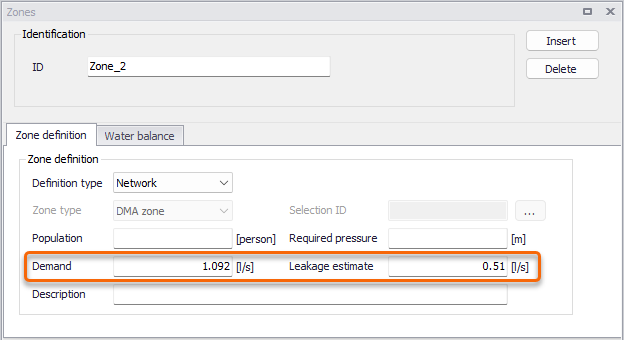
Figure: Zone demand and leakage values which can be computed with the 'Compute zone demand and leakage' tool
This tool is accessed from the 'WD toolbox' group in the 'WD network' tab of the ribbon, from the list of demand tools.
Note
The tool cannot work with zones defined with a 'Selection' definition type.
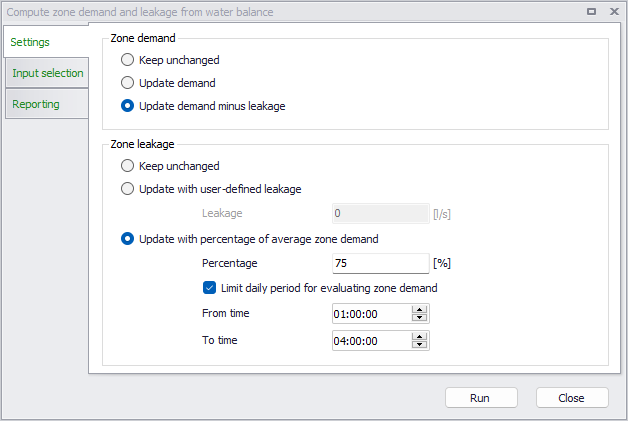
Figure: The 'Compute zone demand and leakage' tool's settings
Zone demand
The selection from the 'Zone demand' group controls the action performed for the demand:
- Keep unchanged: this does not perform any change to the demand values defined in the 'Zones' editor. It should be selected if the goal is to compute the leakage only.
- Update demand: this updates the Demand value in the 'Zones' editor, with the computed average demand of the zone. This average demand is computed as the accumulated volume of all measurement stations flowing into the zone minus the accumulated volume of all stations flowing out of the zone, divided by the duration of the analysis. The period of time used for the analysis is the period specified in the 'Water balance' tab of the 'Zones' editor, which may vary for each of the processed zones. This analysis period is the longest period covered by all measurement time series associated to the zone, unless a custom period has been specified.
- Update demand minus leakage: this updates the Demand value in the 'Zones' editor with the same method as for the 'Update demand' option, but subtracting the estimated leakage. The method for estimating the leakage is selected in the 'Zone leakage' group.
Zone leakage
The selection from the 'Zone leakage' group controls the action performed for the leakage:
- Keep unchanged: this does not perform any change to the leakage estimate values defined in the 'Zones' editor. It should be selected if the goal is to compute the demand only.
- Update with user-defined leakage: this assigns the specified leakage value to all processed zones.
- Update with percentage of average demand: this method computes a leakage value for each zone, being the specified percentage of the zone demand (as computed with the 'Update demand' method). Two options are available:
- If 'Limit daily period for evaluating zone demand' is inactive, the leakage is the percentage of the average demand estimated from the entire period of the analysis (specified in the 'Water balance' tab of the 'Zones' editor, for each zone individually).
- If 'Limit daily period for evaluating zone demand' is active, the method is the same except that the average demand is estimated only for the specified times of the day. This typically allows to estimate the leakage as a percentage of the flow at night.
Input selection
The tool can process either:
- All zones: the demand and/or leakage estimate values are updated for all zones with 'Network' definition type, defined in the Zones editor.
- Selected zones: the demand and/or leakage estimate values are updated only for selected zones with 'Network' definition type.
- Single zone: the demand and/or leakage estimate values are updated only for the selected zone ID.