Alarm Levels
Alarm levels are water levels in the pumps' wet wells or at any other relevant node, that trigger the alarm. A 'Pump emergency storage estimation' simulation uses a single set of alarms, but this set may comprise any number of alarms in individual nodes.
Identification
Each alarm set must be defined by a unique ID.
An optional description may be provided to describe the alarm set.
Local alarm levels
The table in the 'Local alarm levels' group contains the list of nodes where an alarm is defined and the corresponding alarm level, for the active set. The node ID and its alarm level may be edited either in the secondary table or in the 'Alarm settings' group.
New alarms can be added to the table using the 'Insert' button above the table. Alarm levels are independent from the 'Critical levels' defined in the nodes, but frequently can have the same notion. Therefore, the nodes' critical levels (if any) are used to define a default alarm level when inserting new nodes:
- If a critical level is defined for the selected node, the alarm level is set equal to the critical level
- If no critical level is defined for the selected node, the alarm level is set equal to its ground level minus the specified freeboard value. Note that, if weirs discharging out of the modelled network (no 'To node' defined) are connected to the node, then the alarm level is set equal to the weir crest level minus the specified freeboard.
In any case, it is possible to change the default value for any customised alarm level afterwards.
For each alarm, the 'Allow updating level' controls whether the specified alarm level can be updated by the various tools or if it should be kept unchanged. When 'Allow updating level' is selected, it is possible to reset the node's alarm level to the node's critical level.
Note
the specified freeboard is only used to compute default alarm levels when adding new nodes to the table. The freeboard value is not used as such in the simulation.
Note
Sealed nodes cannot be selected to define alarms.
The table can also be populated with a list if alarms with the two following buttons:
- Insert pump critical levels: This populates the table with all pumps' wet well nodes (or only the selected ones, if a selection is active). Each inserted node is given a default alarm level calculated with the same principles as when inserting a single node, and this default value can be modified afterwards. If a pump node is already listed in the table, its alarm level is updated only if 'Allow updating level' is selected, and remains unchanged otherwise. This button is especially relevant when pumps' critical levels have been assigned beforehand, using the tool 'Set pumps critical level'.
- Insert all critical levels: this populates the table with all nodes that have critical levels defined in the Nodes editor (or only the selected ones, if a selection is active). The alarm level is here always set equal to the critical level. If a node is already listed in the table, its alarm level is updated only if 'Allow updating level' is selected, and remains unchanged otherwise.
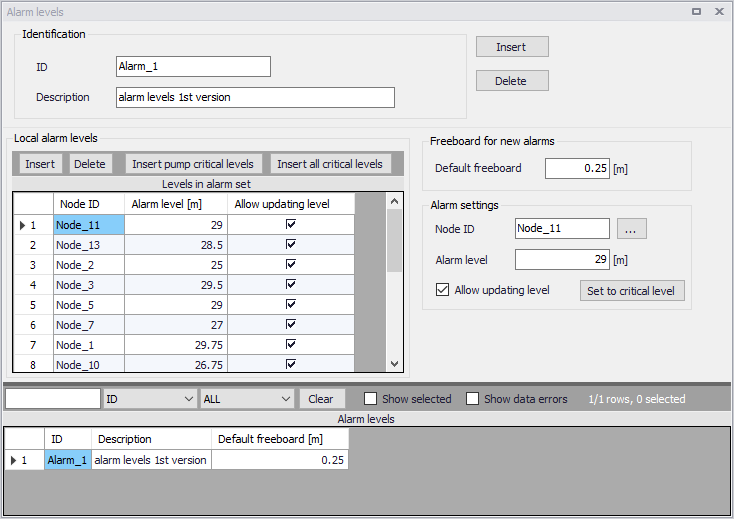
Figure: Defining alarm levels