Batch Runs
If you need to run more simulations sequentially, you can choose to do so by including these to a batch simulation. This is done through the Batch Simulation editor.
The Batch Simulation editor includes functionalities allowing control and execution of batch simulations.
The 'Batch Run' button executes all simulations that have the 'Add to batch' flag set in the sequence that they are specified in the table. This means that multiple simulations and scenarios can be simulated in batch without user interaction.
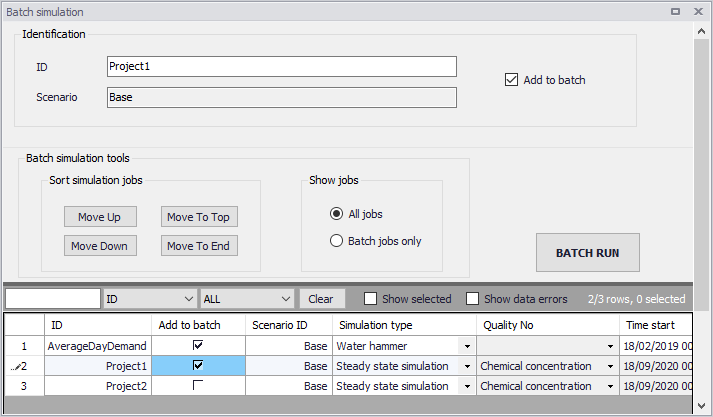
Figure: The Batch Simulation editor
The Batch Simulation editor manages the same data from the Simulation Setup editor. The table shows the same entries as the grid in the Simulation Setup editor, but built-in tools allow reordering and filtering of simulations for batch execution.
| Edit field | Description | Used or required by simulations | Field name in data structure |
|---|---|---|---|
| ID | ID of the hydrodynamic simulation | Yes | MUID |
| Scenario | Scenario for the hydrodynamic simulation | Yes | Scenario ID |
| Add to batch check box | Option for including a hydrodynamic simulation to batch | Yes | IncludeToBatchNo |
Table: Overview of Batch Simulation editor fields (Table mw_Project)
The following functionalities are available on the editor:
Move Up
Moves the active record one position up in the grid.
Move Down
Moves the active record one position down in the grid.
Move To Top
Moves the active record to the top of the table.
Move To End
Moves the active record to the bottom of the table.
'All jobs' and 'Batch jobs only' radio buttons
This filters the list of simulation jobs displayed in the table. A complete list of simulation jobs (i.e. All jobs) is shown by Default, but the display can be reduced to show only those jobs included in the batch (i.e. Batch jobs only).
'Batch Run' button
This starts a batch job execution following the sequence of the simulation jobs on the list. Each consecutive job must wait until the previous job has been fully completed. All user prompts are suppressed during the batch job execution, i.e. the simulations are automatically executed without user prompts.