MIKE ECO Lab State Variables
The MIKE ECO Lab State Variables editor is used for coupling MIKE+ WQ components to MIKE ECO Lab state variables and for possible reconciliation of differences in units used in MIKE+ and MIKE ECO Lab, respectively.
- ID: State variable identifier in MIKE+.
- MIKE ECO Lab template: MIKE+ ID for the template to which the state variable belongs.
- State Variable: State variable identifier in MIKE ECO Lab template file.
- WQ Component: MIKE+ WQ component coupled to the MIKE ECO Lab state variable.
- Conversion Factor: Conversion factor for possible units conversion between MIKE+ and MIKE ECO Lab
- Description: Add a free text description for a state variable via the Description tab page of the editor.
In the MIKE+ WQ Components editor, there must be one component defined for every MIKE ECO Lab state variable defined in the MIKE ECO Lab template. This means that all MIKE ECO Lab state variables are subject to both AD transport mechanisms and MIKE ECO Lab transformations.
For a State Variable, the associated WQ Component must be selected by the user. These WQ components must represent the same constituents as those in the MIKE ECO Lab template, but their names can be freely defined.
For coupled models, coupling a 1D network to the 2D overland model, different templates have to be used for the 1D network and for the 2D domain. When state variables from the different templates describe the same component, they must be associated to the same WQ component in order to be coupled during the simulation
The specified conditions and boundary conditions for the WQ components will therefore control the initial and boundary conditions of the state variables.
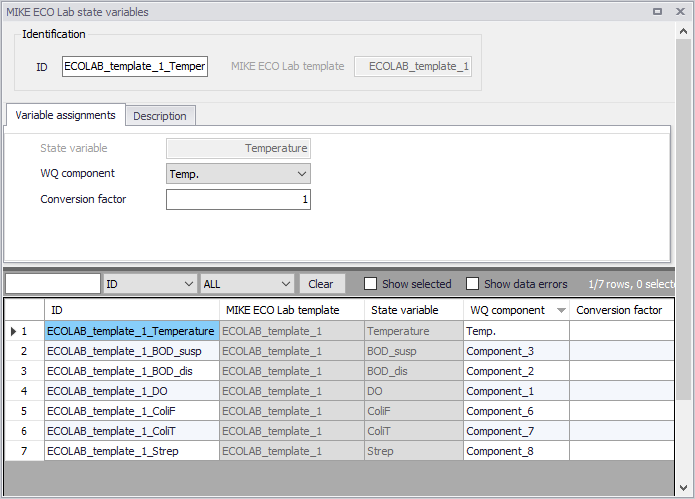
Figure: The MIKE ECO Lab State Variables editor
The import operation described in the MIKE ECO Lab Templates editor will automatically create the required entries in the MIKE ECO Lab State Variables editor. The user must then couple each of these MIKE ECO Lab state variables to the relevant WQ component. Select the appropriate component from the WQ Component dropdown list, which is populated by components defined in the WQ Components editor.
The Conversion Factor (default value 1, i.e. no conversion) may be set different from 1.0 if the units for the AD components and MIKE ECO Lab state variables are different.
Note
Note that the active fields in the editor are only those for coupling the MIKE+ WQ components with MIKE ECO Lab state variables, and for specifying a conversion factor.