Storages
Storages describe any type of storage capacity, which can for example be a reservoir, a lake or a pond in a floodplain. The storage is described by a single calculation point during the simulation, represented by a relationship between the elevation and the storage volume or horizontal area. It is however represented by a polygon on the map, to illustrate the extent of the storage area.
A storage can be defined anywhere on the map, and should be connected to a river end. Connections are defined in the 'Rivers' editor, or using the 'River connection' feature layer on the map.
Storages can receive inflows from boundary conditions or from catchments. Refer to the respective chapters for more information.
Storages can be managed both graphically on the map and through the 'Storages' editor. The graphical editing on the map allows digitisation of the storage's extent using the tools Create, Edit, and Delete.
The Storages editor is used for editing the storage's attributes. It is also possible to insert new storages from the editor, in which case the new storages are given a schematised square shape.
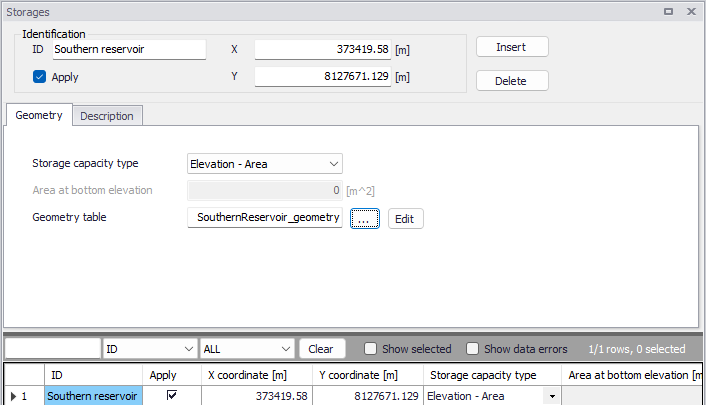
Figure: The Storages editor
Note
A storage can be connected to multiple rivers. A river can however support only one connection at each end, and it is therefore not possible to connect two storages to the same river end.
Identification
The Storages editor has a general Identification group, containing information on catchment identifier and geographic location. Here the location is defined by the XY coordinates of the centroid of the storage polygon.
The 'Apply' check box allows the user to toggle the Active status of the storage on and off. The simulations will omit all storages that are not active.
Geometry
The Geometry tab contains information to describe the storage capacity of the storage, which is to be derived from the topography within the storage area.
Storage capacity type
The storage capacity type of the reservoir must be defined using the drop-down menu. There are two options:
- Elevation-area: the capacity is described using a table giving the horizontal area of the water surface as a function of the water level.
- Elevation-volume: the capacity is described using a table giving the stored water volume as a function of the water level. This Elevation-volume relationship is then converted to an Elevation-Area relationship during the simulation, using the following formula:
(3.7) 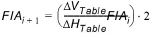
where:
- FlA: Storage area at level 'i' or 'i+1'
- \(DV_{Table}\) and \(DH_{Table}\) are differences in volumes and levels respectively from values defined in the Elevation-Storage volume table.
Area at bottom elevation
This is the area of the bottom of the storage (measured at the lowest level of the Elevation-volume relationship) which must be specified when the storage type is 'Elevation-volume'.
Geometry table
This is the ID of the Elevation-area or Elevation-volume table describing the storage capacity, which must be defined in the 'Curves and relations' editor. For a storage type Elevation-area, the curve type must be 'Storage area capacity'. For a storage type Elevation-volume, the curve type must be 'Storage volume capacity'.
The Elevation-area relationship can be computed from a DEM, using the 'Compute storage from DEM tool'.
Description
The Description tab allows the user to provide additional information for the storage.
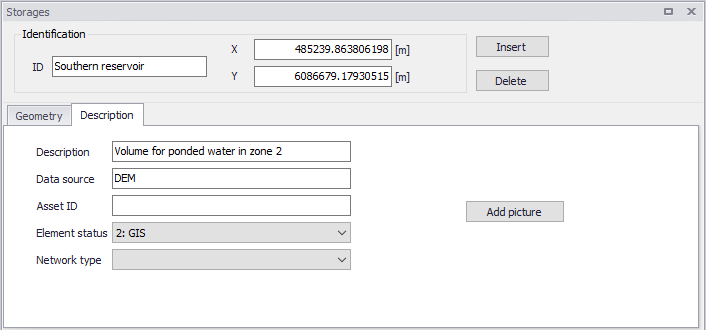
Figure: The Description tab from the Storages editor
Connection
To create a connection to a river, go to the Rivers editor. In the 'Connections' group, click the button with an arrow to select a storage on the map, or the '…' button to select the storage from a list. This latter list is filtered by type of supported features, so selecting 'Storages' will show the list of storages which can be used.

Figure: Connection to a storage defined in the Rivers editor