Catchments Menu
The Catchments menu offers tools and functionalities related to creating catchment features for setting-up rainfall-runoff models for collection systems.

Undo/Redo

Offers Undo or Redo options during Catchments editing.
Edit Features

Tools for graphical editing of Catchment features on the Map, such as for creating, editing, and deleting catchment features.
Please refer to chapter Tools for Graphical Catchment Editing for more details on the various tools under the Edit Features toolbox on the Catchments ribbon.
Selection
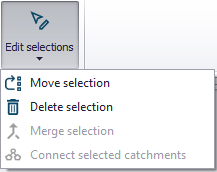
The 'Edit selections' list contains tools for editing/manipulating selected elements:
- Move selection
- Delete selection
- Merge selection: for merging selected elements.
- Connect selected catchments
Catchment Toolbox
Please refer to chapter Automated Catchment Tools for more details on the various tools under the Catchment toolbox.
The toolbox includes the following tools.

Catchment delineation
Tool for automatic catchment delineation as Thiessen polygons or derived from a digital elevation model (DEM).

Catchment processing
Tool to calculate imperviousness, time of concentration and other hydrological parameters for hydrological models.

Catchment slope and length
tool is an automated way to calculate the slope and length of a catchment based on a DEM. These parameters are used for MIKE 1D rainfall-runoff Kinematic Wave models.

Connection tool
Tool for automatic connection of catchments to the network.

Special tools
Offers additional GIS spatial processing operations such as Merge and Join.
Show on Map
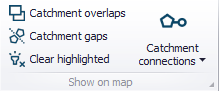
Contains tools and functionalities for validating catchment layer topology, as well as checking catchment and connections to the collection system network.
Please refer to chapter Graphical Tools for Connecting Catchments to Networks for more details on the various tools under the Show on Map toolbox.