Transfer SWMM data to MIKE 1D tool
It is possible to transfer model data from SWMM tables to MIKE 1D tables. That means that SWMM data used in the working mode 'SWMM5 collection system and overland flows' are converted to data for use in the working mode 'Rivers, collection system and overland flows'. This tool is accessed from the 'CS network' tab in the ribbon, under the 'Special tools' button.
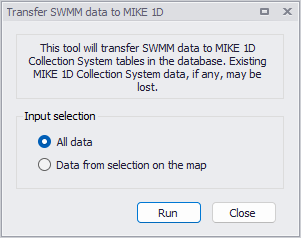
Figure: Transferring data from SWMM to MIKE 1D
This means that if you e.g. create or import a SWMM5 model into MIKE+, it is then possible to convert the model data into the MIKE 1D format in order to continue the modeling with the MIKE 1D engine instead.
Two options are also available to control which data are being transferred:
- All data
- Data from selection on the map: for this option, only the SWMM data being selected when the tool is executed are transferred. This requires that the active working mode is 'SWMM5 collection system and overland flows' in order to select the SWMM data. If the active mode is 'Rivers, collection system and overland flows', this option is therefore unavailable. Note that this will transfer all selected data, even though some are actually not displayed on the map (especially transects).
The following details apply during this data conversion:
- Rainfall-Runoff parameters from SWMM are transferred to the Kinematic Wave (B) model in MIKE1D.
- The operation creates one parameter set per catchment in the table msm_HParB, even if those parameter sets have the same attributes. It populates some attributes of Impervious Steep, Impervious Flat and Pervious Medium, while leaving the other attributes with value 0.
- The operation creates one catchment connection of load type 'Standard', which accepts all runoff and catchment discharge.
- The transfer creates one boundary condition per rain gauge, with boundary type 'Rainfall'. Each rainfall boundary is applied to a list of catchments, which contains all catchments associated with the corresponding rain gauge. The temporal variation of the boundaries refers to a file "Rainfall.dfs0", which the user has to create manually. Each rain gauge should be placed in a separate column in this time series.
- The following SWMM data are converted to Generic shapes:
- Transects.
- Conduits' geometry, for conduit types Trapezoidal, Open rectangular, Triangular, Horizontal ellipsoid, or Modified baskethandle.
- Curves defined in the 'Curves and relations' editor with the type 'Shape'. This shape is scaled with the height of the first SWMM conduit using this shape: if multiple SWMM conduits use the same shape but with different heights, then additional generic shapes must be created manually for MIKE1D, after running the tool.
- Weir geometries for weir types V-Notch and Trapezoidal.