Inflows
Direct Inflows are user-defined time series of inflows added directly into a node. They can be used for flow and water quality routing in the absence of runoff computations (as in a study area where no catchments are defined).
A pollutant component can only be defined as inflow to the system if it is attached to a flow component.
The CS SWMM Inflow editor organizes the related input data for each inflow into the following groups:
- Identification: General identification and connectivity information.
- Time Series: Associated time series item.
- Base Flow: Base flow value and associated variation pattern.
- Pollutants: Pollutant attached to the inflow.
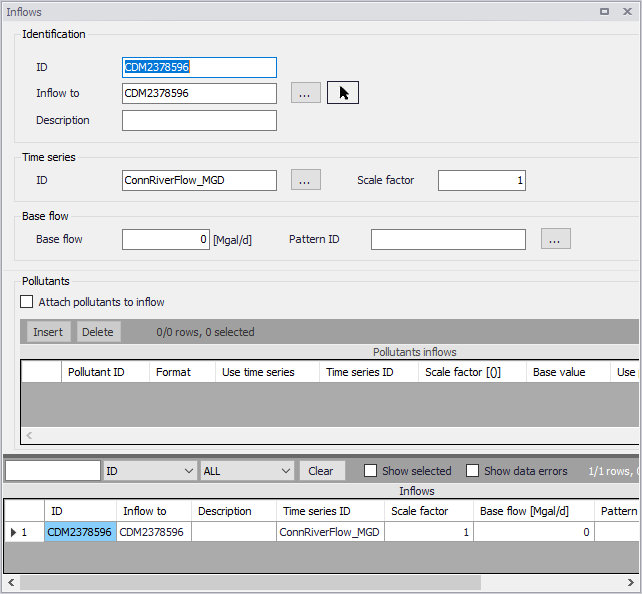
Figure: The SWMM Inflows editor
Identification, Time Series, and Base Flow
The Identification group holds inflow boundary ID and connectivity information. Use the Insert or Delete buttons to add or remove records from the editor, respectively.
Define a time series to describe the time varying inflow component under the Time Series group.
The Base Flow group is where the base flow component of the inflow is defined.
| Edit field | Description | Used or required by simulations | Field name in datastructure |
|---|---|---|---|
| ID | Inflow boundary ID | Yes | MUID |
| Inflow To | ID of node where inflow is loaded | Yes | NodeID |
| Description | Optional description for the inflow boundary | No | Description |
| Time Series ID | ID of flow time series describing time-varying inflows | Yes | FlowSeriesID |
| Scale Factor | Factor multiplied to time series values | Yes | ScaleFlowFactor |
| Base Flow | Constant base flow value. If left blank then no base inflow is assumed. | Yes | BaseFlowValue |
| Pattern ID | Optional time pattern with factors for adjusting base flows | Yes | BaselinePatternID |
Table: Edit fields in the Inflows editor (mss_Inflow)
Pollutants
Define pollutants attached to inflows under the Pollutants group. Tick on the ‘Attach pollutants to inflow’ option to include pollutants in the Inflow boundary setup. Specify pollutant parameters in the secondary table.
| Edit field | Description | Used or required by simulations | Field name in datastructure |
|---|---|---|---|
| Attach Pollutants to Inflow | Option to activate/define a inflow pollutant setup | Yes | PollutNo |
| Pollutant ID | ID of pollutant associated with the inflow boundary | Yes If PollutNo = 1 | PollutantID |
| Format | Pollutant data Format: Mass Concentration | Yes If PollutNo = 1 | FormatNo |
| Use Time Series | Option to use a time series to describe pollutant variation | Yes If PollutNo = 1 | UseTimeSeries |
| Time Series ID | ID of pollutograph | Yes If UseTimeSeries = 1 | PollutSeriesID |
| Scale Factor | Multiplier for adjusting time series values | Yes If UseTimeSeries = 1 | ScalePollutValue |
| Base Value | Pollutant base value | Yes If PollutNo = 1 | BasePollutValue |
| Use Pattern | Option to use a time pattern to describe pollutant base value variation | Yes If PollutNo = 1 | UsePattern |
| Base Pattern | Time pattern ID whose factors adjust base pollutant values | Yes If UsePattern = 1 | BasePatternID |
| Unit Factor | A factor for converting the units of pollutant mass flow rate into concentration mass units per second | Yes If PollutNo = 1 and FormatNo = 2 | ConvFactor |
Table: Edit fields in the Inflows editor Pollutants group (mss_InflowD)