2D Overland Model
For the 2D overland model, a simulation volume balance summary is presented in a file suffixed ‘_m21fmVolumeBalance.html’ and prefixed with the MIKE+ project name.
The file is overwritten for every simulation. An example of a 2D overland simulation volume balance file is shown below. Note that the values are only with respect to the 2D model component.
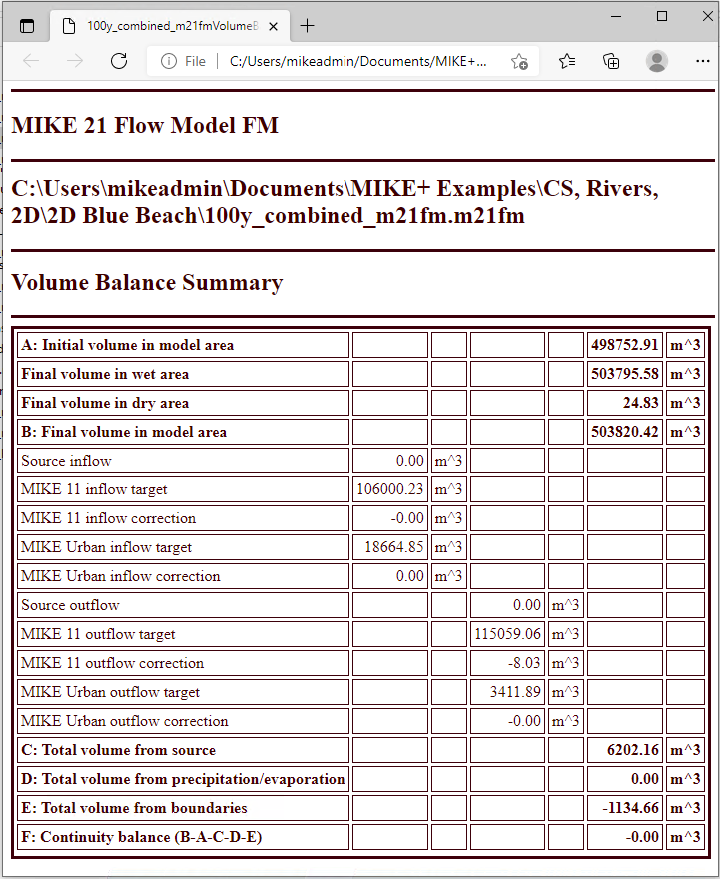
Figure: Example of a 2D model volume balance summary from a 1D-2D coupled model simulation
The volume balance is broken down into the following items:
- Initial volume in model area (open boundary cells are not taken into account)
- Final volume in model area
- Total Volume from Boundaries: Inflow through open boundaries
- Total Volume from Source: Balance of inflows and outflows to/from external model sources, e.g. coupled models. At present, the items are grouped and categorized separately for the river model and collection system model components:
- Inflow Target: Expected inflow from the coupled network model source to the 2D model through the coupling
- Inflow Correction: Correction of inflow through the coupling to the 2D model as determined by the 2D model
- Outflow Target: Estimated outflow from the 2D model to the coupled network model source through the coupling
- Outflow Correction: Correction of outflow through the coupling from the 2D model to the coupled network model as determined by the 2D model
- Total Volume from Precipitation/Evaporation: The contribution from precipitation and evaporation. This amount considers losses through Infiltration, if active.
Deviations in the continuity balance (Relative deficit) may be caused by the numerical scheme and should remain as low as possible.
Additionally, deviations in volume balance may also be caused by corrections of water volumes during the simulation (e.g. Inflow and Outflow Corrections). These corrections represent artificial volumes of water added in the model in different situations:
- A large time step may give rise to water level below the bed level in a cell. If this happens the 2D model will correct the water level to just above the bed (0.0002 m default), by adding an artificial volume of water.
- Sinks/ links (River or MIKE+ Collection System) at dry spots draining more water than present.
- Extraction of water from a dry section of the model area through the river model, MIKE+ Collection System, or evaporation
- Steep slopes in the model area drying out uphill cells
The total correction of water volume in the model is reported in the volume balance as 'Inflow / outflow correction' (Flexible mesh model). These corrections should be checked after the simulation, as high corrections may affect the results and may be due to issues in the model setup.