Units, Default Values and Numeric Formats
MIKE+ is fully flexible concerning the applied units for numeric attributes, number of decimals and default values for any attribute in the database. The system allows for a number of predefined environments. By these means, any MIKE+ user can set up the current MIKE+ project to suit established corporate and/or national standards and conventions. The actual unit system is valid for the entire MIKE+ project, i.e. applies to all features used in the project.
In addition to maintaining the database and presenting the computational results in required units, the system ensures appropriate unit conversions during the import of existing projects, without any interference by the user. Equally, the system takes into account the project data units and formats when submitted to the computational engines, which are automatically converted into the formats required by the computational engines.
This chapter describes how to control units applied to model setups' attributes saved in the database.
Selecting an Appropriate Unit Environment
The term "unit environment" is a pre-defined set of definitions for units, default values and display formats. The unit environment can be in SI units (International System of units) or US units (United States customary units). The unit system controls in which units the various values are expressed in the editors, and also controls the units used for results presentation.
For Rivers, collection systems and overland flows projects, the unit system can be selected from the following options:
- SI units, CMS: SI environment, with flows in \(\text{m}^{3}/\text{s}\)
- US units, CFS: US environment, with flows in \(\text{ft}^{3}/\text{s}\)
- SI units, LPS: SI environment, with flows in l/s
- SI units, MLD: SI environment, with flows in Ml/day (million liters per day)
- SI units, LPM: SI environment, with flows in l/min
- SI units, CMH: SI environment, with flows in \(\text{m}^{3}/\text{h}\)
- SI units, CMD: SI environment, with flows in \(\text{m}^{3}/\text{day}\)
- US units, GPM: US environment, with flows in gal/min
- US units, MGD: US environment, with flows in Mgal/day (million gallons per day)
- US units, MIGD: US environment, with flows in Mgal/day (million imperial gallons per day)
- US units, AFD: US environment, with flows in ac-ft/day
For Water Distribution projects, there are ten pre-defined unit environments within the SI and US unit groups which differ from each other by the applied units for flows and volumes.
Within the SI group, the following unit environments are available:
- SI units, LPS: SI environment, with flows in L/s
- SI units, LPM: SI environment, with flows in L/min
- SI units, MLD: SI environment, with flows in ML/day
- SI units, CMH: SI environment, with flows in \(\text{m}^{3}/\text{h}\)
- SI units, CMD: SI environment, with flows in \(\text{m}^{3}/\text{day}\)
Within the US group, the following unit environments are available:
- US units, CFS: US environment, with flows in \(\text{ft}^{3}/\text{s}\)
- US units, GPM: US environment, with flows in gal/min
- US units, MGD: US environment, with flows in Mgal/day (million gallons per day)
- US units, MIGD: US environment, with flows in IMGD Mgal/day (million imperial gallons per day)
- US units, AFD: US environment, with flows in ac-ft/day
For SWMM5 collection system and overland flows projects, there are six pre-defined unit environments within the SI and US unit groups which differ from each other by the applied units for flows and volumes.
Within the SI group, the following unit environments are available:
- SI units, CMS: SI environment, with flows in \(\text{m}^{3}/\text{s}\)
- SI units, LPS: SI environment, with flows in L/s
- SI units, MLD: SI environment, with flows in ML/day (million liters per day)
Within the US group, the following unit environments are available:
- US units, CFS: US environment, with flows in \(\text{ft}^{3}/\text{s}\)
- US units, GPM: US environment, with flows in gal/min
- US units, MGD: US environment, with flows in Mgal/day (million gallons per day)
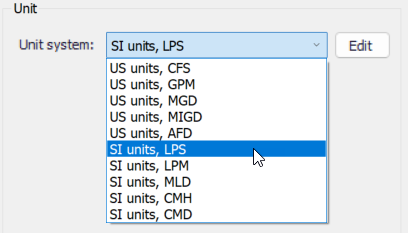
Figure: Selecting the unit environment
The unit environment will apply default units to all attributes (parameters) in the project.
Customizing Unit Environment
These units can then be customised with the 'Edit' button. The button opens the 'Units customisation' dialog, which contains a first table to select units for given attribute types. As an example, this table can be used to change the unit applied for 'Water level' type, and all attributes using this type will use the selected unit. Some types in this table use a "Default mixed unit", which means that different variables use per default a different unit, although they relate to the same type: this corresponds to a default setting and it is not possible to change the individual units for this type, unless using the second table described below.
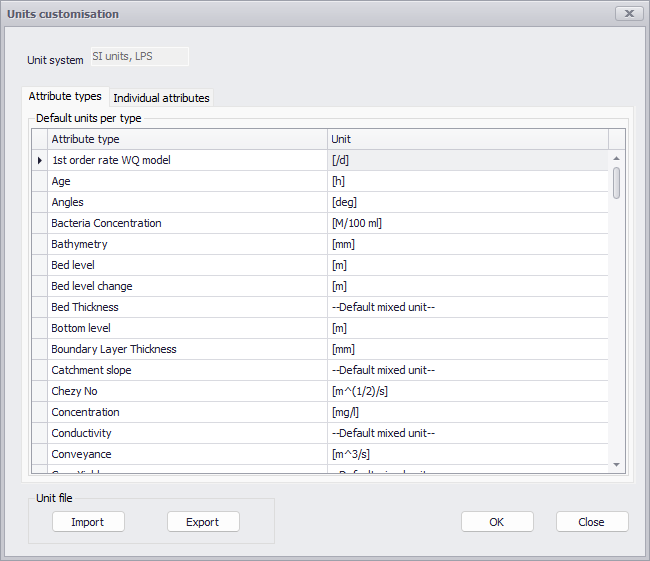
Figure: Customizing units
Prior to customising units for an attribute type, it may be useful to identify the attribute type used by the attributes which need to be changed. To achieve this, open the Property view (from the Project tab in the ribbon), select the layer type 'Visible model layers' in the upper list and select the 'Eum info' button below. This will display a list of attributes available in the opened editor, where the attribute type is shown in the second column.
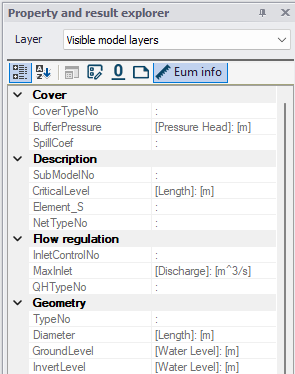
Figure: Identifying the attribute type from the Property view
The second table in the 'Units customization' dialog is used to select the unit for specific attributes. To control the unit for a specific attribute, press the 'Insert' button to add a new item to the table. Then select the table the attribute belongs to, select the attribute's name, and finally select its new unit.
The customized units will be saved in the database. If required, they can be exported to a configuration file by use of the 'Export' button, and then imported in another database with the 'Import' button.
The third tab in the 'Units customisation' dialog contains the units selection for control rules, for use in Collection system and River network simulations. This tab contains a first table for the various sensor types, where the selections control in which units the sensor values are considered in the expressions, for example in the 'Condition' expression of a control rule. It also contains a second table for the various action types, where the selections control in which units the action expressions (returning e.g. a weir crest level or a pump discharge) are expressed.
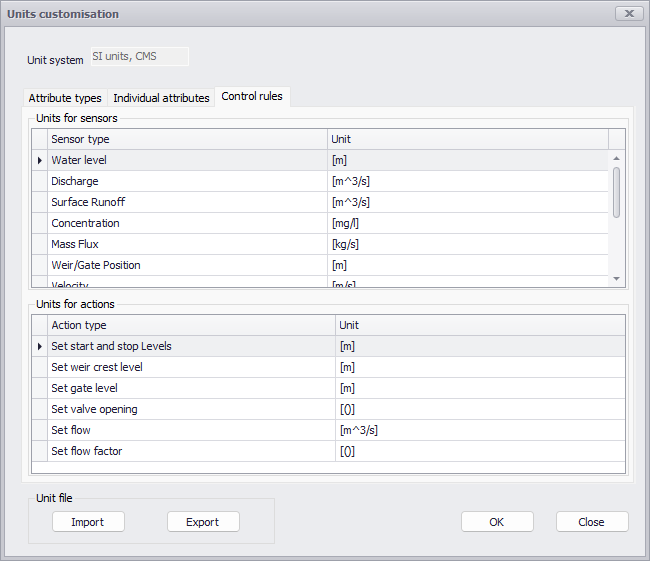
Figure: Selecting units for control rules
It is important to note that the selected control rules units are bound to the numerical values specified in the various expressions (e.g. equations) that may be used to define the condition for a control rule to apply, or to set the action. Changing these units may therefore require updating these expressions accordingly, if any. For this reason, changing the unit system doesn't update the control rules units, to keep consistency with possible existing expressions. If the control rules units are changed, updating existing expressions would have to be done manually.
Note
This customization only controls units applied to model setups' attributes saved in the database. Units used to display results are however controlled by the custom result units applied on the local computer, as described in User preferences.