Regulation Overview
Typically during an extended period simulation, the pipes, pumps, turbines and valves contained in a network will change their status (i.e. open or close) as storage tanks fill and empty and pressures change throughout the network. Also, for a steady state simulation, network components may change their state as the analysis model iterates to a valid solution.
The 'Regulation overview' editor can be used to specify these operational controls on the network.
The following situations are examples of applications of such operational controls:
- A pipe can be opened at a given time (based upon the beginning of the network simulation). This type of operational control has no effect in a steady state simulation.
- A pump can be turned on or off depending on the water level in a specified tank.
- A valve can be opened or closed based upon the pressure in an adjacent node.
Control rules are added using the 'Insert' button and removed using the 'Delete' button. For each rule, the following Identification parameters can be specified:
Control ID
The ID of the control.
Description
An optional description of the control.
Link type
The selection of link type to which the control applies. It can either be a pipe, a pump, a valve or a turbine.
Link ID
The ID of the link to which the control applies. Use the '…' button to access a filtered list of valid IDs.
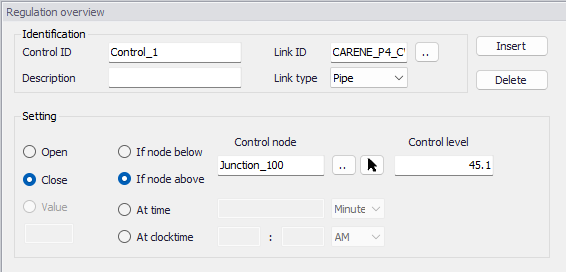
Figure: The Regulation overview editor
These control rules can also be visualized and edited respectively in the Pipes, Pumps, Valves and Turbines editors, in their 'Regulation' tab and for the link ID they are assigned to. There is no difference between editing the rules in one or the other editor.
For a description of the regulation settings, please refer to the Pipes, Pumps, Valves or Turbines editor description chapters.