Create Elevation Zones from DEM Tool
The purpose of the 'Create elevation zones from DEM' tool is to automatically divide catchments into a number of elevation zones to model snowmelt in RDI hydrological models, and also to estimate the area of each of the elevation zone based on an input DEM.
The tool analyses the DEM elevations within the extent of the catchment, as defined by its polygon on the map. Based on the minimum and maximum elevations found in the catchment, and a user-specified maximum zone's height, the tool defines a number of elevation zones for each processed catchment. Then the tool also estimates the area associated with each elevation zone by searching the areas on the DEM with elevations in the range associated with the zone.
The list of elevation zones and their areas are then filled in the set of RDI parameters associated with the catchment. When modelling snowmelt with elevation zones, and especially when using this tool, it is therefore recommended that each catchment is associated with its own set of RDI parameters in order for each catchment to use a local definition of elevation zones.
Note
This tool is primarily intended for catchments using the RDI (solo) hydrological model. The tool will work the same way for other hydrological model types combined with RDI (e.g. 'Time-Area + RDI'), however for such catchments the tool cannot estimate where on the catchment the RDI model applies and where the elevation zones should be computed. Therefore, manual adjustments / corrections may be needed after running the tool for such catchments.
DEM layer
This is the source DEM used to create the elevation zones within the catchment polygons. If valid DEMs are already loaded on the map, they can be selected from the drop-down list. The '…' button can be used to load a new DEM file.
Maximum zones' height
Each zone is associated with a range of elevations (height). This maximum height controls the number of elevation zones which will be obtained.
Each zone is given the same height, which is lower or equal to the specified 'Maximum zone's height'. The number of zones is therefore estimated so that the minimum number of zones, fulfilling this condition, is created,.
For example for a catchment with elevations varying within 100m and a maximum zone's height of 30m, four zones will be created, each with a height of 25m.
In the list of elevation zones in the 'Parameters RDI' editor, the reported elevation of the zone is the average elevation of the zone.
Create a new individual set of RDI parameters for each processed catchment
When this option is unselected, the tool creates the elevation zones in the sets of RDI parameters which are currently used by the RDI catchment (as selected in the 'RDI' tab of the 'Catchments' editor). This solution can however create conflicts if multiple catchments share the same set of RDI parameters.
When this option is selected, the tool instead creates a new set of RDI parameters for each processed catchment. The new set of RDI parameters is initially created as a copy of the original parameters set used by the catchment, in which the elevation zones are created.
Input selection
The tool can process either:
- All catchments: elevation zones will be computed for each catchment in the model setup.
- Catchments from selection on the map: elevation zones will be computed only for the currently selected catchments.
- Single catchment: elevation zones will be computed only for the selected catchment.
Regardless of the selected option, only the catchments using the RDI hydrological models will be processed.
Configuration
- Open: loads the settings from a file created during a previous use of the tool.
- Save: saves the current settings in the tool to a file for later re-use.
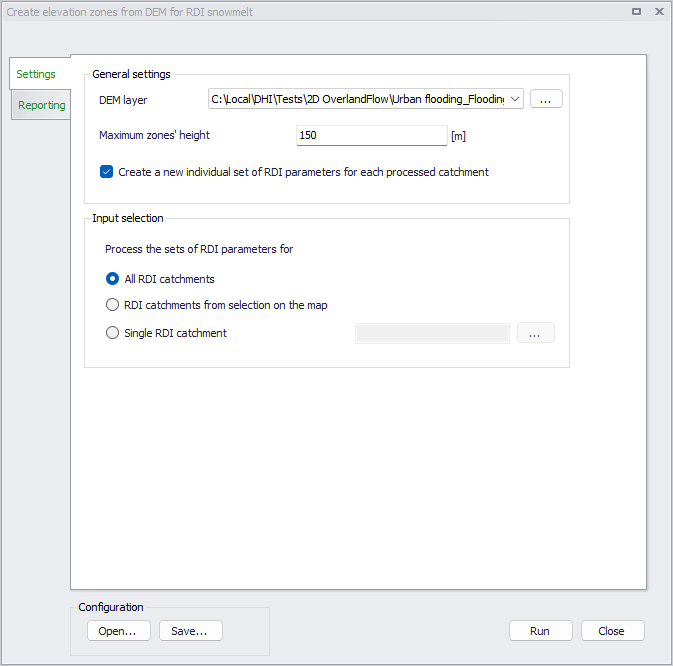
Figure: The Create elevation zones from DEM tool's dialog
After running the tool, the 'Reporting' tab will report the list of processed catchments, as well as errors and warnings if any.
Note
The use of snowmelt and elevation zones in the processed RDI parameters is not automatically activated when running the tool. If these options are not enabled in the processed RDI parameters before running the tool, they must be activated manually afterwards for the elevation zones to take effect.