Catchments
Catchments are hydrological units of land whose topography cause surface runoff to drain to a single point. The user is responsible for the delineation of a watershed/sewershed into a compatible number of catchments, and for identifying the outlet point of each catchment. Outlet points can be either nodes of the conveyance system or other catchments.
Catchments can be divided into pervious and impervious sub-areas. Surface runoff can infiltrate into the upper soil zone of the pervious sub-area, but not through the impervious sub-area. Impervious areas are themselves divided into two sub-areas - one that contains depression storage and another that does not. A portion of the runoff flow from one sub-area in a catchment can be routed to the other sub-area, or both sub-areas can drain to the catchment outlet.
For SWMM models, the Catchments editor organizes data into the following groups.
- Identification
- General Information
- SWMM Catchment Connections
- SWMM Hydrology & Hydraulic Properties
- SWMM Infiltration
- Description
Note
Catchment data in the Catchment editor is shared by Network models in MIKE+ (i.e. MIKE 1D, SWMM, River).
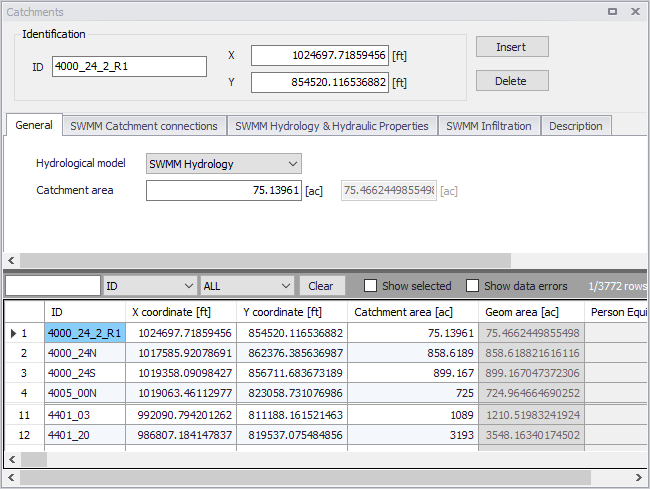
Figure: The Catchments editor for SWMM models
Catchments are featured as a data layer in MIKE+. They can be managed both graphically on the Map and through the Catchments editor.
The two modes complement each other, and efficient management of catchment data can be achieved through joint application of both modes.
The graphical mode (i.e. Edit Features functionality from the Catchments menu ribbon) allows digitisation of catchment extent by tools like Create, Edit, Delete, and Split. Descriptions of graphical catchment tools are found in the Model Manager User Guide.
The Catchments editor is used for:
- Editing catchment attributes. It is possible to insert catchments through the editor; these are given a schematised quadratic shape.
- Editing connections to model networks and hydrological data for Rainfall-Runoff models.
- Editing catchment hydrological model attributes. It is possible to edit catchment attributes in relation to various hydrological runoff models available in MIKE+.
Identification
The Catchments editor has a general Identification group containing information on catchment identifier and geographic location.

Figure: The Catchments editor Identification group
| Edit field | Description | Usage | Attribute Table Field |
|---|---|---|---|
| ID | Unique catchment identifier | Yes | MUID |
| X | X coordinate of the catchment geometry centroid | Yes | GeomCentroidX |
| Y | Y coordinate of the catchment geometry centroid | Yes | GeomCentroidY |
Table: Edit fields in the Catchments editor Identification group (msm_Catchment)
Other catchment attributes related to hydrological modelling and connections to model networks are organized in tabs within the editor and are described in succeeding Sections.
General
General catchment attributes related to hydrological model type and geometry are specified in the General tab page of the Catchments editor.
In MIKE+, the geographical extent of a catchment is determined by the catchment polygon perimeter. MIKE+ provides information on the total catchment area based on polygon geometry.
In some cases, the geographical boundaries of a catchment do not coincide with the actual drainage area. A catchment extent may be defined based on some administrative division, while the drainage network is present only in some parts of the catchment. In such cases, the User may specify the Catchment Area value, which overwrites the actual geometric area in all hydrological computations.
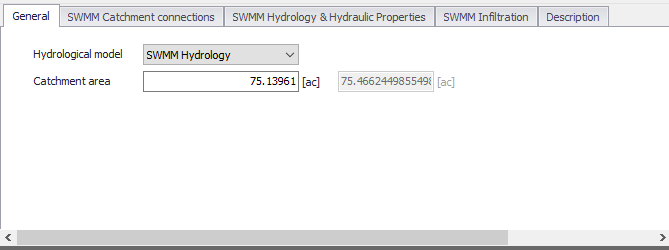
Figure: The Catchments editor General tab
| Edit field | Description | Usage | Attribute Table Field |
|---|---|---|---|
| Hydrological Model | Hydrological runoff model to use for a catchment | Yes | HydrologicalModelNo |
| Catchment Area | The catchment area of relevance for the project (\<= Geom Area) | Optional | Area |
| (Derived Geometric Area) | Program-calculated geometric area of the catchment polygon | Calculated (read-only) | GeomArea |
Table: Edit fields in the Catchments editor General tab (msm_Catchment)
Catchment Connections
To transfer runoff generated on catchment surfaces into the collection network, the model must include information about the connection of the catchment outlet to the network.
For SWMM models, MIKE+ supports the connection of catchments to nodes as well as other catchments wherein runoff is routed from one area to another. One or multiple catchments can be connected to the same node.
Define catchment connections for SWMM models on the SWMM Catchment Connections tab page of the Catchments editor.
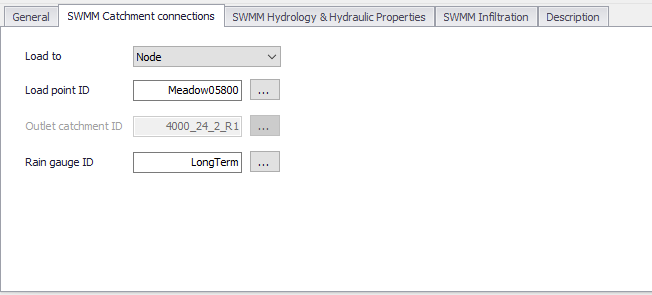
Figure: The SWMM Catchment Connections tab in the Catchments editor
The definition and management of catchment connections is supported both through the editor and by a set of graphical catchment connection tools accessed via the Catchments menu ribbon.

Figure: The Catchment Connection tool on the Catchments menu ribbon
| Edit field | Description | Usage | Attribute Table Field |
|---|---|---|---|
| Load to | Specifies the type of network element to which the catchment is connected. Options are: Node Catchment | Yes | SWMM_LoadToNo |
| Load Point ID | ID of Node that receives the catchment runoff | Yes If Load to = Node | SWMM_OutletNodeID |
| Outlet Catchment ID | ID of Catchment that receives the surface runoff | Yes If Load to = Catchment | SWMM_OutletCatchmentID |
| Raingage ID | Rain Gauge boundary setup ID associated with the catchment | Yes | SWMM_RaingageID |
Table: Edit fields in the Catchment Connections tab (msm_Catchment)
Hydrology and Hydraulic Properties
The concept of the surface runoff used by SWMM is illustrated in the figure below. Each catchment surface is treated as a nonlinear reservoir. Inflow comes from precipitation and upstream catchments. There are several outflows, including infiltration, evaporation, and surface runoff.
The capacity of this "reservoir" is the maximum depression storage, which is the maximum surface storage provided by ponding, surface wetting, and interception.
Surface runoff per unit area, Q, occurs only when the depth of water in the "reservoir" exceeds the maximum depression storage, \(d_{p}\), in which case the outflow is given by Manning's equation (Kinematic Wave).
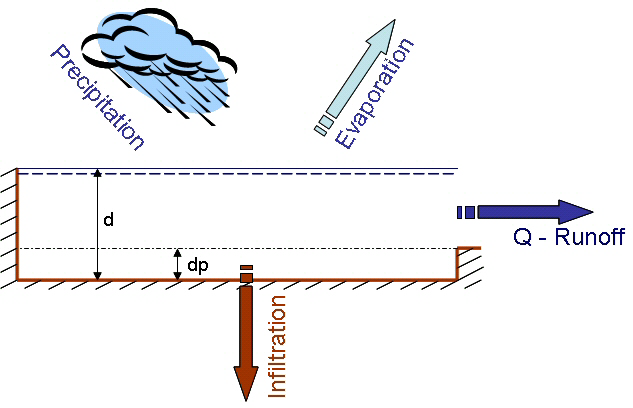
Figure: Nonlinear Reservoir Concept
Depth of water over the catchment is continuously updated with time by numerically solving a water balance equation over the catchment.
Define SWMM surface runoff computation data on the SWMM Hydrology & Hydraulic Properties tab page of the Catchments editor.
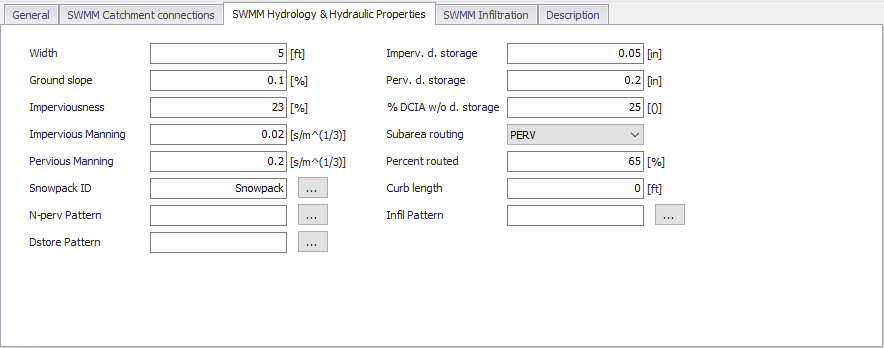
Figure: The SWMM Hydrology & Hydraulic Properties tab of the Catchments editor
| Edit field | Description | Used or required by simulations | Field name in datastructure |
|---|---|---|---|
| Width | Width of catchment | Yes | SWMM_Width |
| Ground Slope | Ground slope of catchment in percentage | Yes | SWMM_Slope |
| Imperviousness | Impervious part of the catchment area in percentage | Yes | SWMM_Impervious |
| Impervious Manning | Manning number for the Impervious part of the area | Yes | SWMM_NImperv |
| Pervious Manning | Manning number for the Pervious part of the area | Yes | SWMM_NPerv |
| Imperv. d. Storage | Size of Impervious Depression Storage | Yes | SWMM_DImperv |
| Perv. d. Storage | Size of Pervious Depression Storage | Yes | SWMM_DPerv |
| %DCIA w/o d. Storage | Percent of the impervious area with no depression storage | Yes | SWMM_ImpervPctZero |
| Subarea Routing | Choice of internal routing of runoff between pervious and impervious areas: IMPERV: runoff from pervious area flows to impervious area PERV: runoff from impervious flows to pervious area OUTLET: runoff from both areas flows directly to outlet | Yes | SWMM_RouteToNo |
| Percent Routed | Percent of runoff routed between subareas | Yes | SWMM_PctRouted |
| Snowpack ID | Snowpack parameter set ID (if any) assigned to the catchment | Optional | SWMM_SnowPackID |
| Curb Length | Total length of Curbs in the catchment. Only used when pollutant buildup is normalized to curb length | No | SWMM_CurbLength |
| N-perv Pattern | Operational monthly pattern that adjust pervious Manning n | Optional | SWMM_NPervPatternID |
| DStore Pattern | Optional monthly pattern that adjust depression storage | Optional | SWMM_DstorePatternID |
| Infil Pattern | Optional monthly pattern that adjust infiltration rate | Optional | SWMM_InfilPatternID |
Table: Edit fields in the SWMM Hydrology and Hydraulic Properties tab (msm_Catchment)
Infiltration
Infiltration is the process of rainfall penetrating the ground surface into the soil over the pervious areas of catchments. SWMM supports the following methods for modelling infiltration:
- Horton Method. This method is based on empirical observations showing that infiltration decreases exponentially from an initial maximum rate to some minimum rate over the course of a long rainfall event. Input parameters required by this method include the maximum and minimum infiltration rates, a decay coefficient that describes how fast the rate decreases over time, and a regeneration constant that describes the restoration of infiltration rate during dry periods.
- Green-Ampt Method. This method for modelling infiltration assumes that a sharp wetting front exists in the soil column, separating soil with some initial moisture content below from saturated soil above. The input parameters required are the initial moisture deficit of the soil, the soil's hydraulic conductivity, and the suction head at the wetting front.
- Curve Number Method. This approach is adopted from the NRCS (SCS) Curve Number method for estimating runoff. It assumes that the total infiltration capacity of a soil can be found from the soil's tabulated Curve Number. During a rain event this capacity is depleted as a function of cumulative rainfall and remaining capacity. The input parameters for this method are the curve number, the soil's hydraulic conductivity (used to estimate a minimum separation time for distinct rain events), and a regeneration constant that describes the restoration of infiltration capacity during dry periods.
- Modified Horton Method. A modified version of the Horton Method that uses the cumulative infiltration in excess of the minimum rate as its state variable (instead of time along the Horton curve), providing a more accurate infiltration estimate when low rainfall intensities occur. It uses the same input parameters as the traditional Horton Method.
- Modified Green-Ampt Method. This is a modified version of the original Green-Ampt procedure by not depleting moisture deficit in the top surface layer of soil during the initial periods of low rainfall as was done in the original method. This change can produce more realistic infiltration behavior for storms with long initial periods where the rainfall intensity is below the soil’s saturated hydraulic conductivity.
Define SWMM Infiltration model parameters on the SWMM Infiltration tab on the Catchments editor.
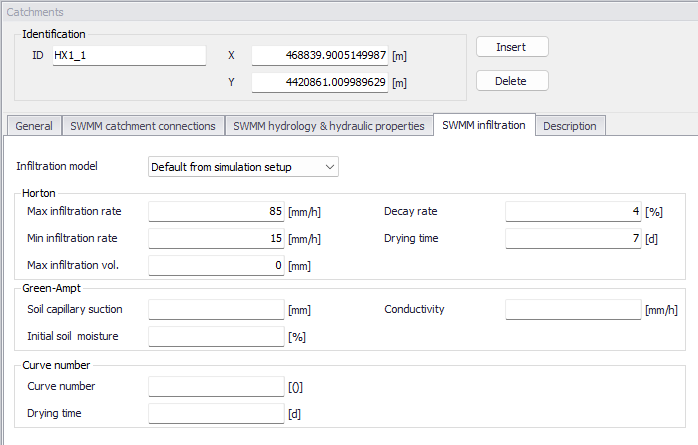
Figure: The SWMM Infiltration tab
The choice of infiltration model can be made in two different ways:
- If the infiltration model for the catchment is set to 'Default from simulation setup', then the infiltration model is selected in the 'Simulation setup' editor.
- If the infiltration model for the catchment is set to any other option (e.g. Horton or Green-Ampt), then the catchment will use this selected model regardless of the selection in the 'Simulation setup' editor.
When running a simulation, defining infiltration parameters are mandatory only for the infiltration models acually selected; the other parameters may remain empty.
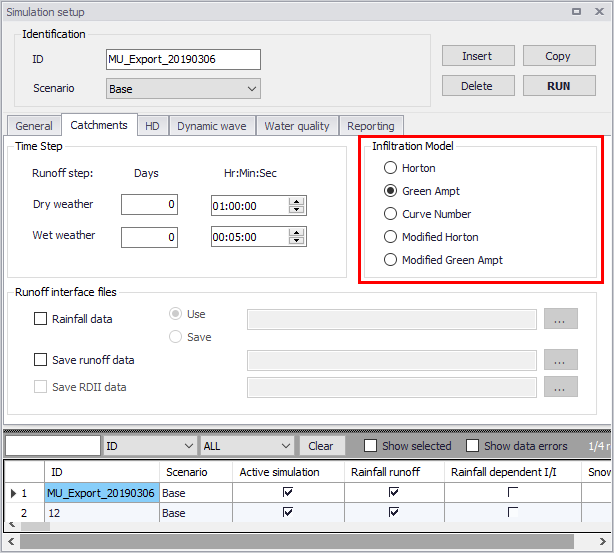
Figure: Infiltration method used in simulation as defined in the Simulation Setup editor
| Edit field | Description | Used or required by simulations | Field name in datastructure |
|---|---|---|---|
| Infiltration model | Choice of infiltration model for the catchment | Yes | SWMM_InfilModelNo |
| Horton | |||
| Max infiltration rate | Max Infiltration Rate | Yes | SWMM_MaxRate |
| Min infiltration rate | Min Infiltration Rate | Yes | SWMM_MinRate |
| Max infiltration vol. | Max Infiltration Volume | Yes | SWMM_MaxInFil |
| Decay rate | Decay Rate | Yes | SWMM_DecayRate |
| Drying time | Time for a saturated soil to get dry | Yes | SWMM_HRegen |
| Green-Ampt | |||
| Soil capillary suction | Soil Capillary Suction | Yes | SWMM_Suction |
| Initial soil moisture | Initial saturated soil moisture | Yes | SWMM_InitDef |
| Conductivity | Soil saturated hydraulic conductivity | Yes | SWMM_Conduct |
| Curve Number | |||
| Curve Number | Curve No | Yes | SWMM_RunoffCN |
| DWF regeneration | DWF regeneration factor | Yes | SWMM_CRegen |
Table: Edit fields in the Infiltration tab (msm_Catchment)
Description
The Catchments editor Description tab allows the User to provide additional information for a catchment record.
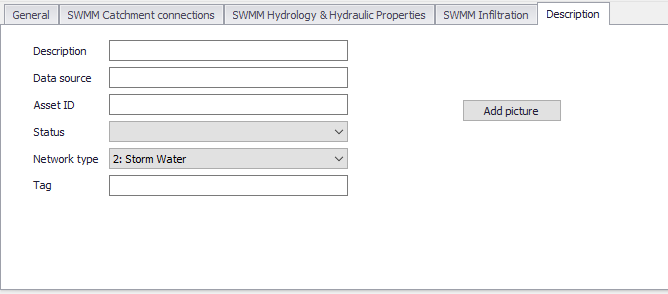
Figure: The Catchments editor Description tab
| Edit field | Description | Usage | Attribute Table Field |
|---|---|---|---|
| Description | Free text description related to the catchment | Optional | Description |
| Data source | Reference to an external data source (e.g. table ID) from where the record was taken | Optional | DataSource |
| Asset ID | Reference to an ID used in external data sources | Optional | AssetName |
| Status | Data status based on a user-specified list (Status Code editor) | Optional | Element_S |
| Network Type | Attributes the catchment to a certain type of network. Used in cases where different network types are in the same project. | Optional | NetTypeNo |
| Tag | Optional label to categorize/classify the catchment | Optional | SWMM_Tag |
| Add Picture button | Facility for defining an image file for the catchment record. Accepts .PNG, .JPG, and .BMP image files. | Optional | - |
Table: Edit fields in the Description tab page (msm_Catchment)