RDII
After defining the RDII Hydrographs, connect them to a node of the conveyance system and the sewershed area that contributes to RDII flow.
This is done via the SWMM RDII editor which organizes the related data into following groups:
- Identification
- Contributing RDII area
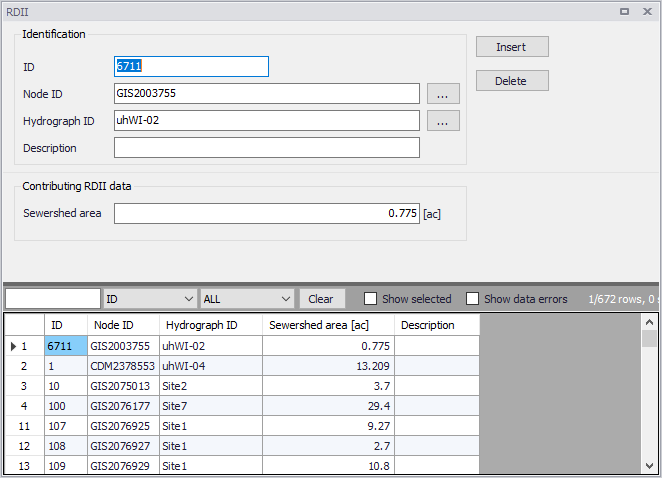
Figure: The SWMM RDII editor
Identification
The Identification groupbox holds information on the RDII setup ID, connectivity, and Description.
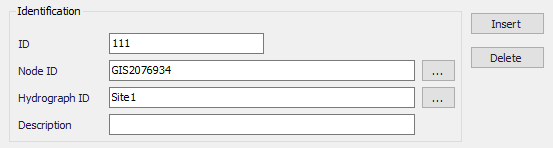
Figure: The RDII editor Identification group
| Edit field | Description | Used or required by simulations | Field name in datastructure |
|---|---|---|---|
| ID | RDII setup ID | Yes | MUID |
| Node ID | ID of Node which receives RDII | Yes | NodeID |
| Hydrograph ID | ID of Hydrograph defined in the RDII Hydrographs editor | Yes | HydrographID |
| Description | User-defined descriptive text | No | Description |
Table: 6Edit fields in the SWMM RDII editor Identification group (mss_RDII)
Contributing RDII Data
Define the size of the sewershed area contributing to RDII flows in the Contributing RDII Data groupbox.
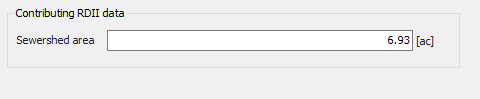
Figure: The RDII editor Contributing RDIIData group
| Edit field | Description | Used or required by simulations | Field name in datastructure |
|---|---|---|---|
| Sewershed area | Area that contributes to RDII inflow | Yes | SewerArea |
Table: Edit fields in the Contributing RDII Data group (mss_RDII)