Rain Gauges
Rain Gauges supply precipitation data for one or more catchments in a study area. The rainfall data can be either a user-defined time series (specified in Time Series editor as Type Rainfall) or come from an external file.
Several different popular rainfall file formats are supported, as well as a standard user-defined formats. These are:
- DSI-3240 and related formats which record hourly rainfall at U.S. National Weather Service (NWS) and Federal Aviation Agency stations, available online from the National Climatic Data Center (NCDC) at www.ncdc.noaa.gov/oa/ncdc.html.
- DSI-3260 and related formats which record fifteen minute rainfall at NWS stations, also available online from NCDC.
- HLY03 and HLY21 formats for hourly rainfall at Canadian stations, available online from Environment Canada at www.climate.weatheroffice.ec.gc.ca.
- FIF21 format for fifteen minute rainfall at Canadian stations, also available online from Environment Canada.
- A standard user-prepared format where each line of the file contains the station ID, year, month, day, hour, minute, and non-zero precipitation reading, all separated by one or more spaces. An excerpt from the user-prepared format might look as follows:
When a file is used as a source of rain gauge data, the user must supply the name of the file and the name of the recording station referenced in the file.
For the standard user-prepared format, the rainfall type (e.g., intensity or volume), recording time interval, and depth units must also be supplied as rain gauge properties.
For other file types these properties are defined by their respective file formats and are automatically recognized by SWMM.
The SWMM Rain Gauge editor organizes the related input data for the rainfall data into the following groups:
- Identification: General identification and location information.
- Rain Gauge Properties: Source data and data format information.
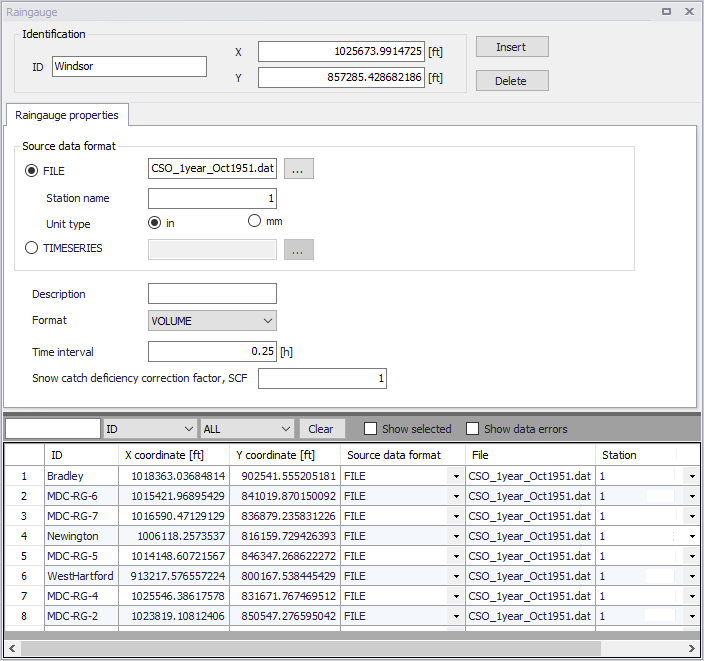
Figure: The SWMM Rain Gauge editor
Identification
The identification group holds rain gauge ID and location information. Use the Insert or Delete buttons to add or remove records from the editor, respectively.
| Edit field | Description | Used or required by simulations | Field name in datastructure |
|---|---|---|---|
| ID | ID of Rain gauge | Yes | MUID |
| X | X coordinate of rain gauge | Yes | GeomX |
| Y | Y coordinate of rain gauge | Yes | GeomY |
Table: Edit fields in the Rain Gauge Identification group (mss_Raingauge)
Rain Gauge Properties
Define the data source for rain gauges under the Rain Gauge Properties tab page of the editor.
| Edit field | Description | Used or required by simulations | Field name in datastructure |
|---|---|---|---|
| Source Data Format Radio buttons | Radio buttons for defining source data format: FILE TIMESERIES | Yes | TypeNo |
| FILE | Name of rainfall data file | Yes If TypeNo = 1 | FileNameSeries |
| Station Name | Station ID in the data file | Yes If TypeNo = 1 | StationNumber |
| Unit Type | Unit type (in or mm) Depth units (IN or MM) for rainfall values in user-prepared files (other standard file formats have fixed units depending on the format). | Yes If TypeNo = 1 | UnitNo |
| TIMESERIES | ID of Time Series item | Yes If TypeNo = 2 | TimeSeriesID |
| Description | Optional rain gauge record description | No | Description |
| Format | Rainfall data value format: INTENSITY VOLUME CUMULATIVE | Yes If TypeNo = 2 | FormNo |
| Time Interval | Time interval between readings in the timeseries in decimal hours or hours:minutes format. | Yes If TypeNo = 2 | TimeInterval |
| Snow Catch Deficiency Correction Factor, SCF | Snow catch deficiency correction factor that corrects readings for snowfall. | Yes | Scf |
Table: Edit fields in the Rain Gauge Properties tab (mss_Raingauge)
The following formats are supported when using TIMESERIES for rain gauge data:
- Intensity: Each value is an average rate (in/h or mm/h) over the recording interval.
- Volume: Each value is the volume of rain that fell over the recording interval (in or mm).
- Cumulative: Each value represents the cumulative rainfall that has occurred since the start of the last series of non-zero values (in or mm).