Controls
A list of the Controls editor's attributes follows with a short description given for each one. Controls are used to define a link / connection between model pumps and control valves and their corresponding entries in the telemetry (SCADA) system. The purpose of this link is to be able to develop pump and valve operations based on the historical data (when the program runs in the hindcast mode) and to reproduce the behavior of the physical system in a hydraulic model. These entries are not needed for the real-time (snapshot) model or for the forecast mode.
Insert
This button is used to insert a new row into the list.
Delete
This button is used to delete the selected row from the list.
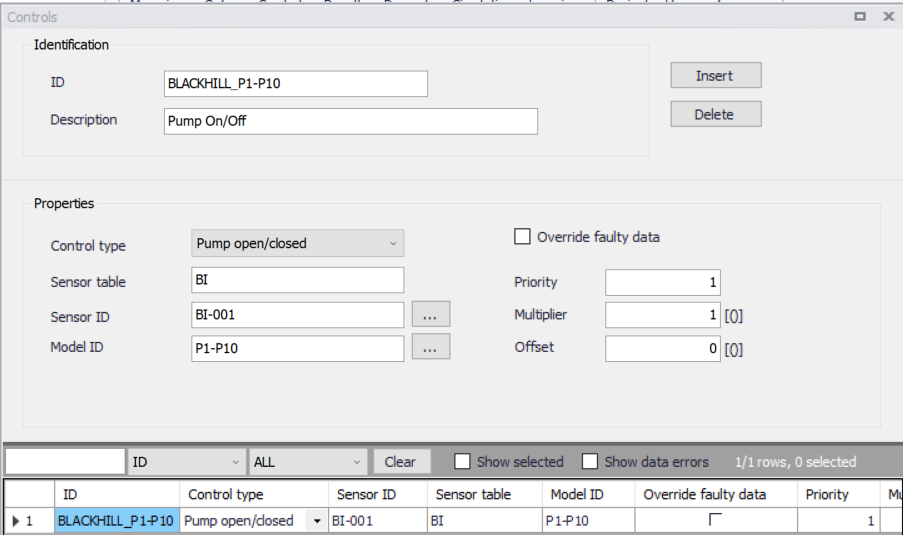
Figure: The Controls editor for the Online analysis
The editor entries are described below.
ID
This is the identification of the control.
Description
User-defined description of the entry.
Is active
This check box allows the user to toggle the Active status of the control on and off.
Sensor ID
This is the SCADA tag name in the table with SCADA data.
Sensor table
This is the name of the table containing SCADA data.
Control type
This list defines how the SCADA data will be used in the automatic model update. The following options are available:
- Tank HGL level
- Pump open/closed
- Open/closed
- PRV valve setting
- PSV valve setting
- TCV valve setting
- FCV valve setting
- Pump speed.
Model ID
This is the ID (MUID) of the hydraulic model element (node or link).
Priority
This data entry defines the rule priority in case multiple rules are used to control the same node or link. The priority is the number 1-5, the highest number has the highest priority.
Override faulty data
This option (when enabled) will use predefined model rules (if any) in case that the SCADA data are flagged as bad quality (Quality = 0).
Multiplier
This entry is the multiplier "k" that will be used to multiply the SCADA value before using it in the model update. The model value = scada value * k + n.
Offset
This entry is the offset "n" that will be added to the SCADA value before using it in the model update. The model value = scada value * k + n.
Example
This configuration will define a link / connection between the model pump "PI-P10" and the corresponding SCADA tag "BI-001" that will be used in the hindcast simulation mode to replicate the pump operations (ON/OFF) based on the telemetry data.
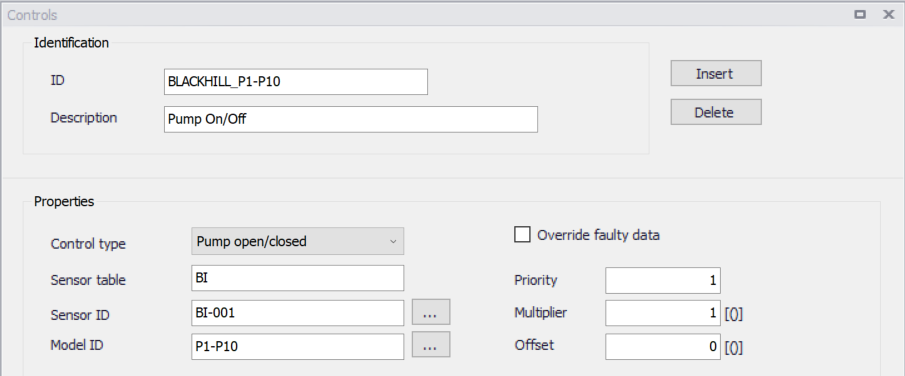
Figure: Example - Controls data input