Groundwater
A sketch of the two-zone groundwater model that is used in EPA SWMM is shown in the figure below. The upper zone is unsaturated at a varying moisture content of q. The lower zone is saturated and therefore its moisture content is fixed at the soil porosity h. The fluxes shown in the figure, expressed as volume per unit area per unit time, consist of the following:
- \(f_{I}\) infiltration from the surface
- \(f_{EU}\) evapotranspiration from the upper zone which is a fixed fraction of the un-used surface evaporation
- \(f_{U}\) percolation from the upper to lower zone which depends on the upper zone moisture content q and depth \(d_{U}\)
- \(f_{EL}\) evapotranspiration from the lower zone, which is a function of the depth of the upper zone \(d_{U}\)
- \(f_{L}\)percolation from the lower zone to deep groundwater which depends on the lower zone depth \(d_{L}\)
- \(f_{G}\) lateral groundwater interflow to the conveyance network which depends on the lower zone depth \(d_{L}\) as well as depths in the receiving channel or node.
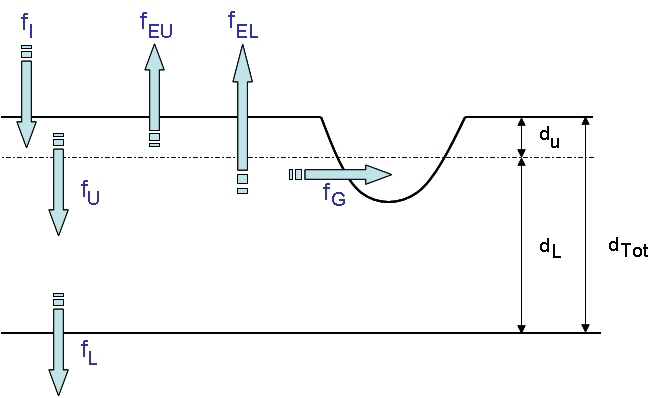
Figure: Groundwater Modelling Concept
After computing the water fluxes at a given point in time, a mass balance is written for the change in water volume stored in each zone so that a new water table depth and unsaturated zone moisture content can be computed for the next time step.
The SWMM Groundwater editor organizes the related input data for Groundwater into the following groups:
- Identification
- Groundwater Properties
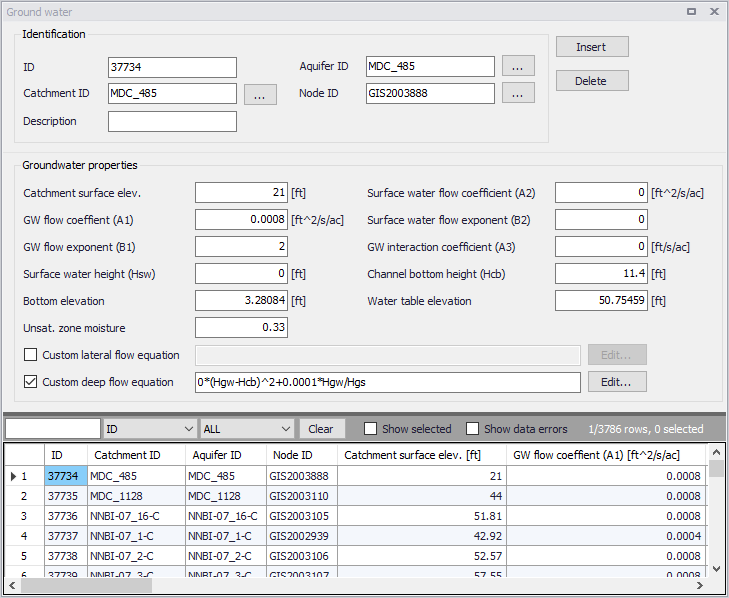
Figure: The SWMM Groundwater editor
Identification
The Identification groupbox of the Groundwater editor holds associated Catchment, Aquifer, and receiving Node information for the groundwater flow parameter set.

Figure: The Groundwater Identification group
| Edit field | Description | Used or required by simulations | Field name in datastructure |
|---|---|---|---|
| ID | Groundwater flow parameter set ID | Yes | MUID |
| Catchment ID | ID of catchment associated with the groundwater flow parameters | Yes | SubCatchID |
| Description | Optional descriptive information for groundwater flow parameters | No | Description |
| Aquifer ID | ID of Aquifer describing subsurface soil properties, thickness, and initial conditions. | Yes | AquiferID |
| Node ID | ID of node receiving groundwater from the catchment | Yes | NodeID |
Table: Edit fields in the Groundwater Identification group (mss_Groundwater)
Groundwater Properties
Define groundwater flow properties on the Groundwater Properties groupbox of the Groundwater editor.
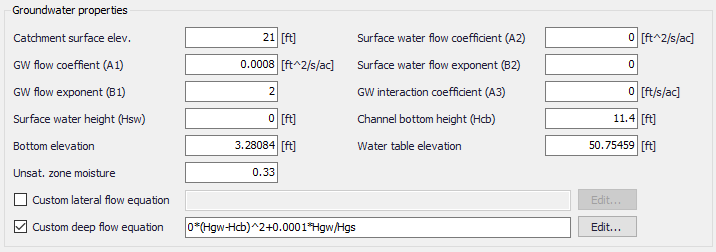
Figure: The Groundwater Properties group
| Edit field | Description | Used or required by simulations | Field name in datastructure |
|---|---|---|---|
| Catchment Surface Elev. | Elevation of the catchment surface | Yes | SurfElev |
| GW Flow Coefficient (A1) | Groundwater flow coefficient A1 in the groundwater flow formula | Yes | A1 |
| GW Flow Exponent (B1) | Groundwater flow exponent B1 in the groundwater flow formula | Yes | B1 |
| Surface Water Flow Coefficient (A2) | Surface water flow coefficient A2 in the groundwater flow formula | Yes | A2 |
| Surface Water Flow Exponent (B2) | Surface water flow exponent B2 in the groundwater flow formula | Yes | B2 |
| GW Interaction Coefficient (A3) | Surface water - Groundwater interaction coefficient A3 in the groundwater flow formula | Yes | A3 |
| Surface Water Height (Hsw) | Fixed level of surface water | Yes | Hsw |
| Channel Bottom Height (Hcb) | Level of receiving node invert | Yes | Hcb |
| Bottom Elevation | Elevation of the bottom of the aquifer below this particular catchment. Leave blank to use the value from the parent aquifer | Yes | BottomElev |
| Water Table Elevation | Initial water table elevation at the start of the simulation for this particular catchment. Leave blank to use the value from the parent aquifer. | Yes | WTElev |
| Unsat. Zone Moisture | Moisture content of the unsaturated upper zone above the water table for this particular catchment at the start of the simulation (volumetric fraction). Leave blank to use the value from the parent aquifer. | Yes | UZoneMoisture |
| Custom Lateral Flow Equation | Option to use a user-defined groundwater flow equation for lateral groundwater flow (QL). The equation will be used in addition to the standard equation to compute groundwater outflow from the subcatchment. | No | LateralFlowEquation |
| Custom Deep Flow Equation | Option to use a user-defined groundwater flow equation for deep groundwater flow (QD). The equation will be used to replace the standard equation for deep groundwater flow. | No | DeepFlowEquation |
Table: Edit fields in the Groundwater Properties group (mss_Groundwater)
Custom Groundwater Flow Equations
Tick on the associated checkboxes to define and use custom groundwater flow equations.

Figure: Define custom groundwater flow equations on the Groundwater editor
Click on the ‘Edit’ buttons to access the Custom Groundwater Flow Equation dialog, where one may define an equation in the input box.
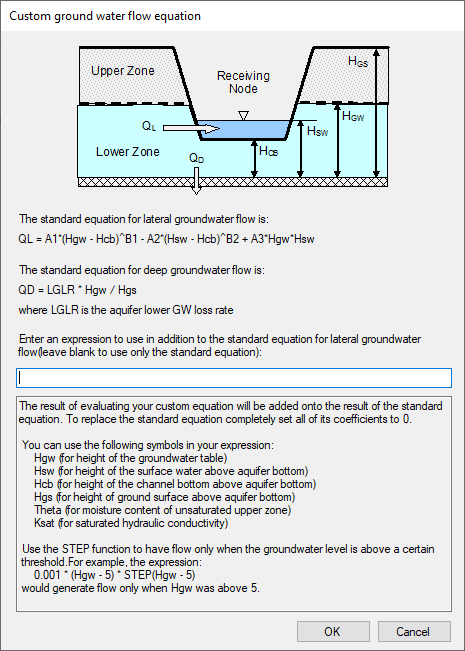
Figure: The Custom Groundwater Flow Equation dialog