Water Quality Boundary Condition Properties
This editor is only available if Water Quality module is active. Water can transport other material such as pollutants, heat, organisms, as well as other properties, such as pH, conductivity, turbidity, etc. The transport of these properties may be modelled in MIKE+, requiring definition of these WQ properties associated with water load boundary conditions. WQ boundary properties for boundary conditions for CS and River network models are defined in the WQ Boundary Properties editor.
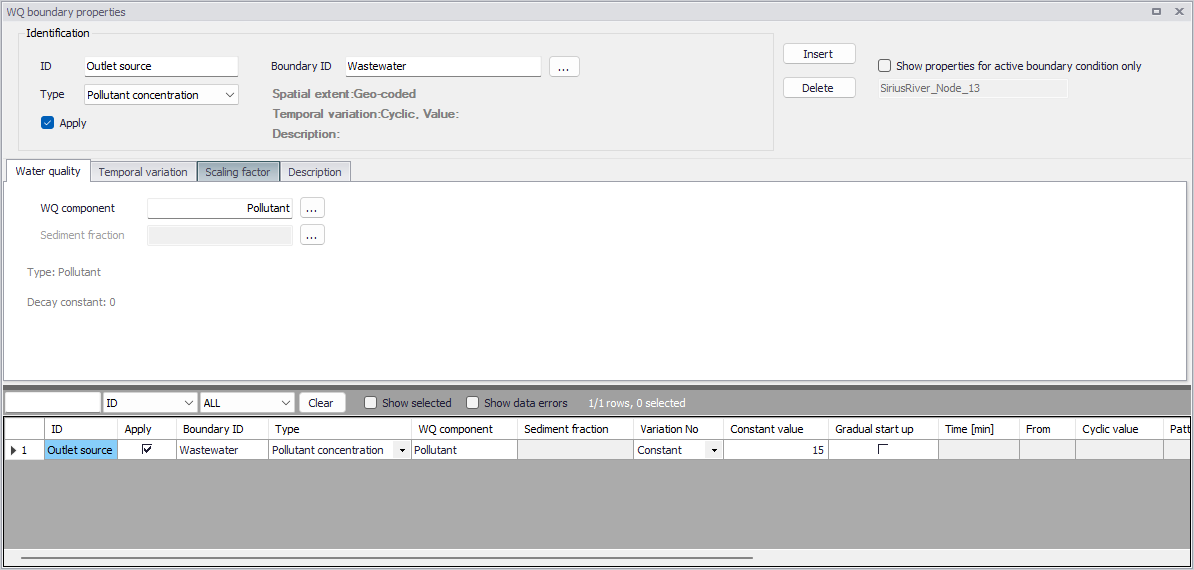
Figure: The WQ Boundary Properties editor
Identification
The top section of the WQ Boundary Properties editor contains the Identification group box where one defines general properties of WQ boundary setups.

Figure: The Identification group box in the WQ Boundary Properties editor
To define a WQ boundary property in the project:
-
Use the 'Insert' button to add a new WQ boundary property to the editor.
-
One may edit the ID for the newly-added WQ boundary property to make it more descriptive.
-
Associate the WQ property to an HD boundary condition via the 'Boundary ID' input box. Click on the ellipsis button to access the Selector window, which lists existing HD boundary conditions that may be associated with WQ properties.
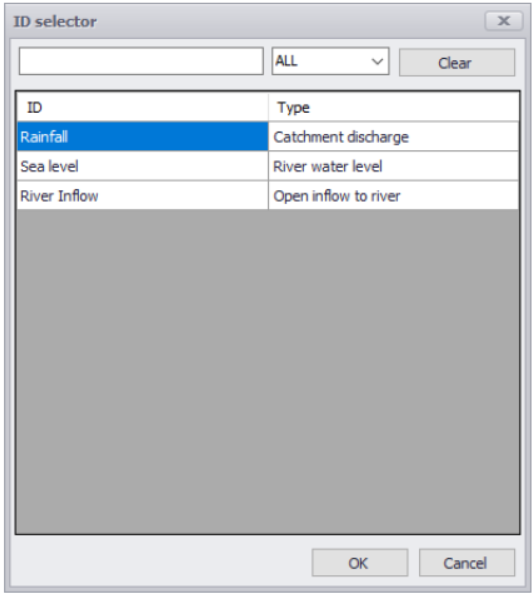
A WQ boundary property must be connected to a hydraulic boundary condition. A hydraulic boundary condition can be used with a hydraulic load set to 0 to only add a Pollutant Load or Sediment Load.
-
Define the WQ property Type from the drop-down list of possible types, which is associated with the WQ Component defined in the Water Quality tab page.
-
Define the WQ Component for the WQ boundary property in the Water Quality tab page of the editor.
-
Furnish information in the other tab pages of the editor as needed.
The top part of the editor also presents options for filtering the WQ boundary properties displayed in the editor.
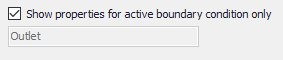
Use the 'Show properties for active boundary condition only' option to display only the WQ properties associated with the active HD boundary condition in the Boundary Conditions editor. The ID for the active HD boundary condition is displayed in the text box below the option. If the option is inactive, all WQ boundary properties are shown in the editor
The available types of WQ properties are described below.
Pollutant concentration or load
The pollutant will be added with the concentration or load specified on the Temporal Variation tab.
Microorganism
The component is added as a micro-organism load, used for bacteria and pathogens.
Temperature
The component represents the temperature, the unit will be adjusted according to the unit system specified for the model.
pH
The component is related to the water pH, a measure of how acid or basic the water is.
Salinity
The component will reflects the measure of salts dissolved in water.,
Water Age
This option allows for water with specified age to enter the network.
Water Blend
This option allows for water with specified mixing ratio to enter the network.
Other Type of AD component
The property type 'Other' can be used in combination with WQ components defined with the type 'Other' in the 'WQ components' editor. This type is to be used for component types not available in the predefined list of types, in the 'WQ components' editor.
Sediment concentration
The sediments will be added with the concentration (mass/volume) specified on the Temporal Variation tab.
The simulation engine will multiply the water discharge at the boundary location to define the total mass entering the network at the boundary location.
Sediment load
The sediments will be added with the load (volume/time) specified on the Temporal Variation tab.
The specified load is directly applied in the simulation and the water discharge at the boundary location is hence not used to determine the mass inflow to the model.
Bed level
This property describes the elevation of the bed (surface of the sediments layers) at the boundary. For this type of boundary property, no sediment fraction needs to be specified (the boundary property applies to the boundary as a whole, no matter how sediment fractions are distributed at this location).
This type of property is only supported for open boundaries (network ends), but not for e.g. sources along the network.
Bed level change
This property describes the relative change of bed level (surface of the sediments layers) at the boundary. For this type of boundary property, no sediment fraction needs to be specified (the boundary property applies to the boundary as a whole, no matter how sediment fractions are distributed at this location).
This type of property is only supported for open boundaries (network ends), but not for e.g. sources along the network.
Mixing
This option can be applied for boundaries where outflows from the model area take place, and where the boundary can become an inflow during the simulation (e.g. due to tidal conditions). When enabling the mixing property for a boundary condition, when the boundary becomes an inflow, the concentration at the boundary is not null but is estimated as a function of the concentration back in time when the boundary was an outflow. This is estimated using the halving time specified in the 'Mixing' tab,
The 'Apply' check box allows the user to toggle the Active status of the WQ boundary on and off. The simulations will omit all WQ boundary conditions that are not active.
Water quality
Define WQ Components associated with WQ boundary properties in the Water Quality tab page of the editor.
Possible components are listed in the ID Selector window accessed via the ellipsis button. The dialog lists components that have been defined in the WQ Components editor.
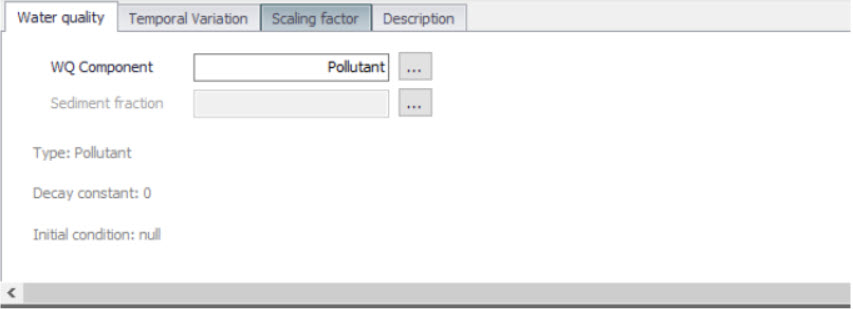
Figure: The Water quality tab in the Water Quality editor
The Sediment Fraction setup associated with a WQ boundary property used in Sediment Transport computations is also defined in the Water Quality tab page. The ellipsis button presents a selector window listing sediment fraction definitions in the Sediment Fractions editor.
Temporal Variation

Figure: Temporal variation tab in Water Quality editor
A water quality boundary condition can have a different temporal variation than the hydraulic boundary condition it is connected to. It can be constant, cyclic, a time series temporal variation, table concentration and SWQ.
Dependent on the water quality type, the units are representative and automatically updated.
If a cyclic temporal variation is to be applied, a pattern is also needed.
The Time-series temporal variation requires a compatible time series file for input. The standard time-series file format is ‘.DFS0’.
The table concentration allows to specify a variation of pollutant loads based on a runoff -concentration varying relation.
The temporal variation can also be defined through a Storm Water Quality method, build-up/ wash-off or EMC, for more details please refer to the Water Quality Module.
Scaling factor
The scaling factor allows to add a global factor to the load. The Default value is 1.
Mixing
This option can be applied for boundaries where outflows from the model area take place, and where the boundary can become an inflow during the simulation (e.g. due to tidal conditions).
When the boundary becomes an inflow, the concentration at the boundary is adjusted according to:
(7.11) 
Where:
\(C_{bf}\) is the concentration specified at the boundary location
\(C_{out}\) is the computed concentration at the boundary immediately before the boundary became an inflow
\(t_{mix}\) is the time since the boundary became an inflow
\(k_{mix} = \ln(2)/T_{halving}\)
\(T_{halving}\) is the user-defined time specified in the 'Mixing' tab.
When outflows occur at the boundary, the boundary condition is defined as:
(7.12) 
Description
The Description tab allows the user to add text data to the specific WQ boundary condition.