Pump Stations
The Pump Stations editor allows to group pumps into pump stations. The purpose is to report pump energy costs per station, in the Cost Analysis.
A pump station is represented by a polygon on the map, and simply contains a list of pumps (defined in the 'Pumps' editor). New pump stations should preferably be added from the map, using the drawing tools to draw a polygon encapsulating the various pumps to be included in the station.
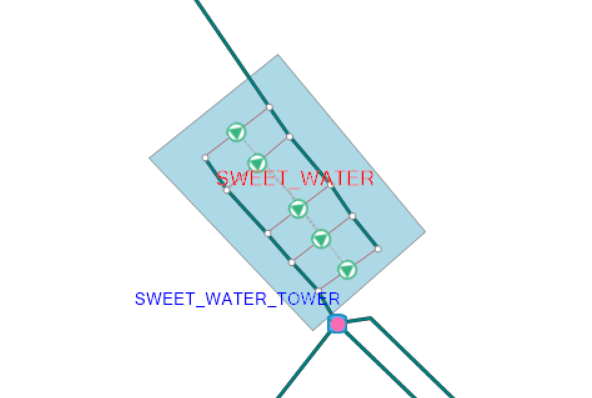
Figure: A pump station polygon grouping several pumps together
Once the pump station has been inserted, all pumps to be included in this station need to be added using the 'Insert' button. They can be removed using the 'Delete' button.
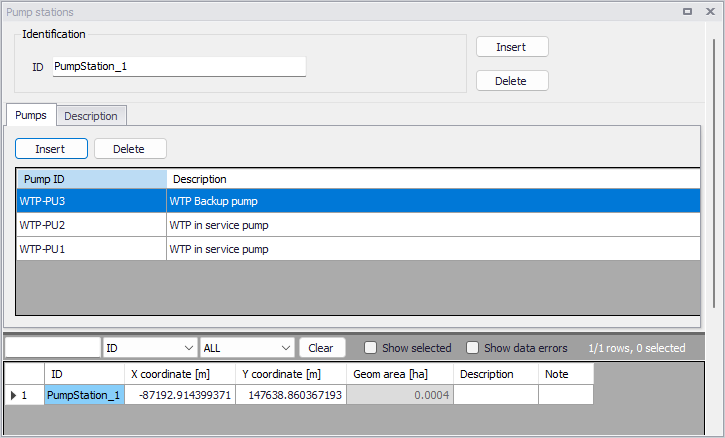
Figure: Listing the pumps belonging to a pump station
From the 'Description' tab, it is possible to add optional text descriptions of the station, and attach a picture of the station.
When running a 'Cost analysis' special analysis, its report will contain a summary per pump station. Note that, in this report, the Efficiency and the Energy/volume for the pump station are computed using only the pumps which are actually used during the simulation (i.e. with a utilization higher than 0% of the time).