Orifices
Orifices are openings in a wall of a manhole junction or storage unit used to model outlet and diversion structures in drainage systems. Orifices belong to the group of Link components connecting two nodes. An orifice can have either a circular or rectangular shape, be located either at the bottom or along the side of the upstream node, and have a flap gate to prevent backflow.
Orifices attached to storage units are active under all types of flow routing.
Those attached to other types of nodes are active only under Dynamic Wave flow routing; otherwise the flow through them is zero.
The flow through an orifice is computed based on the area of its opening, its discharge coefficient, and the head difference across the orifice. The area of an orifice's opening can be controlled dynamically through user-defined control rules.
The Orifices editor organizes the related input data into the following groups:
- Identification. General identification and connectivity information
- Geometry. Geometric data for an orifice
- Hydraulic Properties. Orifice hydraulic parameters
- Description. Optional descriptive information about the element. Also includes an option for adding images of the structure.
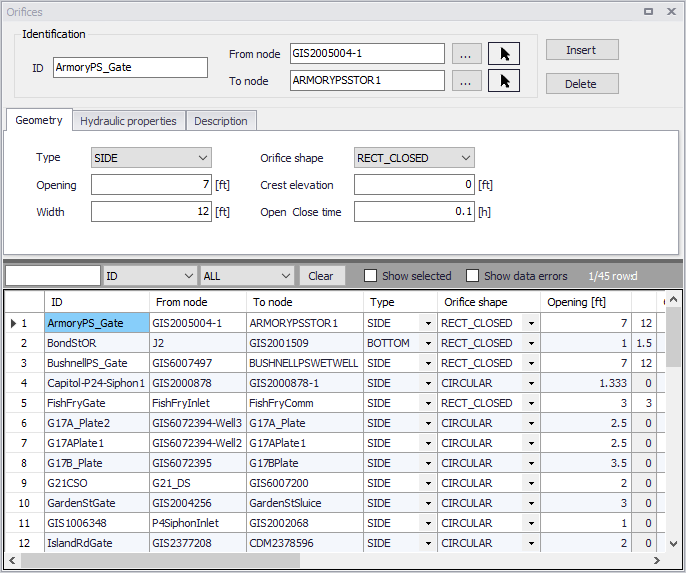
Figure: SWMM Orifices editor
Identification
The identification groupbox holds information on the element ID and connectivity. Use the Insert or Delete buttons to add or remove records from the editor, respectively.

Figure: Orifices Identification groupbox
| Edit field | Description | Used or required by simulations | Field name in datastructure |
|---|---|---|---|
| ID | Id of the Orifice | Yes | MUID |
| From Node | Node location of orifice | Yes | FromNodeID |
| To Node | Downstream node | Yes | ToNodeID |
| Description | |||
| Description | Descriptive information related to the structure | No | Description |
| Data Source | Reference to an external data source from which the record was imported | No | DataSource |
| Asset ID | Id in the asset management system | No | AssetName |
| Status | Status from a user- specified list in the Status Codes editor | No | Element_S |
| Network Type | Type of network i.e Stormwater, Combined or separate. The list of network types can be extended by the user. Network type can be specified for each element. | No | NetTypeNo |
| Tag | Optional label used to categorize or classify the orifice | No | Tag |
Table: Edit fields in the Orifices Identification groupbox and Description tab (mss_Orifice)
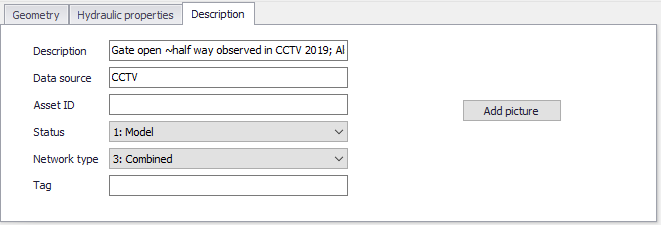
Figure: Orifices Description tab
Geometry
Specify geometric properties for orifices on the Geometry tab page.
| Edit field | Description | Used or required by simulations | Field name in datastructure |
|---|---|---|---|
| Type | Type of orifice: SIDE or BOTTOM | Yes | TypeNo |
| Orifice Shape | Shape of the orifice opening: CIRCULAR or RECT_CLOSED | Yes | ShapeTypeNo |
| Opening | Height/Diameter of orifice opening | Yes | Height |
| Width | Width of orifice when fully open | Yes, if Orifice shape is RECT_CLOSED | Width |
| Crest Height/Elevation | Offset height of orifice bottom from invert of upstream node | Yes (if Orifice Type is BOTTOM then Crest Height is set zero in SWMM engine) | CrestHeight |
| Open/Close Time | Time it takes to open or close a gated orifice in decimal hours | Yes | TimeToOpenClose |
Table: Edit fields in the Orifices Geometry tab (mss_Orifice)
Hydraulic Properties
Define hydraulic flow properties for orifices on the Hydraulic Properties tab page of the editor.
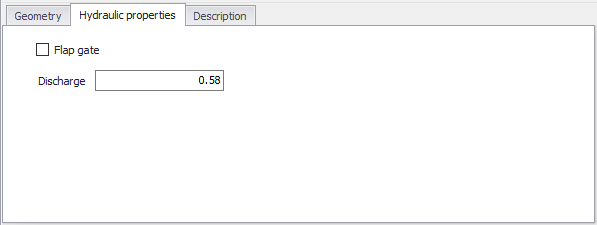
Figure: Orifices Hydraulic Properties tab
| Edit field | Description | Used or required by simulations | Field name in datastructure |
|---|---|---|---|
| Flap Gate checkbox | Option to add a flap gate preventing reverse flow through the orifice | No | FlapGateNo |
| Discharge Coeff | Orifice discharge coefficient. A typical value is 0.65. | Yes | DischargeCoeff |
Table: Edit fields in the Hydraulic Properties tab (mss_Orifice)