Cloning the MIKE+ Database
This functionality creates a new database of the specified type and populates it with the data contained in the selected source database.
For the difference with "Project|Save as", this operation does not create a new MIKE+ project file (*.mupp), but only a database. Cloning also skips damaged tables, which can be useful to repair a damaged database.
Cloning is also useful as data backup and/or when migrating between different database formats (SQLite -> PostGIS or PostGIS-> SQLite).
To clone a MIKE+ database:
- Choose File\Database\Clone database...
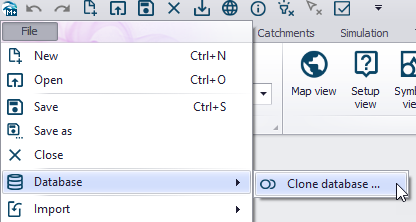
Figure: Accessing and activating the database cloning functionality
- Choose the source database type
- Select the source database, if not using the currently opened one
- Choose the target database type
- Browse the location to store the database clone and specify the new database name
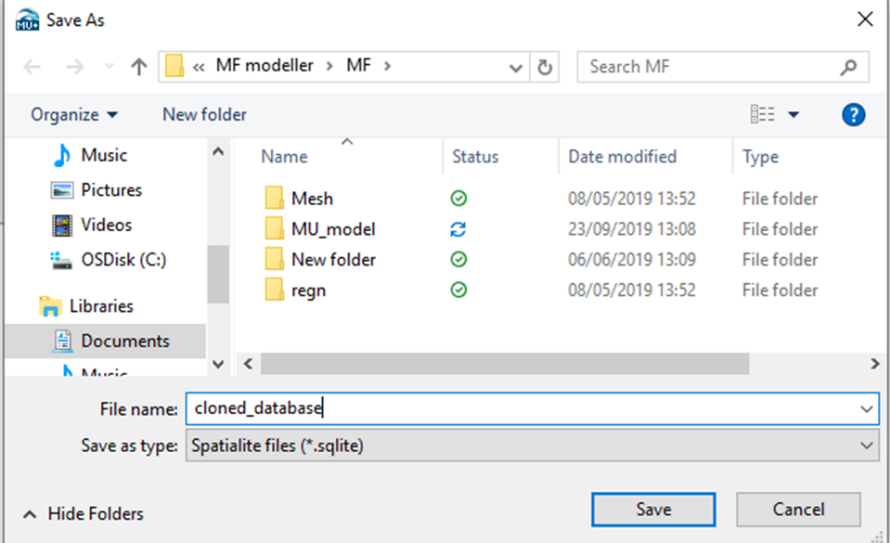
Figure: The database clone is saved at a location and name specified by the user
- Press the 'OK' button to clone the database
Note
Creating a new PostGIS database requires adequate user privileges.