Multiple Trace Node Analysis
Tracing nodes allows to track overt time what percent of water reaching any node in the network had its origin from a specified node (i.e. junction, tank or reservoir). This tool is useful for analysing a network distribution system that draws water from two or more different raw water supplies. Then it is possible to show to which extend water from a given source blends with that from another source, and how the spatial pattern of this blending changes through the simulation time.
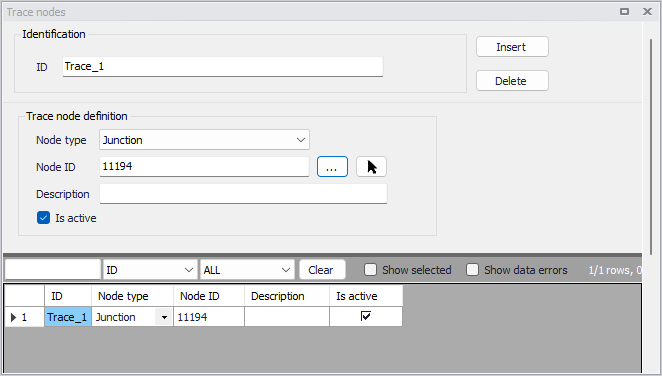
Figure: Point constituent source editor
The 'Trace nodes' editor contains the following attributes.
ID
This is the main identifiier of the trace node.
Node Type
This pull-down selection list allows to select what type of node (i.e., junction, reservoir, or tank) the trace node is being specified for.
Node ID
This defines the ID of the node the trace node is assigned to. It is possible to select the node ID from the node list or by selecting directly on the map.
Description
This field allows to enter a description identifying the simulation defined. The description can be output in reports.
Is active
This check box allows to toggle the Active status of the trace node on and off. The simulations will omit all trace nodes that are not active.
Multiple tracing blending
When there are more than two trace nodes defined, the source tracking simulation will be run on a one-by-one basis for each water source, all results are further combined and the fraction from water source is computed and presented in the map, as shown on the example below.
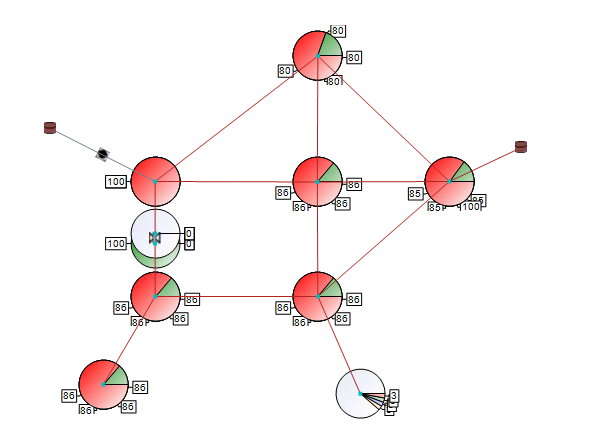
Figure: Multiple source blending (detail from the supply zone, colour shows water from different water sources)