Export Results to Shapefiles
Export MIKE+ simulation result layers to shapefiles via the 'Layers and Symbols' panel for the main map, or the table of content for a Result map.
From main Map
Right-click on a result layer item on the Map via the 'Layers and Symbols' panel to access the local context menu. Select ‘Export...’ and then ‘Export layer to shapefile’. Specify the name of the shapefile and click on ‘Save’.
This will export the selected results layer to a shapefile. The exported shapefile contains the layer geometry, the simulated result item value, and the unique MUID.
When only some items are selected on the map, the option to export only the selected items from the layer is also enabled.
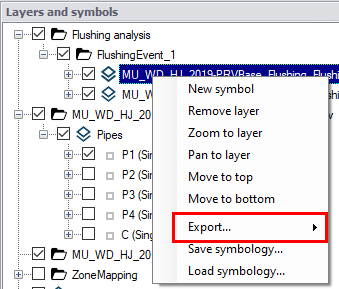
Figure: The export option available from result layers
For river models, it is also possible to export a shapefile with the cross sections layer, and with water level results in these cross sections. In the result file, cross sections are saved in the links result layer, therefore this option is only available from a link result layer and when displaying its water level result.
It is possible to export only some cross sections results using the option 'Export selected cross sections to Shapefile'. To enable this option, some rivers from the result layer must be selected first: all cross sections from these selected rivers will be exported.
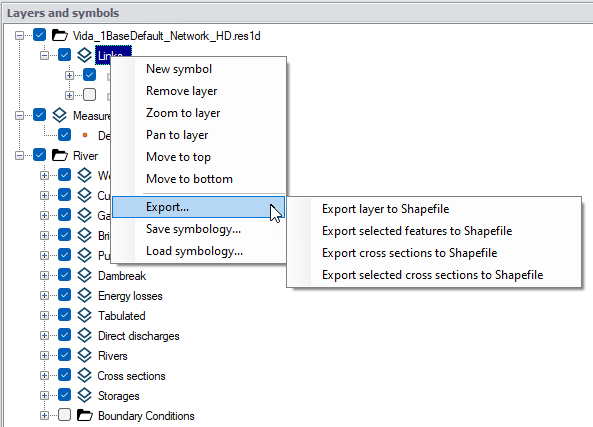
Figure: The options to export water level results from the river cross sections layer
For 2D overland models, it is possible to export vectors and/or isolines.
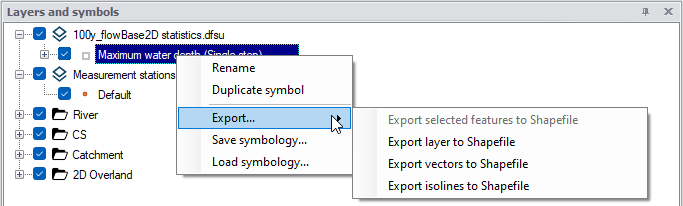
Figure: The options to export 2D overland vectors or isolines
From a Result Map
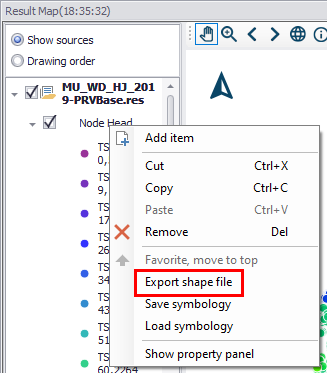
If you have created a result map plot from simulation results (See Displaying Results on a Map), right-click on a result layer on the left panel to access the context menu. Select ‘Export shapefile’. Specify the name of the shapefile and click on ‘Save’.
For river models, it is also possible to export a shapefile with the cross sections layer, and with water level results in these cross sections. In the result file, cross sections are saved in the links result layer, therefore this option is only available from a 'Link water level' result layer.