Submodel Manager
Introduction
The 'Submodel Manager' tool is used to split and combine models in an easy manner. The tool was designed for cases where a detailed model exists within a large area (city-wide model), while the issue to be analysed by the model is only in one small area. Therefore, a simplified model can be created (e.g. using the simplification tool) and then parts of the detailed model and simplified model can be combined. i.e. detailed area of interest with the remainder of the model being simplified to account for upstream and downstream effects.
An additional use for the submodel manager tool is when distributing modelling resources. Modellers can work on different sections of a larger model and then use the submodel manager to combine the final model together.
Based on user specified polygons, different models are split into submodels of the network. The desired submodels can be merged into a new model containing one version of an area from the original models e.g. a detailed or simplified submodel. The tool has two main functionalities:
- Extract submodels
- Merge submodels
An example of the submodel manager concept is shown in the figure below, where two original models are split into submodels based on polygons and then a different combination of submodels are merged together to create a new model.
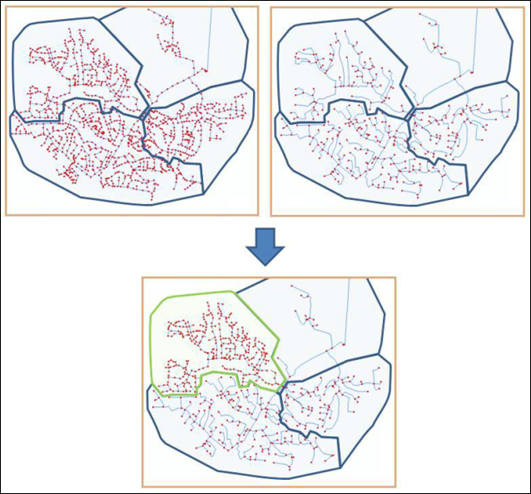
Figure: Submodel manager concept
A submodel will contain all nodes inside the submodel polygon and all elements connected to these nodes even if they are outside the polygon (e.g. catchments). Areas that cross the borders defined by the polygons must be identical in the models (detailed and simplified version of the model area) to be able to be merged later. It is possible to create a selection file of elements that exist in more than one submodel. Before merging, it is important to make sure IDs between the models are unique.
The two options are detailed in the following sections. They can be executed separately or in sequence.
Extract Submodels
A model can be extracted from a base model based on a polygon background layer in MIKE+. Every polygon must contain a unique ID which will be used as a reference to the individual submodel. The background layer must cover the entire model area and the polygons should only intersect with pipes, structures and connections (catchments, demands etc.).
A submodel will contain all junctions, pipes etc. inside the polygon and all elements connected to these junctions. e.g. a zone located outside the submodel polygon will still be included in the submodel if it is connected to a junction located inside the submodel area.
In order to extract the submodel, a polygon layer and submodel ID must be provided to specify the extent and name of the submodel. The directories for the detailed and simplified submodels in the dialog specify where the created submodels will be located. If the directory is specified without a full path the directory is a relative path to the database currently loaded in MIKE+.
In the 'Extract' tab the detailed and simplified models must be specified. The selected polygon shape under the selection tab defines the area for submodel #1, which is the submodel to be extracted. Submodel #2 is given by region outside the selected polygon. To create the submodel, add a name for the selection list and click on ‘Create and clip submodels’.
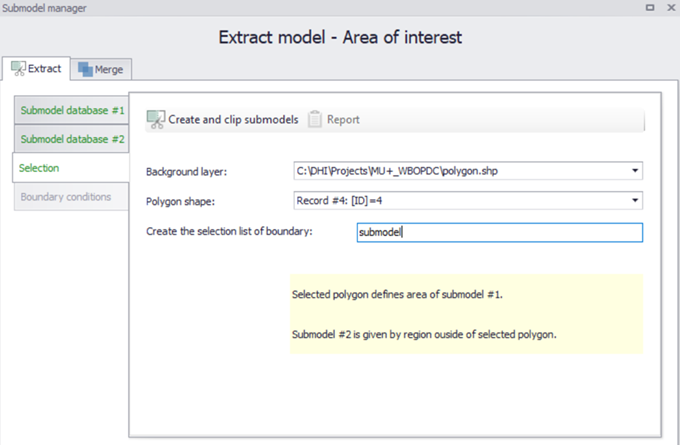
Figure: Extracting submodels
It should be noted that the created submodels do not function as individual models but parts for a complete model. Hence a submodel may not be valid for a simulation without further manual editing.
Merge Submodels
When merging submodels the same polygon layer that was used to extract sub models should be loaded into MIKE+. For each polygon, the user needs to specify which model to use within the area. E.g. from the detailed or simplified model.
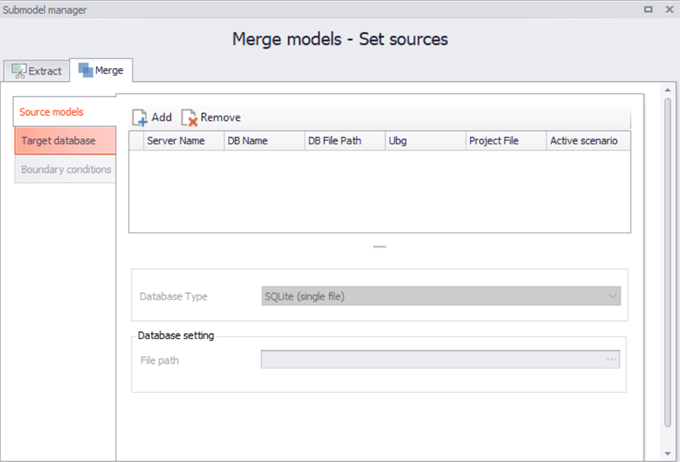
Figure: Merging submodels
In order to merge submodels, Click on Merge within the sub model manager dialog as shown in the above figure. The source models must be added (Add button), along with a new file path / name. The target database must be specified. Then click on ‘Create and Merge’ and a report file can be produced and exported through the Report tab. The report will include information of when the model was created and which version of each submodel was used.
If the location of the submodels is specified without a full path the directory use a relative path to the database currently loaded in MIKE+.
When a new model is created, it is based on a combination of submodels originating from the detailed model and from the simplified model. In order to ensure that the individual submodels fit together in both versions there are some limitations to which changes are allowed between the detailed and simplified model.