Time Patterns
MIKE+ uses EPANET as its numerical engine for hydrodynamic and water quality simulations. This engine assumes that water usage rates, external water supply rates and constituent source concentrations at nodes remain constant over a fixed period of time, but that these quantities can change from one time period to another. The default time period interval is one hour, but this can be set to any value. The value of any of these quantities in a time period equals a baseline value multiplied by a time pattern factor for that period. Following it is illustrated a pattern of factors that might apply to daily water demands, where each demand period is of an hour duration. Different patterns can be assigned to individual nodes or groups of nodes.
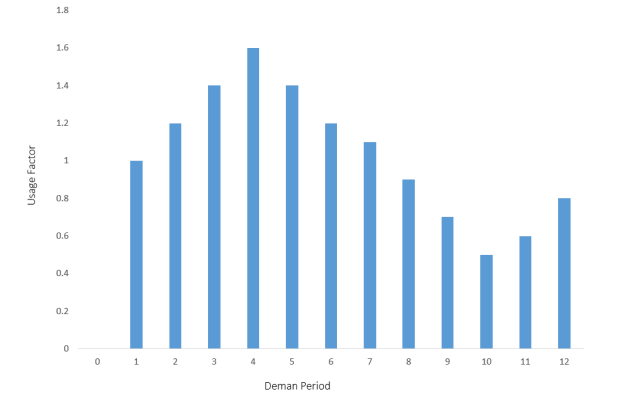
Figure: Time pattern for water usage
Patterns
Patterns are used to define diurnal profiles as series of multipliers (multiplication factors applied to a baseline value of junction node demand, constituent source concentration, storage water level). The diurnal profiles settings can be accessed from the Patterns tab.
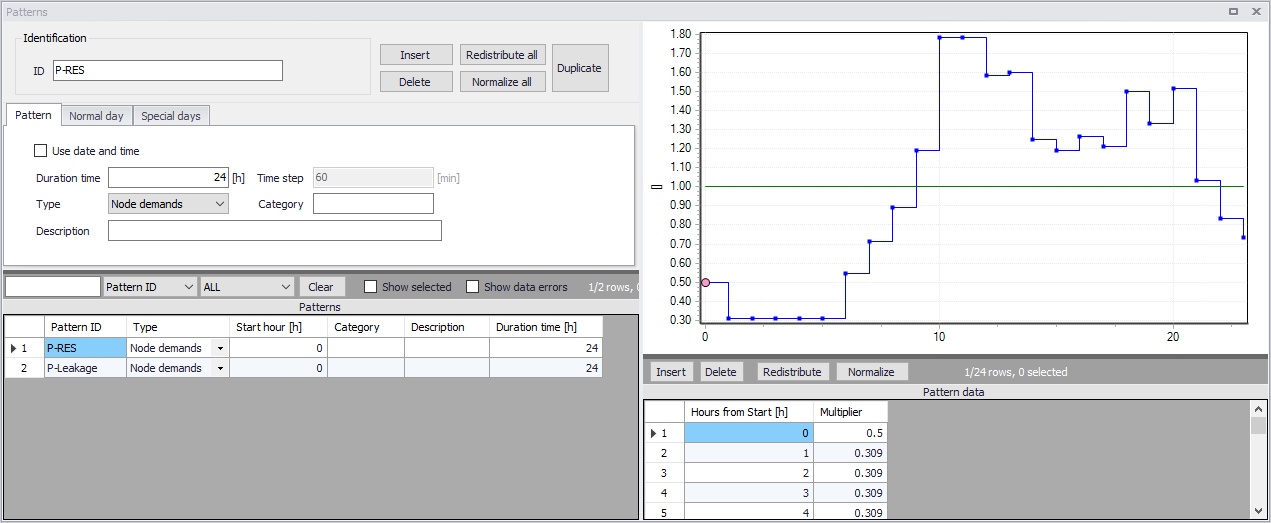
Figure: Diurnal Pattern
Patterns are defined with the following attributes:
- Pattern ID: This data entry is used to specify the ID of component being defined. The pattern ID value can be any string value (up to 40 characters). There is no limit to the number of demand patterns that can be defined.
- Use date and time: ‘Use date and time’ sets whether the absolute date and time will be used for each and every multiplier, instead of the default format 'Hours from start'.
- Time Step: The pattern time step specifies the length of time between each pattern change (i.e., the period of time over which water demands and constituent source strengths remain constant). To change the pattern time step, use the field Pattern time step specified in the ‘Simulation setup’ editor (see figure below).
- Duration time: The duration is used when redistributing the pattern data: in that case, the duration time and time step control the number of records in the pattern data table.
- Type: The available types are Node demands, Water quality, Tank water, Energy Price, Pump relative speed or Undefined. The selected type controls how and where the pattern can be applied.
- Category: An optional user-defined category description.
- Description: This data entry allows the user to enter a category that further define the demand pattern. For example, a demand might have the description of a residential, and a category of either high density, medium- density or low density to further define what is meant by residential.
- Redistribute: The 'Redistribute' buttons fills the pattern data with a fixed time interval corresponding to the pattern time step, and with the specified duration. Use this button to fill the pattern table with initial values, or when the pattern time step or duration was changed and you want to adjust the pattern accordingly.
- Normalize: The 'Normalize' button adjusts the pattern multipliers so that their average value equals “1”. Note, that this will change the pattern values (multipliers) but it will not change their count. Normalization of patterns is useful when you want to create a typical daily demand patterns.
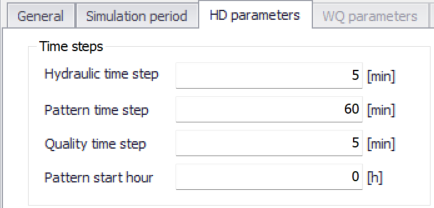
Figure: Pattern time step in the ‘Simulation setup’ editor
Normal Day
Normal days are understand as usual schedule days in which the consume of water shall not vary significantly. The contends for days are weekly defined days; Monday, Tuesday, Wednesday, Thursday, Friday, Saturday and Sunday. For months the items are: January, February, March, April, May, June, July, August, September, October, November and December.
There is an option to add factors to specific days, default value is one 1. When the factor is modified, MIKE+ will find the multipliers that correspond to the “Day” or “Month” based on “hours from simulation” and the Simulation Day set in time settings, further this factor will be applied to those multipliers.
Special Days
It is possible to define factors for special days (e.g. Holidays) in which the water demand pattern varies from normal days. These days can be defined in the special days table. The factor specified for Special Days has a higher priority than the day and month factors in Normal Days. When the date meets holiday, pattern would use the factor in the special days table instead of using ones of normal days.