Spatial Processing Tools
The Catchment Toolbox also offers specialised tools i.e. for Spatial Processing. These are accessed via the ‘Special tools’ menu on the Catchments ribbon.
Spatial analysis tools allow the user to perform several GIS-processing operations on various polygon and line layers available in the project. These layers are either model element layers, or shapefile layers loaded into the project.
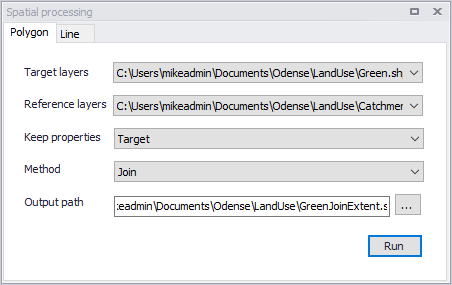
Figure: The Spatial Processing dialog
Polygon
Operations such as Merge and Clip may be performed between various polygon layers. The analysis results are saved in a new shapefile and automatically loaded into the project as a new layer. It may also be imported as a model element feature.
| Parameter | Description |
|---|---|
| Target layers | Polygon feature to be modified (i.e. to which the operation will be done) |
| Reference layers | The second polygon layer used in modify the target layer |
| Keep properties | Information on the feature attributes used for resulting layer |
| Method | Dropdown menu for selecting spatial operation to use: Clip = Extracts from target the areas intersecting the reference. Features in target not intersecting the reference are also kept. Erase = Removes from target the areas intersecting the reference. Merge = Features in both layers combined, where intersecting features are fused in new features. Join = Extracts from target the areas intersecting the reference. |
| Output path | Use the ellipsis button “...” to specify the path and file name for the resulting feature layer from the operation |
| Run button | Button for executing the spatial processing |
Table: Parameters for Polygon Spatial Processing
Line
Operations such as Merge and Clip may be performed between various polygon layers. The analysis results are saved in a new shapefile and automatically loaded into the project as a new layer. It may also be imported as a model element feature.
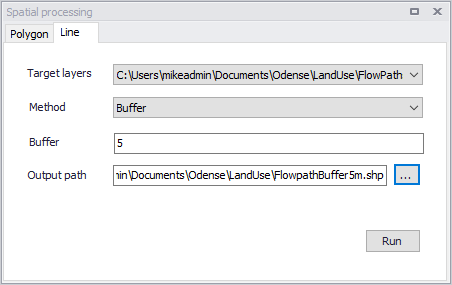
Figure: Spatial processing for lines
| Parameter | Description | Usage |
|---|---|---|
| Target layers | Line layer to be modified (i.e. to which the operation will be done) | Yes |
| Method | Dropdown menu for selecting spatial operation to use: Buffer = Creates buffer polygons around target layer features according to a buffer distance. To Polygon= Converts the line features to polygons. Note that polyline features must be closed with overlapping start- and end-vertices to be converted to polygons. | Yes |
| Buffer | Distance around the line features that will be buffered. | If Method = Buffer |
| Output path | Use the ellipsis button “...” to specify the path and file name for the resulting feature layer from the operation | Yes |
| Run button | Button for executing the spatial processing | - |
Table: Parameters for Line Spatial Processing