Time-Area Method (A)
The Time-Area Method is a simple surface runoff model with minimum data requirements. The runoff computation is based on a simple treatment of hydrological losses and the runoff routing by the so called Time-Area curve. Technical details on the method can be found in the MIKE 1D Reference Manual.
Model Data
A full overview of the editor fields and corresponding attributes is provided in the table below.
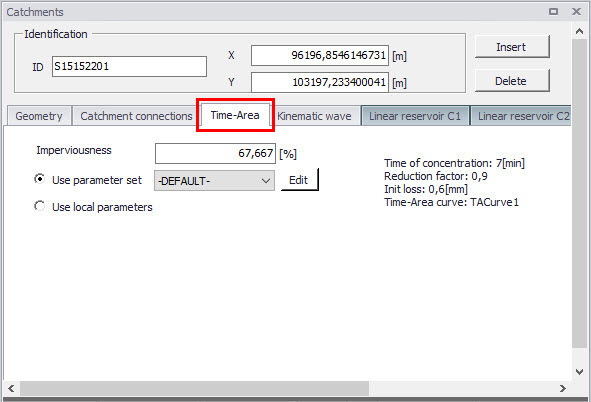
Figure: The Time-Area Model tab
| Edit field | Description | Used or required by simulations | Field name in datastructure |
|---|---|---|---|
| Imperviousness | Impervious catchment area, as percent of the actual model area | Yes | ModelAImpArea |
| Use Parameter Set | Reference to a set of model parameters to be used for the current catchment | Yes | ModelAParAID |
| Use Local Parameters | Allows for local use of individual parameters | Optional | ModelALocalNo |
Table: Overview of the Time-Area Model attributes (table msm_Catchment)
Parameters Time-Area
The Time-Area model uses several parameters. For practical reasons, these parameters have been grouped in parameter sets, which can be associated with certain catchments. This means the entire model setup can be established with a very small amount of information, while still allowing for full spatial variation of model parameters for individual catchments through the application of local values.
New parameter sets can be inserted and values of individual parameters can be edited in the Parameters Time-Area Editor.
MIKE+ comes with a Default parameter set (-DEFAULT-). The User can insert any number of parameter sets and edit them as needed.
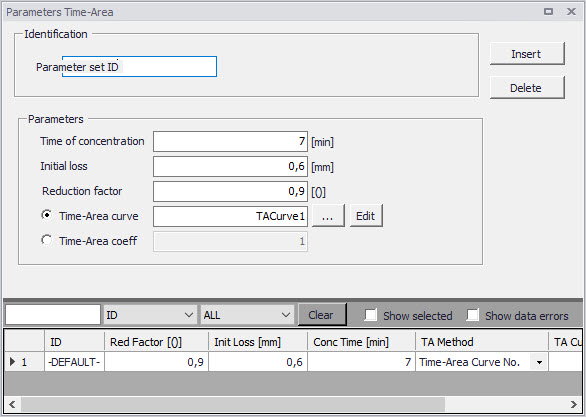
Figure: The Time-Area Parameter Sets editor (Catchments|Parameters Time-Area)
A full overview of the editor fields and corresponding database attributes is provided in the table below.
| Edit field | Description | Used or required by simulations | Field name in datastructure |
|---|---|---|---|
| Parameter Set ID | Parameter set identifier | Yes | MUID |
| Time of Concentration | Concentration time | Yes | ConcTime |
| Initial Loss | Initial loss (wetting, interception, local depressions…) | Yes | InitLoss |
| Reduction Factor | Hydrological reduction factor | Yes | RedFactor |
| Time-Area curve/coefficient radio buttons | Switch for use of predefined tabulated T-A curves or analytically computed T-A relation | Yes | TAMethodNo |
| Time-Area Curve | Predefined T-A curve ID | Optional, alternates with TACoeff | TACurveID |
| Time-Area Coeff. | Value of the analytical T-A curve coefficient | Optional, alternates with TACurveID | TACoeff |
Table: Overview of the Time-Area Parameter Set database attributes (table msm_HParA)
Time-Area Curve Editor
The Time-Area model uses (except if analytical curve is applied) predefined tabulated time-area curves. A Time-Area curve represents the contributing part of the catchment surface as a function of time. Implicitly, the Time-Area curve accounts for the shape of the catchment in relation to the outlet point.
MIKE+ comes with three Default Time-Area curves: TACurve1, TACurve2, and TACurve3, applicable for rectangular, divergent and convergent catchments, respectively (see the figures below).
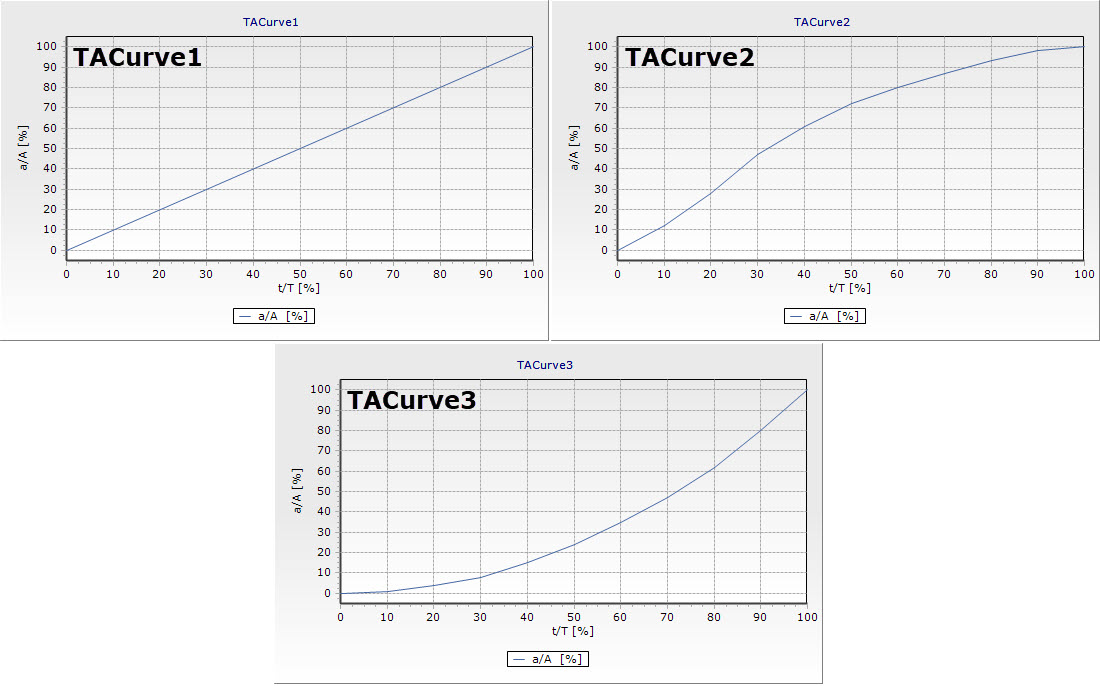
Figure: Three Default Time-Area curves
You can define any number of custom Time-Area curves. These can be inserted and edited in the editor for Curves and relations (Tables|Curves and Relations). Each Time-Area table must start with a pair of values (0,0) and must end with a pair of values representing the whole (per Default, MIKE+ maintains T-A curves in percent (%), i.e. the last pair of values in the table must be (100,100).
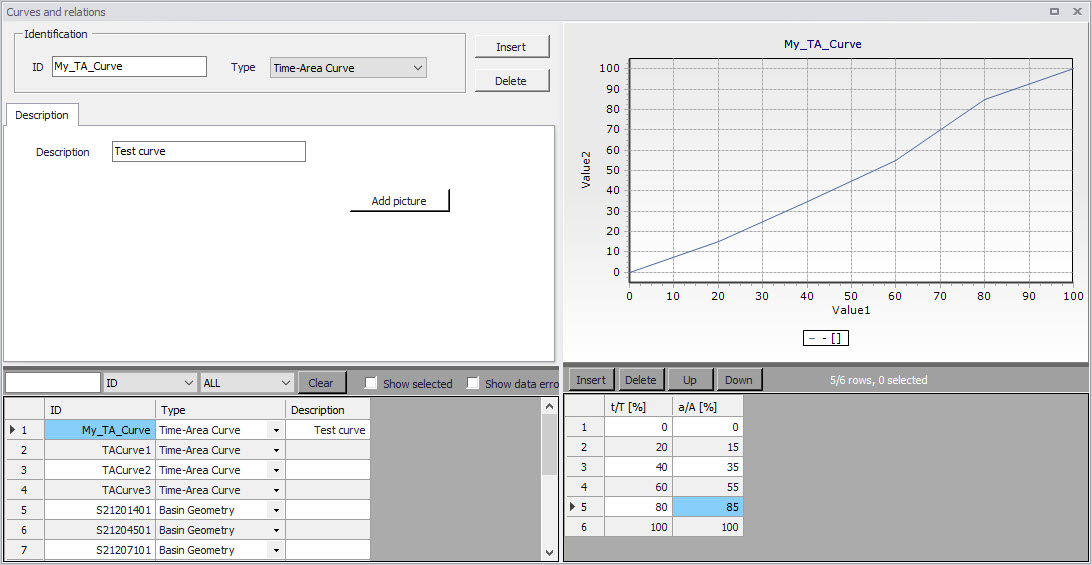
Figure: The Curves and Relations editor with a user-defined Time-Area curve