Dry Weather Flow
Dry Weather Flows are continuous inflows that typically reflect the contribution from sanitary sewage in sewer systems or base flows in pipes and stream channels. They are represented by an average inflow rate that can be periodically adjusted on a monthly, daily, and hourly basis by applying Time Patterns multipliers to this average value.
The SWMM Dry Weather Flow editor organizes the related input data for each dry weather inflow into the following groups:
- Identification: The Identification group holds Dry Weather Flow setup ID and connectivity information. Use the Insert or Delete buttons to add or remove records from the editor, respectively.
- Flow Data: Define flow values and associated patterns under the Flow Data group.
- Pollutants: Define pollutants attached to dry weather flow under the Pollutants group.
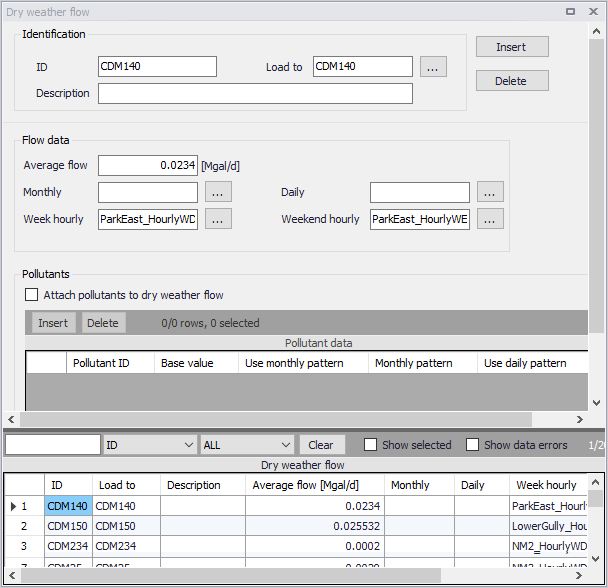
Figure: The SWMM Dry Weather Flow editor
Identification and Flow Data
The Identification group holds Dry Weather Flow ID and connectivity information. Use the Insert or Delete buttons to add or remove records from the editor, respectively.
Define associated flow values and patterns for the DWF setup under the Flow Data group.
| Edit field | Description | Used or required by simulations | Field name in datastructure |
|---|---|---|---|
| Identification | |||
| ID | ID Dry Weather Flow | Yes | MUID |
| Load To | ID of Node ID for DWF load | Yes | NodeID |
| Description | Optional description for the DWF setup | No | Description |
| Flow Data | |||
| Average Flow | Average DWF value | Yes | FlowValue |
| Monthly | Monthly Pattern ID | No | PatternMonthID |
| Daily | Daily Pattern ID | No | PatternWeekID |
| Week Hourly | Hourly Pattern ID for weekdays | No | PatternWeekHourlyID |
| Weekend Hourly | Hourly Pattern ID for weekends | No | PatternWeekendHourlyID |
Table: Edit fields in the Dry Weather Flow editor (mss_DWF)
Pollutants
Define pollutants attached to dry weather flows under the Pollutants group. Tick on the ‘Attach pollutants to dry weather flow’ option to include pollutants in the DWF setup. Specify pollutant parameters in the secondary table.
| Edit field | Description | Used or required by simulations | Field name in datastructure |
|---|---|---|---|
| Attach Pollutants to Dry Weather Flow | Option to activate/define a DWF pollutant component for a simulation | Yes | PollutNo |
| Pollutant ID | ID of Pollutant | Yes If PollutNo = 1 | PollutantID |
| Base Value | Base value of pollutant | Yes If PollutNo = 1 | BValue |
| Use Monthly Pattern | Option to use a monthly pollutant pattern | Yes If PollutNo = 1 | UseMonthlyPtn |
| Monthly | ID of Pattern of Monthly type | Yes If UseWeekendPtn = 1 | PatternMonthID |
| Use Daily Pattern | Option to use a daily pollutant pattern | Yes If PollutNo = 1 | UseDailyPtn |
| Daily | ID of Pattern of Daily type | Yes If UseDailyPtn = 1 | PatternWeekID |
| Use hourly pattern | Option to use an hourly pollutant pattern | Yes If PollutNo = 1 | UseHourlyPtn |
| Week hourly | ID of Pattern of Hourly type | Yes If UseHourlyPtn = 1 | PatternWeekHourlyID |
| Use Weekend Pattern | Option to use a different hourly pollutant pattern for weekends | Yes If PollutNo = 1 | UseWeekendPtn |
| Weekend hourly | ID of Pattern of Weekend type | Yes If UseWeekendPtn = 1 | PatternWeekendHourlyID |
Table: Edit fields in the Dry Weather Flow Pollutants Group (mss_DWFD)